






















Trending Topics

Why do they ask you to turn off Find My Mobile before repair?
I understand why Find My Mobile is useful if the phone gets lost, but I noticed Samsung asks users to disable certain security features before handing the phone over for repair. Why is that necessary?

Has anyone used MirrorFly for team collaboration?
 (1).jpg "Has anyone used MirrorFly for team collaboration?")
We are looking for a team collaboration solution for our team. We were using different tools for chat, file sharing, and calls and it became a little difficult to keep everything in one place and also the monthly subscription.
We mainly needed 1-to-1 messaging, group chats, file sharing, voice/video calls, notifications, and something that our admins could manage easily.
While looking at different options, we came across MirrorFly Teams. What interested us was the flexibility around customization and deployment. We were also looking for something that could be adapted to our own workflow instead of having to change our workflow around the software.
The messaging and communication features were the main things we looked at. We also paid attention to mobile support, admin controls, security, and how much control we would have over the platform.
One thing I noticed is that MirrorFly is more focused on communication and building a customized collaboration experience, whereas tools like Microsoft Teams and Slack come with a much broader set of ready-made workplace features.
So it really depends on what you need. If you're looking for an out-of-the-box collaboration suite, there are plenty of options. But if you want more control and customization, I think it's worth looking at platforms like MirrorFly.
Has anyone else used MirrorFly for team collaboration? I'd be interested to know how it worked for you after actually using it with a team.

buy crypto with credit card without OTP verificationsss
Welcome to Trocrypt.com
Your Fast, Secure Gateway to Digital Finance
At Trocrypt, we’re redefining how you access crypto and manage digital payments. Whether you're buying Bitcoin instantly, sending money online, or topping up your wallet, our platform combines speed, simplicity, and enterprise-grade security—so you can transact with confidence.
???? Why Users Trust Trocrypt
✅ Instant Crypto Purchases with Card
Buy Bitcoin, Ethereum, Solana, and more in seconds using your Visa or Mastercard. Once verified, trusted sessions let you complete transactions faster—without repeated authentication steps.
✅ Simplified Onboarding for All Traders
New to crypto? Experienced trader? Our streamlined checkout makes buying digital assets effortless—no complex steps, no unnecessary delays.
✅ Fast Card-to-Card Transfers
Send money directly from your debit or credit card in real time. Ideal for peer-to-peer payments, urgent bills, or instant top-ups—designed for speed without compromising security.
✅ Secure Fund Access, Anytime
Access your funds digitally—no ATM needed. For authorized users, Trocrypt supports secure transactions using standard card credentials (card number, CVV, and expiry), all processed through a PCI-DSS Level 1 compliant infrastructure.
✅ Smart Authentication, Not Constant OTPs
After initial verification, recurring or low-risk transactions may not require repeated OTPs—thanks to intelligent session management and continuous security monitoring.
???? Security You Can Rely On
We know: "Can someone use my card with just the number, CVV, and expiry?"
On unsecured platforms—yes, that’s a risk. But at Trocrypt, your safety is non-negotiable.
We protect your data with:
End-to-end encryption
Tokenization (your actual card details are never stored)
Device fingerprinting & behavioral analytics
Real-time fraud detection
Adaptive authentication that scales with risk
Your financial activity stays private, protected, and under your control.
???? Built for the Modern User
⚡ Instant crypto buys – fund your wallet in seconds
???? Frictionless experience for trusted users
???? Global card support – Visa, Mastercard, and major debit/credit cards
???? Fully mobile-optimized – trade anytime, anywhere
???? Available in 100 countries
Join thousands of users who’ve streamlined their digital finance.
At Trocrypt.com, we believe speed and security go hand in hand. Buy crypto, send money, or access funds—faster, smarter, and safer.
Get started today at Trocrypt.com
Where crypto meets speed. And security meets simplicity.

Which mobile will be best to buy ranging from from 15000 to 25000 Rupees
Hello, I am a bit confused regarding purchasing a good phone. I want to know which mobile will be best to buy. It should include functions like: gorilla class] Regards
- My budget is from 15000 to 25000 Rupees.
- Which one will be good Android Phones or Windows, I just need perfect working with no issue.
- Have good security
- Have minimum of 1.5 to 2GB RAM, 16GB internal memory.
- Have minimum Quod Core processor [atleat have or more 1.5GHz]
- Good built quality and good battery life.
- Camera should have minimum of 5 mega pixel.
- Full HD
- Perfect Touch screen with high resolution and some like scratch resistant or protection to screen [may be
Your mobile phone will be safer with this application

 Hello guys, I'd like to share one application we made.
Most downloaded app lock in Play Store. Protect privacy with password, pattern, fingerprint lock.
Â
Applock Aurora allows you to set numeric password or pattern lock to lock individual apps preventing snooper or intruders from accessing or enabling information you want keep private.
Play Store Link:
https://play.google.com/store/apps/details?id=com.freejoyapps.applock.Aurora&referrer=utm_source%3Dforumseo
Â

Â
With Applock Aurora:
Never worry about a friend borrows your phone to play games with mobile data again!
Never worry about a workmate gets your phone to look the gallery again!
Never worry about someone reads private data in your apps again!
Never worry about kids mess up Settings, send wrong messages, paying games again!
Â
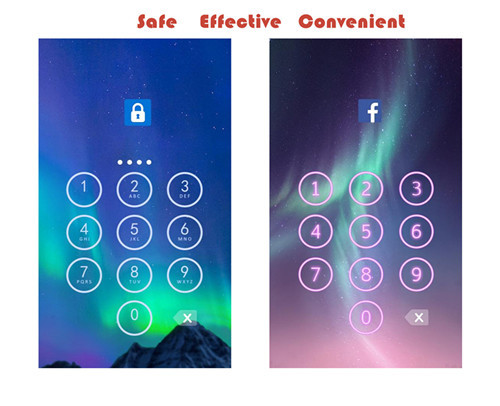
Apps you want lock include:
-System settings
-Call log
-Text messages (SMS)
-Social media accounts like Facebook, Instagram, Twitter, Tumblr, Snapchat etc.
-Contacts
Features of applock password & pattern:
-Private image: hide and encrypt your private photos. Lock them with password lock or pattern lock
-Private video: Hide and encrypt your private videos. Lock them with password as PIN code or pattern
-Lock cover: Disguise your lock screen as something else like calculator, weather, Clock. Force Close & Finger Print screen cover to confuse snoopers or intruders.
-Prevent uninstall: After you enable Advanced Security feature, others are unable to delete this applock password & pattern without your permission. This can better protect your privacy and secret.
Hope you will like it
Thanks a lot!!!!!

Root - A Privilege That Should Be Allowed By The Smartphone Companies
Now many of you people wouldn't know what 'Root' is so, lemme explain, it is kind of a 'Privilege', which allows us to access the core functions of our android smartphone, it is something that is not allowed by the smartphone companies and what they do is if they find that a phone is rooted, they void it's warranty because it is something that could help us overlock our phone's CPU to a higher level. Now this is only one feature of root, but there are many others like by rooting your phone you could have access to 'Cheat Tools' which can help us modify an apps data, make In App Purchases (IAP) free and patch some apps to get their premium versions for free, removing unwanted system apps with ease, but it also helps in SECURING OUR PHONE, like '360 Security', it needs root to establish a firewall to protect our phones from unwanted access, key logging etc., I think that it should be allowed by the smartphone companies, like there are two sides to every coin, just like that, there are two kind of people, one which need it to secure their phones and one who hack IAP and stuff by using it. I want to say that people would never stop rooting their phones and hacking stuff just because these companies void the warranty, it's like a limitation, how do you know who will use it for the good and who will use it for that bad? So, simply just let people do what they want, they paid for the phones and warranty comes within it. Some tools that could help you root your phone: 1) iRoot (Windows) Some hacking apps due to which smartphone companies don't allow root: 1) Freedom Note: I've not posted the rooting methods, please search Google for that.
2) iRoot (Mobile)
3) Unlock Root (PC Version Only)
4) Framaroot (Android version only)
2) Lucky Patcher
3) SB Game Hacker

