






















Trending Topics

Android apps- the much sought after ones

The Fine Art of Mobile APp Developent
Customer engagement is the by-word now as more and more mobile phone manufacturers are training their skills towards this feature. Mobile phones have made life easy while being engaged in a train or a long journey. Mobile applications has occupied that space with its vast innovation into android app development and ios app development. Virtual reality and augmented reality are the latest observations of mobile application development by taking the user experiences into new heights in the field of visualisation. Mobile apps are of two types: native and hybrid. User interfaces of mobile phones are implemented using either native or hybrid app mobile technology. Both offer reliable and responsive user experiences. Mobile app developers dwell to the minutest details of the idea and build the most sensible and intuitive UI's.

Google keeping the Pixel software clean is still a big deal
Every other phone seems to have 100 settings and random apps now. Pixel still feels like the least cluttered Android experience.

Samsung Galaxy S26 Ultra Quick Share Feels Faster Than Messaging Files
I recently sent a lot of photos from my Samsung Galaxy S26 Ultra to another Galaxy phone, and Quick Share made it super easy. Thanks to this feature, I no longer have to use sluggish messaging apps that also reduce image quality. It shares data instantly and supports sharing with Android and Windows devices.

My Android phone has started lagging randomly lately and I cannot figure out why
I am really annoyed with my current Android phone. The storage is not yet full, apps are updated, and it has been only two years. Still, my phone is lagging, and animations and app switching feels slower. Has anyone faced the same issue? How can I fix it without resetting the phone?

Which one is suitable for me? Blackberry Priv or Apple iPhone 6S?
Currently I'm using Blackberry Z10 (previously Blackberry Curve 9320). I have Apple MacBook Air. Mostly my usage is for office and mail. I'm happy with Z10. Due to incompitable apps in BB OS, I'm thinking to move to Android / Apple platform. Suggest me for suitable smartphone.

Installing Apps in PANASONIC VIERRA TV 43ES480DS (2017 Models)
Panasonic televisions of 2017 make mostly come with Vierra OS. Pre installed Apps are pretty useless and most of them do not work. How to install Android Apps or other Apps into it?

Mobile Professional Reviews--Oppo R5 review
Oppo's R5 is a seriously gorgeous phone. Clad in metal, it's super-thin -- just 4.85mm (0.19 inches) deep, and it weighs a scant 155 grams (5.5 ounces). It's certainly impressive, but this comes at the loss of the 3.5mm audio jack, so you'll have to use Bluetooth headphones if you want to listen to music. For Android fans envious of the iPhone 6 's slim frame, well, look no further. The R5's ultra-slim body beats the iPhone handily, and will draw envious stares from other Android owners as well. But slimness isn't all that great without the performance to back it up, and this is where the phone falters. It's oftentimes sluggish, and the camera takes forever to start up. The phone's thin frame also doesn't help with the heat and it can get uncomfortably hot at times. Oppo hasn't yet revealed exact dates for the phone's availability, but the Chinese company intends to sell it globally, either through its online store or working in partnership with local distributors. What I do know is that there will be three versions due to the different LTE bands -- one for the US, one for China and one for the rest of the world. Price wise, the R5 will be sold at $449, which converts to roughly £310. It will also come unlocked, so you'll be able to use the phone on 3G mostly everywhere. The R5 is encased in metal -- with a hand-polished steel frame and, on the back, brushed aluminum. This gives the phone a premium feel that you'd expect from a more expensive device. The two-tone color scheme (either white and silver or white and gold) at the back does draw comparisons to Apple's iPhone designs, but the shape of the phone is much more angular. Despite being thinner, it doesn't feel as slippery as the iPhone. One downside to the thin frame of the phone is that the rear 13-megapixel sticks out, much like Apple's iPhone. However, unlike the small bump of the iPhone 6, the R5's rear camera pops out a fair way, enough that it makes the phone uneven when placed on a flat surface. The R5 sports a 5.2-inch AMOLED display, with a full HD resolution of 1,920x1,080 pixels. The screen is bright and sharp, while colors were vibrant. I do have issues with the auto-brightness settings of the phone -- it can sometimes be too dim. Like most Chinese-made smartphones, the R5 sports physical home, menu and back keys. I'm not a fan of physical keys since I feel software keys are better to interact with -- you can (depending on the OS) switch the back button to either the left or right position. The volume and power keys are on the right side, with the micro-USB port at the bottom. As mentioned earlier, there's no 3.5mm audio jack. Oppo's R5 is powered by an octa-core 1.5GHz Qualcomm Snapdragon 615 processor, and in theory, should have enough juice to power the phone. But my experience with the device was less than satisfactory: at times the phone would pause between switching apps, for example. I reckon a software update could fix this, and I will update the review if it does. The phone packs 2GB of RAM, 16GB of onboard storage and a 2,000mAh battery. There's no microSD card slot to expand that storage, which limits the number of apps you can install and the number of tunes and movies you can keep onboard. The phone is powered by Android 4.4 KitKat -- not the latest 5.0 Lollipop -- with Oppo's custom ColorOS UI on top. The software is very much improved from the company's first version, How to move apps from an old iPhone to a new iPhone though it looks similar. For one, it's much flatter.
See a phone that's less than 5mm thick, How to Transfer Playlist from iTunes to iPhone with Data Remained the... See full gallery 


Which is the Best Site/App to sell your old or used gadgets?
Sharing my personal experience and looking forward to explore more options! Thanks! The all new Cashify App (https://play.google.com/cashify) is quite amazing. Caught my attention during the recent buzz about their exchange programmes. I had a Samsung Galaxy Grand Duos which is more than two years old and I was looking for a right platform to sell it for the best price. I tried downloading the app which is only available for Android OS as of now and might be available for iOS soon I guess. Frankly speaking, I was quite amazed with what it does. Introduced by ReGlobe - a firm that buys old and used gadgets through their buyer network, Cashify is an all star that offers convenient, secure, fast & easy way of selling old gadgets. You get a price quote within a fraction of seconds once Cashify finishes to diagnose the mobile automatically. It's your mobile's personal doctor and tops the charts of my favourites' list. I got INR 4200 for my phone which was higher than what the other portals were offering! Also a free pick up of phone in addition. It's a must try! I am sure everyone will enjoy the steps that are included in the self-diagnosis process! Views are my own! Thanks!
Huawei Honor 6 Plus review
Honor, if you didn't know, is the brand Huawei uses to sell some of its phones in Europe and it's the name attached to the new Honor 6 Plus. A 5.5-inch Android smartphone with a full HD display, an octa-core processor and a quirky dual 8-megapixel camera, it's got everything you need to cope with your social network and Netflix addiction. And true to the Honor brand's affordable promise, the 6 Plus comes with a low price. Now, here's where it gets confusing: though Honor as a separate brand is supposed to exist only in Europe, the Honor 6 Plus has been on sale since December 2014 in China, but sold as the Huawei Honor 6 Plus. What's more, Huawei does sell phones in Europe with its own name attached -- the flagship P8 , for example, launched in London in April. What's the difference between them all? Not much, really. Strip away the Honor branding and you're left with a signature Huawei phone complete with the same Emotion user interface. That's not a criticism, really, but you shouldn't forget that a phone bearing the Honor name doesn't deliver a unique experience from a Huawei-branded counterpart. Like other Honor phones, you can pick up the Honor 6 Plus in the UK, SIM-free directly from Amazon for £300. Yet, the 6 Plus also is the first of Honor's phones to be available through a UK network, showing a definite commitment by Honor (or Huawei) for it to become a recognised brand, selling in stores. The Three network has the phone available on a range of contracts from £24 per month, with a £19 up front charge. In the US, you can buy the Huawei Honor 6 Plus through Amazon for $472. The design of the 6 Plus is possibly best described as that of a larger, cheaper iPhone 4. The black glass front and back together with the metal-effect band running around the edge are similar to Apple's earlier phone, although 6 Plus' band is plastic, rather than metal, meaning it doesn't feel as solid or indeed as premium. The back panel has a very subtle criss-cross pattern which you can only really see under certain lights. Honor could have made this a bit more prominent, which would have helped add a bit of interest and separate its design more from the iPhone 4. With its 5.5-inch display, the Honor 6 Plus is significantly larger than the iPhone 4, measuring 150mm long and 75mm wide. It's comfortable to hold and easy to slide into a pocket, but you'll need two hands to type properly. The phone comes with 32GB of storage as standard, which is a generous amount for a more budget-conscious phone. Cheaper phones typically skimp on the storage by offering 16GB or even 8GB of space, so it's nice to see a more healthy offering that doesn't force you to also buy a microSD card. It does accept microSD cards though, which is worth bearing in mind if you save a lot of music and videos to your phone, rather than streaming them. The 5.5-inch screen has a full-HD (1,920x1,080-pixel) resolution, giving it a pixel density of 400 pixels per inch. That's the same size and resolution as the iPhone 6 Plus, and in terms of clarity, there's nothing to differentiate the two. Small text beneath icons is sharp and easy to read and high-res photos look crisp and sharp. The Honor's display is reasonably bright, sufficiently countering the harsh overhead office lights in the CNET UK office, although outside in the bright sun it did become a bit more difficult to see, even when set to max brightness. Colours are bold and vibrant, making Netflix shows like 'Breaking Bad," "SpongeBob" or indeed "Power Rangers" look good. The Honor 6 Plus runs Android 4.4.2 KitKat, which is several versions out of date. The most up-to-date version of Android is Lollipop, which you can find on even rock-bottom budget phones, so it's very disappointing to see such an old version of the software on a midrange mobile. On the surface you probably won't be able to tell, however, as Honor has heavily skinned the phone with the same Emotion user interface you'll see on most of Huawei and Honor's recent phones. It makes huge changes to the stock Android interface, including the colour schemes and the fonts (which you can alter using various themes), but the biggest change is that there's no app tray. I don't like this change as it forces you to keep all of your apps scattered across the homescreens. Once you throw widgets into the mix, it quickly becomes cluttered and difficult to navigate. The phone is powered by a Kirin 925 processor -- an octa-core chip that apparently uses four lower-powered processing cores for everyday tasks, and four burlier cores for more intense processing needs. That's backed up by 3GB of RAM. It performed well on benchmark tests, scoring an impressive 4,456 on the Geekbench 2 test, How to transfer app and data from iPad to iPhone 6? although a less impressive 11,982 on the Quadrant test. By comparison, the Sony Xperia Z3 and LG G4 scored over 20,000 on the Quadrant test and the Galaxy S6 managed to achieve over 36,000. Still, it was able to play the demanding game Grand Theft Auto: San Andreas extremely smoothly, and photo editing in Snapseed was handled without any trouble at all. Everyday essential apps like Instagram were also handled perfectly well, but navigating around the phone's interface was less smooth, with noticeable stutters and lag creeping in -- an issue I would bet is caused by the bloated Emotion software. I'd really like to see how a stock Android version of this phone performs as I'm sure it would be a lot more smooth to use. On the back of the phone are two 8-megapixel cameras. One takes regular shots, but the second allows some interesting depth of field effects and also lets you refocus a scene after you've taken it. I'll start with testing the phone's standard photo quality. I was pleased with this first shot of the London Eye. There's a great balance in exposure between the bright sky and the River Thames and a nice rich blue colour in the sky as well. There's a lack of clarity on the fine details when you zoom right in, but it displays full-screen well, making it great for Facebook. This second shot of a fruit stand is not bad either,transfer candy crush to new iphone although the white garlic has been rather overexposed. Again, when zooming in there's a noticeable fuzziness to the picture.

Root - A Privilege That Should Be Allowed By The Smartphone Companies
Now many of you people wouldn't know what 'Root' is so, lemme explain, it is kind of a 'Privilege', which allows us to access the core functions of our android smartphone, it is something that is not allowed by the smartphone companies and what they do is if they find that a phone is rooted, they void it's warranty because it is something that could help us overlock our phone's CPU to a higher level. Now this is only one feature of root, but there are many others like by rooting your phone you could have access to 'Cheat Tools' which can help us modify an apps data, make In App Purchases (IAP) free and patch some apps to get their premium versions for free, removing unwanted system apps with ease, but it also helps in SECURING OUR PHONE, like '360 Security', it needs root to establish a firewall to protect our phones from unwanted access, key logging etc., I think that it should be allowed by the smartphone companies, like there are two sides to every coin, just like that, there are two kind of people, one which need it to secure their phones and one who hack IAP and stuff by using it. I want to say that people would never stop rooting their phones and hacking stuff just because these companies void the warranty, it's like a limitation, how do you know who will use it for the good and who will use it for that bad? So, simply just let people do what they want, they paid for the phones and warranty comes within it. Some tools that could help you root your phone: 1) iRoot (Windows) Some hacking apps due to which smartphone companies don't allow root: 1) Freedom Note: I've not posted the rooting methods, please search Google for that.
2) iRoot (Mobile)
3) Unlock Root (PC Version Only)
4) Framaroot (Android version only)
2) Lucky Patcher
3) SB Game Hacker
Understanding Android and iOS App Development
Smart phones are ruling the world with their advanced and infused new technologies with the use of mobile application development. The advent of android app development and iOS app development made intelligent portable devices to leverage end-to-end mobile solutions. Mobile applications made wide explosion of information accessing and retrival of data, images and videos. Mobile apps are of two types: native and hybrid. User interfaces of mobile phones are implemented using either native or hybrid app mobile technology.
How to Transfer Contacts from HTC to Samsung
Help! I recently purchased a Samsung S3 and want to transfer SIM and phone contacts from HTC Desire to Samsung S3. However, I have to use a new Mini-SIM with the S3 and I can’t put my old SIM in the phone. Is there an easy way to complete this task? Actually, if you want to cope HTC contacts to Samsung, like Samsung S3, you don't have to insert the old SIM card or edit the phone numbers one by one on your Samsung S3. With the help with Phone to Phone Transfer tool, you can transfer all your contacts including the ones in Gmail, How to Transfer Photos from iPhone/iPad/iPod to Computer ChatON and other accouts to the Samsung Galaxy S3 with I click. Download Phone to Phone Transfer tool to copy contacts from HTC to Samsung S3. Note: Phone to Phone Transfer works well with Samsung and HTC phones and tables. Check more supported Samsung and HTC phones and tablets and Android OS here. Download, install and run Phone to Phone Transfer on your computer. The primary window pops up like the screenshot shows below. Connect both of HTC phone and Samsung S3 to the computer via USB cables. Then this program will detect the two devices soon as possible. After that, you can see them in the primary window. On the left is your HTC phone, and on the right is Samsung S3. Between the two devices is "Flip", which lets you change the places of the two devices. It needs you can follow the similar steps to transfer contacts from Samsung S3 to HTC phone. If you decide to remove all contacts on your target Samsung S3 to save the being transferred contacts, you just need to tick off "Clear data before copy". Or just keep "Clear data before copy" unchecked if you don't want to delete the contacts. This Phone to Phone Transfer program empowers you to cope contacts, music, videos, SMS, apps, call logs and photos from HTC to Samsung within 1 click. Therefore,How to Transfer PDF to iPhone from Computer with Ease you can choose the data which you want to transfer. If you only want to cope the contacts, please uncheck the other data except contacts and click "Start Copy". You can check the process in the pop-up transfer window. When the contact transfer process comes to an end, please click "OK" button. That's all! More information about Phone to Phone Transfer tool: Zero quality loss & risk-free: everything you transfer is 100% same as the original and can be only read by yourself. How to cope contacts from HTC to Samsung Galaxy S3 in 1 click
Step 1: Run Phone to Phone Transfer tool
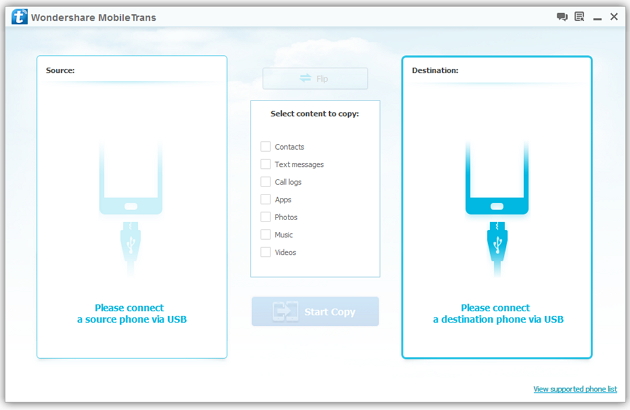
Step 2: Connect your HTC and Samsung S3 to the computer
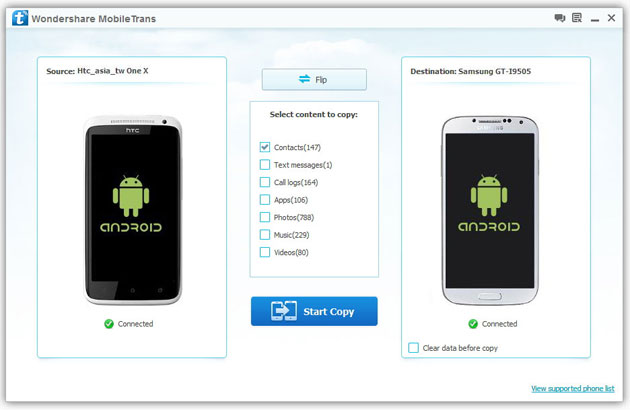
Step 3: Transfer contacts from THC to Samsung Galaxy S3
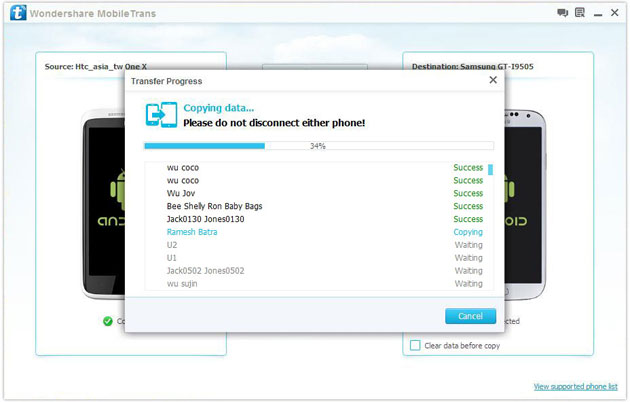
2) Not just contacts, transfer SMS, call logs, photos, music, videos and apps*
3) Comprehensive contact copy, including job title, email addresses, company name, etc.
4) Works with over 2,000 phones including Droid, Symbian (Nokia), and all models of iPhones, including new iPhone 5.
5) Transfers content between phones on different networks. AT&T, Verizon, Sprint, T-Mobile - no problem!

Code Integrating Google Play Services on Android
By integrating your Android apps with the Google Play Services, you can access Google services, such as Maps, Drive, and Google+. Once you have your apps set up to use these services, accessing them is typically straightforward. The setup process does require a few steps, but you only need to carry them out once. In this tutorial we will go through the process of integrating Google Play Services with Android apps.
Throughout the tutorial, we will outline what you need to do to integrate apps with Play Services in both Eclipse and Android Studio. You will need access to the Google Developer Console and to the Keytool utility. Once you are set up with Play Services, the development process itself will be determined by what you want your apps to do. The the setup procedure, however, remains the same. By using the client library to access platform services, your apps will benefit from automatic updates through the Play Store.Introduction
How to Transfer Music from Samsung Galaxy to iPhone 6s
Many people, especially youngster, like editing and creating their own songs or music with some useful and fabulous music-editing apps on Samsung smartphone, for instance Galaxy S6/ S6 Edge, Galaxy Note 4. However, if you buy a new iPhone 6s and you want to transfer the edited music from Samsung device to your iPhone 6s, how could you get it done? I guess you will firstly save the songs from Samsung to PC/Mac, then,mobiletrans import the music into iTunes and sync iPhone 6s with iTunes Library. This is exactly a workable solution yet inconvenient. Here is another way helping you to directly transfer music from Samsung devices to iPhone 6s.
TunesGo is a professional tool which supports you to straightforwardly transfer music in between iPhone and Android, iTunes and Android as well as iOS and iOS. Besides, it also enables you to download song tracks from YouTube, manage and organize albums in iTunes.Tutorial about Transferring Music from Samsung to iPhone 6s
Step 1 Download and Install TunesGo
Hit the buttons to download the software on your computer: Windows users click the left button and Mac users the right one. When download finished, set up the program.
Step 2 Plug Samsung and iPhone 6s in the Computer
Run the TunesGo on the computer after installation. Connect both your Android and iOS device to PC/Mac via USB cable.
For Samsung device, you need to enable USB debugging on the phone so as to build the connection.
1) For Android 4.2 or newer: Go to "Settings" > "About Phone" on your Samsung. Press "Build number" for several times until "You are under developer mode". Then enter "Settings" again, and choose "Developer options" > "USB debugging".
2) For Android 3.0 to 4.1: Go to "Settings" > "Developer options" > "USB debugging".
3) For Android 2.3 or earlier: Go to "Settings" > "Applications" > "Development". Check "USB debugging".
When it's connected, you can see it as the below interface.
As for iPhone, you need to tap "Trust" in the phone screen to build the connection.
Step 3 Copy Music from Samsung to iPhone 6s
Click the Samsung device in the left menu and hit the "Music" option under the Samsung panel to open the playlists. All the songs in Samsung Galaxy will be listed in the main window. Select the songs you want to transfer and click the "Export" button. A pop-up box will show you three options, how to transfer candy crush to new iphone hit "Export to iPhone 6s (the name of your iPhone)", the selected music will start transferring from Samsung Galaxy to iPhone 6s. 
More Feature: Manage iTunes Library
TunesGo also works as the iTunes Library manager. With it, you can fix the missing and inaccurate tags and covers of iTunes music. Clean up duplicated songs as well as remove missing tracks.
There are more impressive features on TunesGo waiting for your exploration. Hurry to download it and give it a shot.
What are the benefits of e-commerce app development?
E-commerce has revolutionized businesses, and the increase in online sales has witnessed the significant growth in mobile app solutions. Customers require the freedom of buying their desired product from anywhere, anytime. It helps companies to endorse their products and services across the world.
Yet, most online shoppers prefer online apps than websites. E-commerce businesses have realized that online presence is essential. Thus, app development companies hire android application developeras well as the iOS developer to deliver the best solutions to the e-commerce businesses.
There are tremendous benefits of e-commerce app development that can help you to boost your business. Here are the few essential ones.
Android 7.0 Nougat: The stand-out features of this new version's android app development includes
Android 7.0 Nougat is the latest version operating system released by Google for portable devices like mobile phones, tablets, phablets and smart watches. The stand-out features of this new version's android app development include: Google’s operating system is totally acceptable by every end-user for it’s highly flexible functional features and for it’s friendly user version names.
Run Android applications on Mac
Hello,
I downloaded and installed Bluestacks on my Yosemite 10.10.3. However after the installation, when I opened Bluestacks, then only thing I could do to it was to make it full screen. All the other icons when clicked do nothing.
Please advise as to what needs to be done in order to run android apps on my mac.
Windows 10 vs android lollipop
windows= more performance (stability and flexibility of apps.)
android lollipop = improved ui. and more apps.
Android Wear experiences and recommendations
I've just been gifted an Android Wear smartwatch - I'll be getting my LG G Watch this evening and I'm not really sure what to do with it. Does anyone here have any experiences to share? Any tips, or cool apps to try out?

