Trending Topics






My LeEco Le 1s Fingerprint Sensor - The Best Security Feature


One interesting feature of Le 1s is that the sensor comes with a 6H hardness anti-scratch mirror that allows the finger print to be read without any issues.

As I tried to unlock my phone, I found the sensor enables both flash recognition and identification accuracy immediately and effectively as promised and it eliminates the need for PIN codes or patterns to be memorised.
Now with quick access to my online trading and banking accounts, I can truly say that I have all information at my fingertips.

Huawei Honor 6 Plus review
Honor, if you didn't know, is the brand Huawei uses to sell some of its phones in Europe and it's the name attached to the new Honor 6 Plus. A 5.5-inch Android smartphone with a full HD display, an octa-core processor and a quirky dual 8-megapixel camera, it's got everything you need to cope with your social network and Netflix addiction. And true to the Honor brand's affordable promise, the 6 Plus comes with a low price. Now, here's where it gets confusing: though Honor as a separate brand is supposed to exist only in Europe, the Honor 6 Plus has been on sale since December 2014 in China, but sold as the Huawei Honor 6 Plus. What's more, Huawei does sell phones in Europe with its own name attached -- the flagship P8 , for example, launched in London in April. What's the difference between them all? Not much, really. Strip away the Honor branding and you're left with a signature Huawei phone complete with the same Emotion user interface. That's not a criticism, really, but you shouldn't forget that a phone bearing the Honor name doesn't deliver a unique experience from a Huawei-branded counterpart. Like other Honor phones, you can pick up the Honor 6 Plus in the UK, SIM-free directly from Amazon for £300. Yet, the 6 Plus also is the first of Honor's phones to be available through a UK network, showing a definite commitment by Honor (or Huawei) for it to become a recognised brand, selling in stores. The Three network has the phone available on a range of contracts from £24 per month, with a £19 up front charge. In the US, you can buy the Huawei Honor 6 Plus through Amazon for $472. The design of the 6 Plus is possibly best described as that of a larger, cheaper iPhone 4. The black glass front and back together with the metal-effect band running around the edge are similar to Apple's earlier phone, although 6 Plus' band is plastic, rather than metal, meaning it doesn't feel as solid or indeed as premium. The back panel has a very subtle criss-cross pattern which you can only really see under certain lights. Honor could have made this a bit more prominent, which would have helped add a bit of interest and separate its design more from the iPhone 4. With its 5.5-inch display, the Honor 6 Plus is significantly larger than the iPhone 4, measuring 150mm long and 75mm wide. It's comfortable to hold and easy to slide into a pocket, but you'll need two hands to type properly. The phone comes with 32GB of storage as standard, which is a generous amount for a more budget-conscious phone. Cheaper phones typically skimp on the storage by offering 16GB or even 8GB of space, so it's nice to see a more healthy offering that doesn't force you to also buy a microSD card. It does accept microSD cards though, which is worth bearing in mind if you save a lot of music and videos to your phone, rather than streaming them. The 5.5-inch screen has a full-HD (1,920x1,080-pixel) resolution, giving it a pixel density of 400 pixels per inch. That's the same size and resolution as the iPhone 6 Plus, and in terms of clarity, there's nothing to differentiate the two. Small text beneath icons is sharp and easy to read and high-res photos look crisp and sharp. The Honor's display is reasonably bright, sufficiently countering the harsh overhead office lights in the CNET UK office, although outside in the bright sun it did become a bit more difficult to see, even when set to max brightness. Colours are bold and vibrant, making Netflix shows like 'Breaking Bad," "SpongeBob" or indeed "Power Rangers" look good. The Honor 6 Plus runs Android 4.4.2 KitKat, which is several versions out of date. The most up-to-date version of Android is Lollipop, which you can find on even rock-bottom budget phones, so it's very disappointing to see such an old version of the software on a midrange mobile. On the surface you probably won't be able to tell, however, as Honor has heavily skinned the phone with the same Emotion user interface you'll see on most of Huawei and Honor's recent phones. It makes huge changes to the stock Android interface, including the colour schemes and the fonts (which you can alter using various themes), but the biggest change is that there's no app tray. I don't like this change as it forces you to keep all of your apps scattered across the homescreens. Once you throw widgets into the mix, it quickly becomes cluttered and difficult to navigate. The phone is powered by a Kirin 925 processor -- an octa-core chip that apparently uses four lower-powered processing cores for everyday tasks, and four burlier cores for more intense processing needs. That's backed up by 3GB of RAM. It performed well on benchmark tests, scoring an impressive 4,456 on the Geekbench 2 test, How to transfer app and data from iPad to iPhone 6? although a less impressive 11,982 on the Quadrant test. By comparison, the Sony Xperia Z3 and LG G4 scored over 20,000 on the Quadrant test and the Galaxy S6 managed to achieve over 36,000. Still, it was able to play the demanding game Grand Theft Auto: San Andreas extremely smoothly, and photo editing in Snapseed was handled without any trouble at all. Everyday essential apps like Instagram were also handled perfectly well, but navigating around the phone's interface was less smooth, with noticeable stutters and lag creeping in -- an issue I would bet is caused by the bloated Emotion software. I'd really like to see how a stock Android version of this phone performs as I'm sure it would be a lot more smooth to use. On the back of the phone are two 8-megapixel cameras. One takes regular shots, but the second allows some interesting depth of field effects and also lets you refocus a scene after you've taken it. I'll start with testing the phone's standard photo quality. I was pleased with this first shot of the London Eye. There's a great balance in exposure between the bright sky and the River Thames and a nice rich blue colour in the sky as well. There's a lack of clarity on the fine details when you zoom right in, but it displays full-screen well, making it great for Facebook. This second shot of a fruit stand is not bad either,transfer candy crush to new iphone although the white garlic has been rather overexposed. Again, when zooming in there's a noticeable fuzziness to the picture.

How to Recover Data from Hard Drive
“Yesterday, I formatted my hard drive on my computer to erase virus from my computer, but forgot to backup some important files, can I recover them? There are some precious photos, Excel documents, etc. they are important to me. How to recover lost files from hard drive?”—Jessica When we are using our computer, we may lose files due to various reasons, formatting in one of the reasons. So, can we recover deleted files from hard drive? This article will show you the solution. In fact, the system on the hard drive does not erase the deleted files immediately after you deleted the files from your computer, the deleted files are still on your computer, but inaccessible to general users, and the space they occupy is labeled as free to use. So, as long as the deleted data are not overwritten by new files, How to copy Message from iPhone to iPhone/ from android to android you get a chance to restore them. The tool you need is the Data Recovery. Data Recovery is a professional tool to recover files from hard drive, USB drive, SD card, and other storage devices. With the help of this tool, you can easily restore deleted files from your HDD. This program provides four recovery modes to restore lost data, below is the guide. Firstly, download the data recovery tool as per your computer’s OS. Mac and Windows versions are available here. After you install the Data Recovery for hard drive, run it. You can see four recovery modes in the home window. You are recommended to try the first mode first for it can fast recover lost data. This mode will carry out a quick scan to find the deleted files on your hard drive and recover them with the original file names. Next, select the disk you lost files to scan. All disks including the external drives will be listed in the window. If you are trying to recover data from external hard drive, connect the drive to your computer before run this program, pc to android file transfer software or hit Refresh drives if the drive is not displayed. After the scan, you will see all recoverable files displayed in the left sidebar, open the folders to check the files you need. You can preview images, and documents. Select the files you need and click Recover to save the recovered files to your computer. Note: Do not save the recovered files to the disk where you lost data, or, it may overwrite some delete data on the disk. Guide on Recovering Deleted Data from Hard Drive
Step 1. Choose a data recovery mode
Step 2. Select disk to scan
Step 3. Recover deleted data from hard drive
How to Transfer Contacts from HTC to Samsung
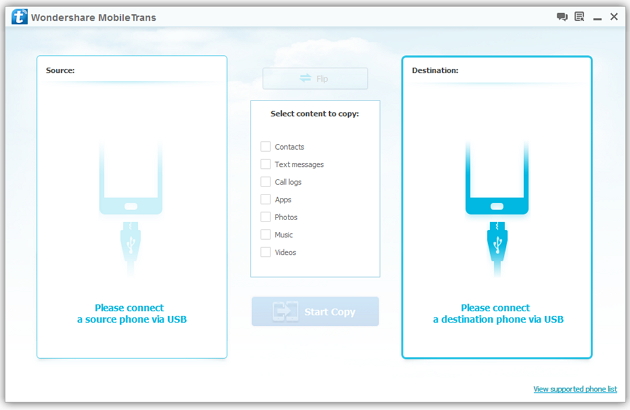
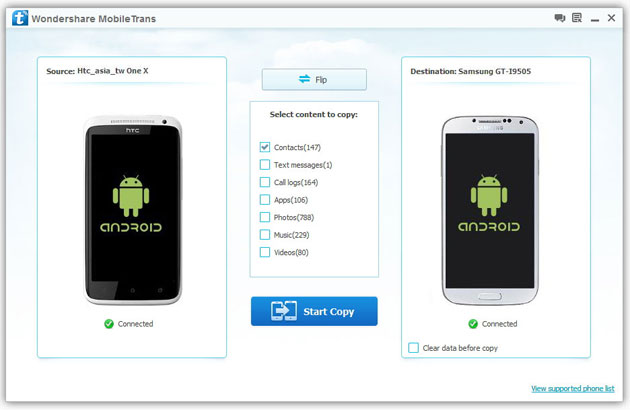
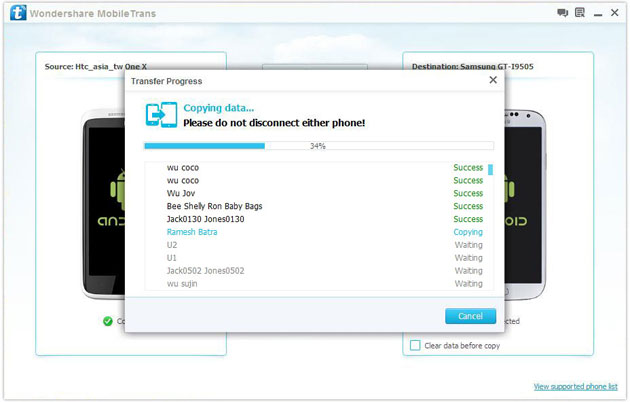
Help! I recently purchased a Samsung S3 and want to transfer SIM and phone contacts from HTC Desire to Samsung S3. However, I have to use a new Mini-SIM with the S3 and I can’t put my old SIM in the phone. Is there an easy way to complete this task? Actually, if you want to cope HTC contacts to Samsung, like Samsung S3, you don't have to insert the old SIM card or edit the phone numbers one by one on your Samsung S3. With the help with Phone to Phone Transfer tool, you can transfer all your contacts including the ones in Gmail, How to Transfer Photos from iPhone/iPad/iPod to Computer ChatON and other accouts to the Samsung Galaxy S3 with I click. Download Phone to Phone Transfer tool to copy contacts from HTC to Samsung S3. Note: Phone to Phone Transfer works well with Samsung and HTC phones and tables. Check more supported Samsung and HTC phones and tablets and Android OS here. Download, install and run Phone to Phone Transfer on your computer. The primary window pops up like the screenshot shows below. Connect both of HTC phone and Samsung S3 to the computer via USB cables. Then this program will detect the two devices soon as possible. After that, you can see them in the primary window. On the left is your HTC phone, and on the right is Samsung S3. Between the two devices is "Flip", which lets you change the places of the two devices. It needs you can follow the similar steps to transfer contacts from Samsung S3 to HTC phone. If you decide to remove all contacts on your target Samsung S3 to save the being transferred contacts, you just need to tick off "Clear data before copy". Or just keep "Clear data before copy" unchecked if you don't want to delete the contacts. This Phone to Phone Transfer program empowers you to cope contacts, music, videos, SMS, apps, call logs and photos from HTC to Samsung within 1 click. Therefore,How to Transfer PDF to iPhone from Computer with Ease you can choose the data which you want to transfer. If you only want to cope the contacts, please uncheck the other data except contacts and click "Start Copy". You can check the process in the pop-up transfer window. When the contact transfer process comes to an end, please click "OK" button. That's all! More information about Phone to Phone Transfer tool: Zero quality loss & risk-free: everything you transfer is 100% same as the original and can be only read by yourself. How to cope contacts from HTC to Samsung Galaxy S3 in 1 click
Step 1: Run Phone to Phone Transfer tool
Step 2: Connect your HTC and Samsung S3 to the computer
Step 3: Transfer contacts from THC to Samsung Galaxy S3
2) Not just contacts, transfer SMS, call logs, photos, music, videos and apps*
3) Comprehensive contact copy, including job title, email addresses, company name, etc.
4) Works with over 2,000 phones including Droid, Symbian (Nokia), and all models of iPhones, including new iPhone 5.
5) Transfers content between phones on different networks. AT&T, Verizon, Sprint, T-Mobile - no problem!
How to Transfer Music from Samsung Galaxy to iPhone 6s
Many people, especially youngster, like editing and creating their own songs or music with some useful and fabulous music-editing apps on Samsung smartphone, for instance Galaxy S6/ S6 Edge, Galaxy Note 4. However, if you buy a new iPhone 6s and you want to transfer the edited music from Samsung device to your iPhone 6s, how could you get it done? I guess you will firstly save the songs from Samsung to PC/Mac, then,mobiletrans import the music into iTunes and sync iPhone 6s with iTunes Library. This is exactly a workable solution yet inconvenient. Here is another way helping you to directly transfer music from Samsung devices to iPhone 6s.
TunesGo is a professional tool which supports you to straightforwardly transfer music in between iPhone and Android, iTunes and Android as well as iOS and iOS. Besides, it also enables you to download song tracks from YouTube, manage and organize albums in iTunes.Tutorial about Transferring Music from Samsung to iPhone 6s
Step 1 Download and Install TunesGo
Hit the buttons to download the software on your computer: Windows users click the left button and Mac users the right one. When download finished, set up the program.
Step 2 Plug Samsung and iPhone 6s in the Computer
Run the TunesGo on the computer after installation. Connect both your Android and iOS device to PC/Mac via USB cable.
For Samsung device, you need to enable USB debugging on the phone so as to build the connection.
1) For Android 4.2 or newer: Go to "Settings" > "About Phone" on your Samsung. Press "Build number" for several times until "You are under developer mode". Then enter "Settings" again, and choose "Developer options" > "USB debugging".
2) For Android 3.0 to 4.1: Go to "Settings" > "Developer options" > "USB debugging".
3) For Android 2.3 or earlier: Go to "Settings" > "Applications" > "Development". Check "USB debugging".
When it's connected, you can see it as the below interface.
As for iPhone, you need to tap "Trust" in the phone screen to build the connection.
Step 3 Copy Music from Samsung to iPhone 6s
Click the Samsung device in the left menu and hit the "Music" option under the Samsung panel to open the playlists. All the songs in Samsung Galaxy will be listed in the main window. Select the songs you want to transfer and click the "Export" button. A pop-up box will show you three options, how to transfer candy crush to new iphone hit "Export to iPhone 6s (the name of your iPhone)", the selected music will start transferring from Samsung Galaxy to iPhone 6s. 
More Feature: Manage iTunes Library
TunesGo also works as the iTunes Library manager. With it, you can fix the missing and inaccurate tags and covers of iTunes music. Clean up duplicated songs as well as remove missing tracks.
There are more impressive features on TunesGo waiting for your exploration. Hurry to download it and give it a shot.
How to Recover Deleted Contacts from Water Damaged iPhone 6S
Summary: Do not panic if you lose contacts when your iPhone is water damaged, iPhone Data Recovery can help you recover deleted contacts from water damaged iPhone 6S . As we all know, letters for contacting and communication has withdrew from our life for many years. With the rapid development of science and technology in the modern society, we are in favor of iPhone 6S and always enjoy the convince that mobile phone bring to us, as long as you have someone’s contact number, you can take up your iPhone 6S to click his contact number and begin to talk to him or her, no matter how far this people is from you. As a result, it is obvious that contacts are very necessary to store in your device and so we do. I bet nowadays, no one will be so “hard working” to write the contacts down on the notebook,How to Transfer Music from Android to Another Android because that is really troublesome and inconvenient. Everyone are used to directly store the contacts in iPhone 6S. Here, sometimes unavoidably, trouble comes to you, especially the device is really waterproof as some other electronic products, such as Tank007 flashlights IP68. I mean, it often occurs that our iPhone 6S are water damaged when we bend down in the bathroom, when we go walking along a small river, when we wash our hands in the kitchen, etc. And then you will be crazy about the following results. All the contacts in your device are lost, including your sweetheart’s, your families’, your best friends’, your important customers’, your colleagues’, etc. “Oh, my god, what a big loss caused by an small accident! Shit!” Ok, good guy, If you are just keeping sad and annoyed about that, than you can only be regretful; But if you come to us, then all this messy condition can be solved with an amazing tool from us—-iPhone Data Recovery. This tool is absolutely multi-functional and perfect choice for you to save your loss, such as contacts, messages, photos, videos, call history, notes, reminders, bookmarks, music, documents, etc. Do not think that this can just be believable in magic suppositional world, or just think I am fooling you around. You may think how can it recover something that doesn’t exist in your device any more. No, not exactly. Let me explain to you. In fact, your iPhone 6S data have not truly get away from your device, but secretly hidden in some invisible place. What you need to do for recovery is to draw support from outside tool to scan your device and find them out. How to Recover Deleted Contacts from Water Damaged iPhone 6S Step 1: Take up seconds to download iPhone Data Recovery and set up this software system in your computer. Then your device need to be connected to computer by USB cable.
Ok, let me tell you how you can make it!
Step 2: Focus on your iPhone 6S device and choose ”Recover”, then all the categories of your device turn up.
Step 3: Choose “ Contacts “ category, How to Manage iTunes Transfer Easily then click the “Scan “ buttom to scan all your contacts.
Step 4: Carefully selecting the contacts which you think are essential and want to be get back.
Now you can see the surprise. So in the future, no matter how many contacts you have stored in the iPhone 6S and unfortunately your device are water damaged, just follow my above step, then you can be completely satisfied and feel happy again.

Smart watch treding now a days why...
Here I can say few things in short here why?? The growing trend of buying Smartwatches reveals the changing consumer behaviour. World’s technology giants like Apple, Garmin, Vivoactive, Samsung Gear etc. have introduced their own smartwatches to club with their smartphones or other compatible devices. As stated by the director of AndroidWear, David Singleton, in the next 50 years of time everyone would learn to live a life with wearable technology and all of us would be living like this. The rising demandof smartwatches has immersed with the growing need of consumers. People demand a gadget which can keep them accountable, and fitness monitors are a bonus for most. This leads them to invest in wearable devices like Fitness bands and Smartwatches. Smartwatches are quiet useful because of their versatile features. They have different apps that can be very useful while working outdoors, travelling, workouts etc. Somecarry a camera which stays on the strap of the watch to take pictures with ease. Smartwatches are now available forAndroid, Windows and iOS platforms, which are the most popularoperating systems for smartphones here are few more words saying about it here http://www.iamwire.com/2016/08/why-the-smartwatch-trend-is-here-to-stay/140187. Share more aspects as you want which upgraded features in smart watch or expecting in it to have. Here..