






















Trending Topics

What improvement do you want most in upcoming iPhones?
For Apple Lovers, my question is: What improvement would you like to see in the upcoming launches of iPhones?

The Rumored 'Search or Ask' Feature Could Change How We Use iPhones
If Apple would integrate AI directly into search and app navigation, I can be better at searching or asking questions.

iPhone 18 Pro Could Cost Up to Rs. 1.7 Lakh
According to estimates from JP Morgan, Apple's next-generation Pro iPhones could see a noticeable price increase due to rising component and manufacturing costs. If prices continue to climb, at what point do even long-time iPhone users start considering other options?

Are iPhone Prices About to Go Up?
Reports indicate that memory component prices are increasing, which may eventually affect the pricing of iPhones, iPads, and Macs. It also raises the question of whether premium devices have already become too expensive.

OnePlus 15 finally gets AirDrop support
Big news for OnePlus 15 users! Google is updating Quick Share so you can finally beam photos, videos, and files directly to iPhones, iPads, and Macs just like using AirDrop. No sketchy third-party apps, no cloud-upload waiting games, just seamless cross-platform sharing.
The End of App Support Is Usually What Kills a Phone
WhatsApp is stopping support for older iPhones. It sucks because those phones still work great for basic stuff, but losing essential apps makes them hard to keep using.

Need Advice on which Phone to buy
Hi, I have been an IPhone user for almost 5 years now and I have got comfortable with the device and interface. I am looking to upgrade my I Phone 4S to a higher end phone which will serve my business needs. I mainly use the following applications While Iphones would be my first choice, I am open to looking at other mobiles. The shortlisted phones are i phone 6, Samsung S6 edge, Note 4 and One Plus one. While my interia from changing from apple is mainly due to comfort level and having a mac and ipads at home. Kindly suggest as i am really confused.
How to Transfer Contacts from HTC to Samsung
Help! I recently purchased a Samsung S3 and want to transfer SIM and phone contacts from HTC Desire to Samsung S3. However, I have to use a new Mini-SIM with the S3 and I can’t put my old SIM in the phone. Is there an easy way to complete this task? Actually, if you want to cope HTC contacts to Samsung, like Samsung S3, you don't have to insert the old SIM card or edit the phone numbers one by one on your Samsung S3. With the help with Phone to Phone Transfer tool, you can transfer all your contacts including the ones in Gmail, How to Transfer Photos from iPhone/iPad/iPod to Computer ChatON and other accouts to the Samsung Galaxy S3 with I click. Download Phone to Phone Transfer tool to copy contacts from HTC to Samsung S3. Note: Phone to Phone Transfer works well with Samsung and HTC phones and tables. Check more supported Samsung and HTC phones and tablets and Android OS here. Download, install and run Phone to Phone Transfer on your computer. The primary window pops up like the screenshot shows below. Connect both of HTC phone and Samsung S3 to the computer via USB cables. Then this program will detect the two devices soon as possible. After that, you can see them in the primary window. On the left is your HTC phone, and on the right is Samsung S3. Between the two devices is "Flip", which lets you change the places of the two devices. It needs you can follow the similar steps to transfer contacts from Samsung S3 to HTC phone. If you decide to remove all contacts on your target Samsung S3 to save the being transferred contacts, you just need to tick off "Clear data before copy". Or just keep "Clear data before copy" unchecked if you don't want to delete the contacts. This Phone to Phone Transfer program empowers you to cope contacts, music, videos, SMS, apps, call logs and photos from HTC to Samsung within 1 click. Therefore,How to Transfer PDF to iPhone from Computer with Ease you can choose the data which you want to transfer. If you only want to cope the contacts, please uncheck the other data except contacts and click "Start Copy". You can check the process in the pop-up transfer window. When the contact transfer process comes to an end, please click "OK" button. That's all! More information about Phone to Phone Transfer tool: Zero quality loss & risk-free: everything you transfer is 100% same as the original and can be only read by yourself. 

How to cope contacts from HTC to Samsung Galaxy S3 in 1 click
Step 1: Run Phone to Phone Transfer tool
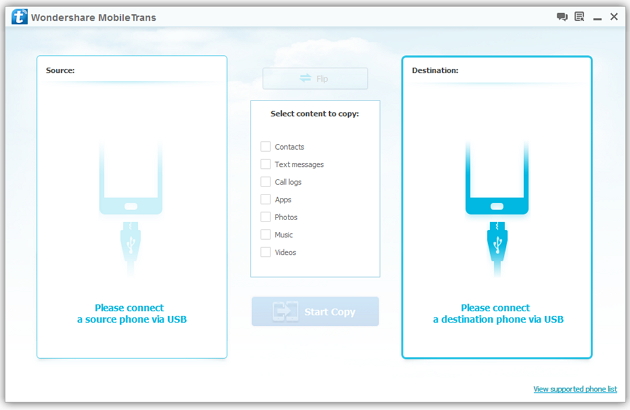
Step 2: Connect your HTC and Samsung S3 to the computer
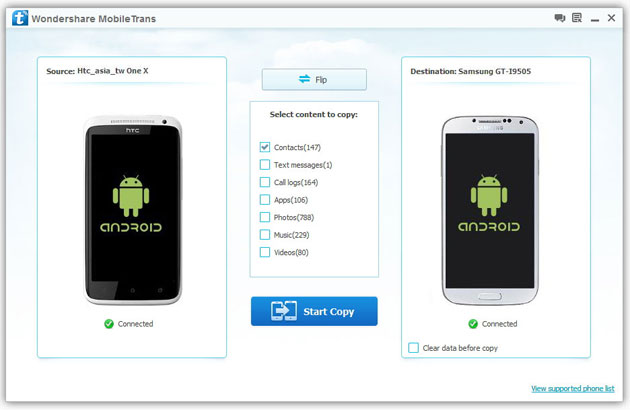
Step 3: Transfer contacts from THC to Samsung Galaxy S3
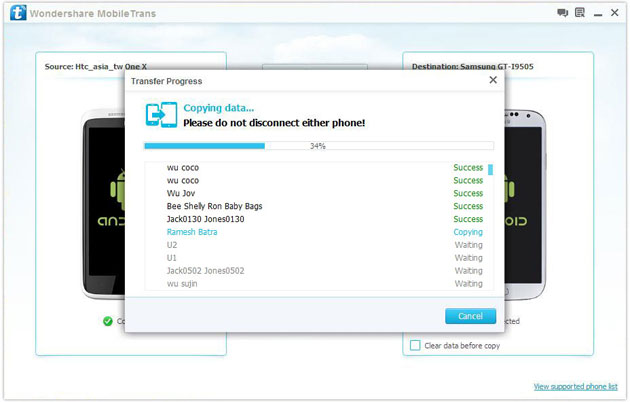
2) Not just contacts, transfer SMS, call logs, photos, music, videos and apps*
3) Comprehensive contact copy, including job title, email addresses, company name, etc.
4) Works with over 2,000 phones including Droid, Symbian (Nokia), and all models of iPhones, including new iPhone 5.
5) Transfers content between phones on different networks. AT&T, Verizon, Sprint, T-Mobile - no problem!

