






















Trending Topics

Does the anti-reflection coating on the Samsung Galaxy Z Fold8 Ultra really help around windows and bright lights?
I’m usually indoors but sit near windows, so reflections on my phone are sometimes more annoying than outdoor brightness itself. The Samsung Galaxy Z Fold8 Ultra has an anti-reflective main display, and I’m curious how noticeable that is during everyday use.

Does the Samsung Galaxy Z Fold 8’s low-reflection display help much under office lights?
I mostly use my phone indoors at work, where ceiling lights and windows often reflect on the screen. The Samsung Galaxy Z Fold 8 has a low-reflection finish, so I’m wondering whether it helps in these normal indoor situations too, not just outdoors.

Samsung Galaxy S26 Ultra Quick Share Feels Faster Than Messaging Files
I recently sent a lot of photos from my Samsung Galaxy S26 Ultra to another Galaxy phone, and Quick Share made it super easy. Thanks to this feature, I no longer have to use sluggish messaging apps that also reduce image quality. It shares data instantly and supports sharing with Android and Windows devices.

Which mobile will be best to buy ranging from from 15000 to 25000 Rupees
Hello, I am a bit confused regarding purchasing a good phone. I want to know which mobile will be best to buy. It should include functions like: gorilla class] Regards
- My budget is from 15000 to 25000 Rupees.
- Which one will be good Android Phones or Windows, I just need perfect working with no issue.
- Have good security
- Have minimum of 1.5 to 2GB RAM, 16GB internal memory.
- Have minimum Quod Core processor [atleat have or more 1.5GHz]
- Good built quality and good battery life.
- Camera should have minimum of 5 mega pixel.
- Full HD
- Perfect Touch screen with high resolution and some like scratch resistant or protection to screen [may be

Smart phone Up gradation with Windows 10
Does any one have any idea about up gradation of Windows 8.1 to Windows 10 in Smart phone?

Classic Nokia will return, will it take us back to the good old times?
Nokia phones have been out of our sights for a while since Microsoft bought its mobile business in 2014. The terms of trade claimed that Nokia shouldn't set foot in the mobile device market. And the terms will end in the second half of the year. According to the Jianya Wang, the president of Nokia China region, Nokia is likely going to return to the mobile market this year. Furthermore, they made a decade plan in order to continue their legendary accomplishment. Majority of the people who were born in 80s and older have used Nokia at least once. If you didn't, you must have heard of the classic Nokia ring tone.

Blind typing during the class and finals, texting lovers, those were the good old days, right?

When the phone was thrown out the window by the teacher, you find the phone was still playing the music. It had solid quality and it's budget friendly.

There were the times you could easily find a repair shop to get your Nokia fixed without sending back to the dealers.

Sometimes you don't realize how good the good old days were until they're gone. I'm not a person who like reminiscent, but when I do, it's because of Nokia. The Nokia phones has the outstanding quality but cheap, long lasting battery life and convenient customer service.
However, the world is changing fast, especially, in the smartphone industry. Brands and manufactories release new product every month. Hardware and design are getting similar. And according to the Worldwide Quarterly Mobile Phone Tracker from IDC, the market share of Android OS reaches 82.8% by the end of 2015Q2, Windows Phone dropped to 2.6% because of the lack of compatibility. Furthermore, the profit is getting transparent and shrinking.


Besides, there are more quality and cheap smartphone brands from China hitting on the market. Oukitel K10000 is one of the example. The phone features weekly lasting battery life of 10000mAh, solid quality and good performance. From the price point and overall design, Oukitel fans said that Oukitel is the Chinese Nokia.

Which is better? Le 1s or iPhone SE?
Apple announced the iPhone SE and the web is going wild about it! The Verge says "The new iPhone SE finally makes a small phone feel powerful", TechRadar says that its "Small but mighty!" and The Telegraph calls it "Apple's secret weapon". Lots of superlatives are being thrown around, as is always the case with Apple products. So, in the midst of Apple's reality distortion field, I decided to compare it to my Le 1s - that I've been using for more than a month now. The results, at least for me, are very conclusive.

Let's start with the OS. Android and iOS are now at-par on features, freely taking inspiration from each other and the perennial also-ran Windows Phone. However, if you've been using an Android phone, the move to iOS is jarring regardless of preparation. Trust me, having moved from a OnePlus 2 to an iPhone 6S, I know this better than most. If you're an iPhone user already, there is no discussion required. If you're an Android user, then I'd say "Don't even consider an iPhone!"
Moving on to design and build, the new iPhone is, in line with Apple's policy "thinner, smaller and lighter" than the Le 1s. However, the Le 1s has an astounding screen-to-body ratio of 75% that enables single-handed use and the phone doesn't feel too big. After all, within reason, bigger is always better! Both phones offer amazing build quality at their respective price points, so that's not really much of a contest.
On display, if you like smaller screens, the iPhone SE will appeal to you. But for someone who has used a 4+ inch screen device earlier, going back to a smaller display doesn't really work. In this respect, the Le 1s scores with its big but not too big display, and its helped by minimal bezels. Resolution-wise, its a no contest with the Full HD In-Cell display on the Le 1s ruling the roost with its fantastic color reproduction, great viewing angles and almost-zero bezels.
On connectivity, both the Le 1s and the iPhone SE are at par with each other on Wi-Fi and Network compatibilities, but the Le 1s scores with its dual-SIM capability.
When it comes to performance, I believe that specs are just one part of the game. Real-world performance is key. And in this area, despite having lesser amount of RAM than the Le 1s, the iPhone SE performs equally well due to better memory management in iOS versus Android. Its a straight tie!
Camera is another key feature where specs are just one part of the game with actual photo clarity being the key identifier. The iPhone SE uses the much-lauded camera module from the iPhone 6S, so its a given that photos will come out well. The Le 1s on the other hand had a few initial hiccups with photo clarity but they've since been resolved by OTA updates, so overall - its a good camera experience on both smartphones. The Le 1s scores in lowlight clarity and front-camera! Apple, for reasons that defy logic, went with a 1.2MP sensor on the front-camera. Now megapixels might not be everything, but with a 5MP sensor, the Le 1s handily beats the iPhone SE on selfies. Another reason is the smaller aperture size on Le 1s cameras – both front and rear (f2.0) compared to the iPhone SE which has f2.4 on the front camera and f2.2 on the rear camera – in photography parlance, smaller is referred to as “wider”. A wider aperture lets in more light which gives better photos in low-light and indoor situations, and gives you that beautiful blurred “out of focus” effect on wide shots.
With respect to sensors, the Le 1s has an infrared sensor to control home appliances that the iPhone doesn't. Everything else on this front is a tie.
Finally, the "essential spec" in today's world, battery! The Le 1s has almost double the battery capacity of the iPhone SE, with fast-charge built-in! While iOS has better power management than Android, the huge difference in capacity should result in longer standby times with the Le 1s!
Regardless of all technical specifications and performance comparisons, there will still be people convinced that an Apple product is the next best thing since sliced bread! So, to those people, here is a final nail in the coffin. Both the Le 1s and iPhone SE are good phones that do almost everything you can expect them to. Most importantly for a budget-conscious Indian, the Le 1s costs INR 10,999 while the iPhone SE starts at a whopping INR 39,000! That’s three times more expensive than the Le 1s!!! Case closed.
Microsoft Surface May launch with 8GB RAM
Upcoming Surface of Microsoft’s Surface phone has been making headlines for months now and is rumoured to be unveiled only in “early 2017.” Now, a new tip has given details about the handset’s innards including the processor and memory. According to Forbes reports unveiled that the MSM8998 could be next-generation high-end chipset, Snapdragon 830. Considering Snapdragon 830 will be the successor to the Snapdragon 820 processor, the report adds citing analysts that it could support up to 8GB of RAM, and be built using Samsung’s 10nm fabrication process.
The company instatntly updated surfaces phone’s specs means ‘Minimum hardware requirements’ page for Windows 10 Mobile, and added MSM8998 SoC as a compatible processor with the OS. Notably, Qualcomm is yet to debut the MSM8998 chipset. After seeking reports claim that Microsoft had added support for the MSM8998 SoC, the company removed the reference from the page.

Root - A Privilege That Should Be Allowed By The Smartphone Companies
Now many of you people wouldn't know what 'Root' is so, lemme explain, it is kind of a 'Privilege', which allows us to access the core functions of our android smartphone, it is something that is not allowed by the smartphone companies and what they do is if they find that a phone is rooted, they void it's warranty because it is something that could help us overlock our phone's CPU to a higher level. Now this is only one feature of root, but there are many others like by rooting your phone you could have access to 'Cheat Tools' which can help us modify an apps data, make In App Purchases (IAP) free and patch some apps to get their premium versions for free, removing unwanted system apps with ease, but it also helps in SECURING OUR PHONE, like '360 Security', it needs root to establish a firewall to protect our phones from unwanted access, key logging etc., I think that it should be allowed by the smartphone companies, like there are two sides to every coin, just like that, there are two kind of people, one which need it to secure their phones and one who hack IAP and stuff by using it. I want to say that people would never stop rooting their phones and hacking stuff just because these companies void the warranty, it's like a limitation, how do you know who will use it for the good and who will use it for that bad? So, simply just let people do what they want, they paid for the phones and warranty comes within it. Some tools that could help you root your phone: 1) iRoot (Windows) Some hacking apps due to which smartphone companies don't allow root: 1) Freedom Note: I've not posted the rooting methods, please search Google for that.
2) iRoot (Mobile)
3) Unlock Root (PC Version Only)
4) Framaroot (Android version only)
2) Lucky Patcher
3) SB Game Hacker

How to Transfer Music from Samsung Galaxy to iPhone 6s
Many people, especially youngster, like editing and creating their own songs or music with some useful and fabulous music-editing apps on Samsung smartphone, for instance Galaxy S6/ S6 Edge, Galaxy Note 4. However, if you buy a new iPhone 6s and you want to transfer the edited music from Samsung device to your iPhone 6s, how could you get it done? I guess you will firstly save the songs from Samsung to PC/Mac, then,mobiletrans import the music into iTunes and sync iPhone 6s with iTunes Library. This is exactly a workable solution yet inconvenient. Here is another way helping you to directly transfer music from Samsung devices to iPhone 6s.
TunesGo is a professional tool which supports you to straightforwardly transfer music in between iPhone and Android, iTunes and Android as well as iOS and iOS. Besides, it also enables you to download song tracks from YouTube, manage and organize albums in iTunes.Tutorial about Transferring Music from Samsung to iPhone 6s
Step 1 Download and Install TunesGo
Hit the buttons to download the software on your computer: Windows users click the left button and Mac users the right one. When download finished, set up the program. 

Step 2 Plug Samsung and iPhone 6s in the Computer
Run the TunesGo on the computer after installation. Connect both your Android and iOS device to PC/Mac via USB cable.
For Samsung device, you need to enable USB debugging on the phone so as to build the connection.
1) For Android 4.2 or newer: Go to "Settings" > "About Phone" on your Samsung. Press "Build number" for several times until "You are under developer mode". Then enter "Settings" again, and choose "Developer options" > "USB debugging".
2) For Android 3.0 to 4.1: Go to "Settings" > "Developer options" > "USB debugging".
3) For Android 2.3 or earlier: Go to "Settings" > "Applications" > "Development". Check "USB debugging".
When it's connected, you can see it as the below interface.
As for iPhone, you need to tap "Trust" in the phone screen to build the connection.
Step 3 Copy Music from Samsung to iPhone 6s
Click the Samsung device in the left menu and hit the "Music" option under the Samsung panel to open the playlists. All the songs in Samsung Galaxy will be listed in the main window. Select the songs you want to transfer and click the "Export" button. A pop-up box will show you three options, how to transfer candy crush to new iphone hit "Export to iPhone 6s (the name of your iPhone)", the selected music will start transferring from Samsung Galaxy to iPhone 6s. 
More Feature: Manage iTunes Library
TunesGo also works as the iTunes Library manager. With it, you can fix the missing and inaccurate tags and covers of iTunes music. Clean up duplicated songs as well as remove missing tracks.
There are more impressive features on TunesGo waiting for your exploration. Hurry to download it and give it a shot.
How to Transfer Contact from iPhone to Computer - iPhone Contact Transfer
iPhone Transfer Contact can provide you: Tutorial 1: Transfer Contact from iPhone to Computer Tutorial 2: Transfer Contact’s photo from iPhone to Computer Tutorial 3: Restore Contact from CSV file to Outlook Tutorial 4: Restore Contact from CSV file to iPhone Step 2: Connect your iPhone to your computer, mobiletrans and run iPhone Transfer Contact. Then, your contacts on iPhone memory will display as shown in your iPhone screen automatically as fig 1. You can click on single name, all his or her information will display as fig 2 shown.
- Backup iPhone Contact’s Photos.
- Export two types of file format (Antc file, Text file).
- Export full screen of iPhone contact’s Photos.
- View Contacts in Text file format (.txt) or ANTC file format (.antc) on PC.
- Password protection support (ANTC file only).
Tutorial 1: How to transfer contact from iPhone to computer
Step 1: You can download iPhone Transfer Contact free version here, and install the software (skip if done yet).
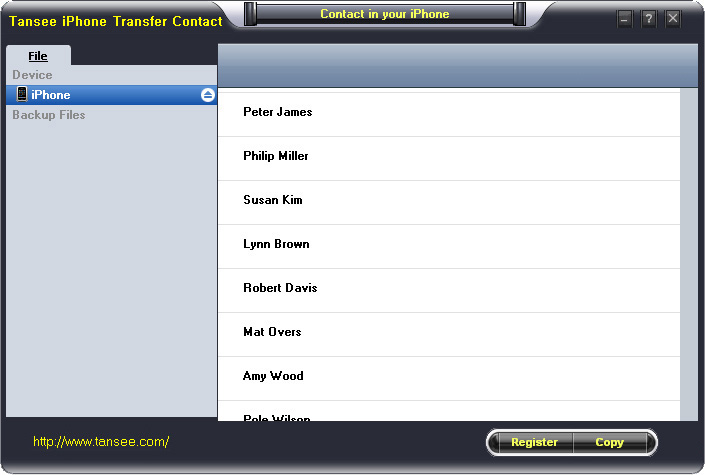
Step 3-a: In fig 1 situation, click button "Copy" to copy all contacts from your iPhone to your computer , then select options:
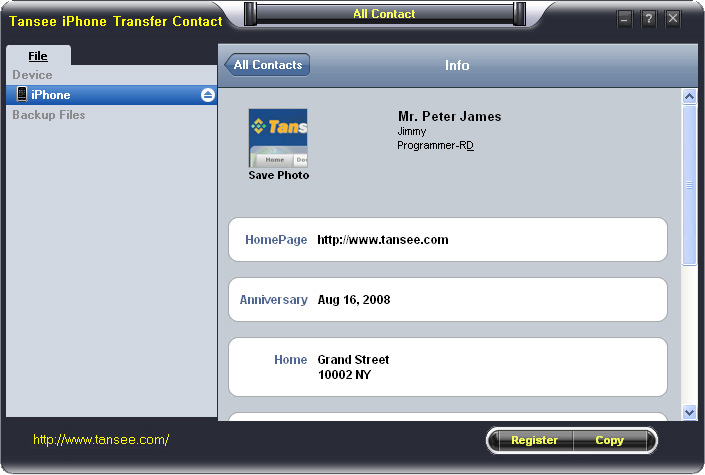
1: Choose File Type: backup to TXT file, ANTC file or CSV file;
2: Choose File Path: You also can change the backup path if you don’t use default path.
3: Advanced Option: if you choose ANTC format in step 1, you can add a password to protect the file.
Note: You must remember your password, because we don’t know the it except yourself. So please remember it well.
Click "OK" Button to finish the Copy. Please see fig 3.
Note: With trail version, you can only copy the first 5 contacts .

1: Choose File Type: Backup contacts to TXT file, and CSV file in single contact transfer;
2: Choose File Path: You can change the backup path if you do not use default path;
3: Advanced Option: Disabled in single contact transfer.
Click OK Button to finish the Copy. See fig 4.
Note: You can only copy the first 5 contacts in trail version.
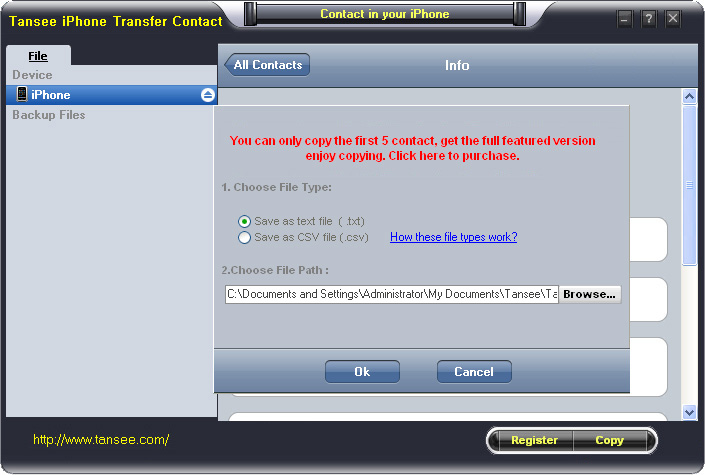
Tutorial 2: How to transfer iPhone contact’s photo to computer?
In fig 2 above, you can click the photo of single person to save it to your computer., then you can transfer iPhone contact’s photo to computer. See fig 5.

Tutorial: 3:How to restore contact from CSV file to outlook?
Step 1: Backup all your contacts from iPhone to computer as .csv file format using iPhone Transfer Contact.
Step 2: Click on Start - All Programs - Accessories, click to open Address Book.
In Address Book, click File - Import - Other Address Book..., select "Text File (Comma Separated Values)", click Import, then browser the CSV file, click Next, Map the fields you wish to import, click finish.After all this, you had import the contacts to your Windows Address Book.
Step 3: Open Outlook; Open the File menu; Choose “Import and Export”; In the “Import and Export Wizard” dialog box choose “Import Internet email and address", then choose "OUTLOOK EXPRESS 4.X 5.X 6.X", click "Next".
Tutorial 4: How to restore contact from CSV file to iPhone?
Step 1: Backup all your iPhone contacts computer as .csv file format using iPhone Transfer Contact.
Step 2: Click on Start - All Programs - Accessories, click to open Address Book.
In Address Book, click File - Import - Other Address Book..., select "Text File (Comma Separated Values)", click Import, then browser the CSV file, click Next, Map the fields you wish to import, click finish.After all this,how to use anytrans you had import the contacts to your Windows Address Book.
Step 3: Open iTunes, connect iPhone, click to select the iPhone on iTunes, choose Info tab, in Contact section, check "Sync contacts with Window Address Book", click apply. Back To Homepage.
Want to buy a phone for long term use!
budget around 8K or less i don't play much of games.. can anyone one suggest a good phone and with experience,
i need a phone which can be used for reading and social networking and messaging.
like mostly for the professional use..?
plus i thought of microsoft lumia 535 dual sim is that a good phone ? because OS is not a mandatory thing , i am comfortable with windows
Nokia Lumia 638 performance and gaming advice
Hey guys, i m planning to buy a lumia 638. I want some information gaming in this device. It has 1gb RAM and Qualcomm snapdragon 400 processor in it. Windows phone r famous for nt hanging. I want to know dat can it play games like Asphalt 8, modern combat 5, nova 3, six guns etc types of games seamlessly without hanging? I dnt care about front camera nd flash so leave it. And it has only one review dat doesn't help. So please tell Is it will work for my gaming?
Gaming in lumia 638....!
Hey guys, i m planning to buy a lumia 638. I want some information gaming in this device. It has 1gb RAM and Qualcomm snapdragon 400 processor in it. Windows phone r famous for nt hanging. I want to know dat can it play games like Asphalt 8, modern combat 5, nova 3, six guns etc types of games seamlessly without hanging? I dnt care about camera so leave it. Is it will work for my gaming?
Best CDMA Smartphone with: min 8GB internal storage plus 3G connectivity
Hi, My requirement is very simple: I am looking for a CDMA Smartphone that has -- The above 3 are absolutely necessary. All other parameters are secondary. Like, whether the phone is pure CDMA, or dual sim (CDMA + GSM). Also, whether it's an Android or Windows or Blackberry or iOS platform phone. And, so on. Any guidance/help on this matter is immediately sought. Thanks a ton
i) minimum 8GB internal storage
ii) minimum 1GB RAM
iii) 3G Connectivity
Which Smartwatch to buy

Hey guys i want to buy a smartwatch and i am confused between Sony Smartwatch and LG W100 Smartwatch. Price is not a concern. I am currently using a windows phone and is planning to buy an android phone next month. Please help me in this regard. Seeking a reply from you soon.
Thanks,
Vishnu Nair
Bangalore.
+919001844566
vishnunair689@gmail.com

Operating System
I am planning to buy a New handsent (cell phone) currently I am not user of any smartphone, just I am using a Featured phone. I wanted to know which Operating System like (Windows, Apple, Blackberry, Android) is always better to use which does not have much lags. I am a moderate user if I buy the smartphone, so Kindly let me know which OS is good to buy as I am not pouring money lot much, say about around Rs.10000/- which all the specification, configuration should be good for daily normal usage. I will use the net rarely say about once in a week. So, considering all these please suggest the better smartphone. And also need users review which ever you mentioned the Phones? Thanks in Advance
Ramesh
The New Xolo Hive!
Xolo, on the other hand has started promoting its unannounced Hive UI with a dedicated page that come with taglines such as "And right now there's something different brewing at Xolo. Stay curious," "Soon you will too. The revolution has begun," and "A revolution is in the works. Stay tuned." Other quotes from the Hive teaser page, read, "Imagine if you had the power to change your phone the way you want to. Like play dough. The music player is yours. The contact book is yours. The themes are yours. Imagine what it would be like to create things based on your ideas. Wouldn't that be wonderful?... So the next probable question itself is what exactly is Hive? We would say, imagine a forge. You are the knights who would want blades made of Valerian steel. We the forgers make that possible because the steel we create is malleable to your likes and dislikes. Hive is that forge. It's a platform where we follow democracy in creation... The Hive pits the thinkers and the doers together under one huge umbrella so that the result is beneficial for both." All this seems to indicate a UI that is very customisable, and that partially ties-in with the fact that Xolo is also said to be working with a designer community to create themes for its new UI and might also announce a new store for its smartphone consumers where all the exclusive content will be available for download. Earlier on Monday, Xolo's first Windows Phone 8.1-based smartphone, the Win Q900s went up for pre-order at Rs. 9,999. Last week, the company launched a new Android 4.4 KitKat-based smartphone in India, the Q1011 at Rs. 9,999. Official Coverage

