






















Trending Topics
Nokia P1 launch date
hi there,m planning to buy a new mobile under 15k,should i wait for nokia P1 or should I go for Moto G4 Plus??
Nokia 8.1 not available anywhere
I am interested in buying Nokia 8.1 but it isn't available on Amazon or Flipkart. Is there any other site where it's available? I don't want open box/refurbished phone.

Nokia was back again new c6 some says boss is back
Earlier, Nokia was the number one dominant cellphone maker but couldn’t make its impression in the world of smartphones, but further chose Microsoft's Windows operating system for its "Lumia" range. But couldn’t achieve much success. And finally, abandoned both businesses.
See more here for specs and about nokia c6
http://www.technolons.com/2017/01/12/nokia-6-is-the-new-flagship-from-hmd-global/

Nokia Lumia 638 performance and gaming advice
Hey guys, i m planning to buy a lumia 638. I want some information gaming in this device. It has 1gb RAM and Qualcomm snapdragon 400 processor in it. Windows phone r famous for nt hanging. I want to know dat can it play games like Asphalt 8, modern combat 5, nova 3, six guns etc types of games seamlessly without hanging? I dnt care about front camera nd flash so leave it. And it has only one review dat doesn't help. So please tell Is it will work for my gaming?

Classic Nokia will return, will it take us back to the good old times?
Nokia phones have been out of our sights for a while since Microsoft bought its mobile business in 2014. The terms of trade claimed that Nokia shouldn't set foot in the mobile device market. And the terms will end in the second half of the year. According to the Jianya Wang, the president of Nokia China region, Nokia is likely going to return to the mobile market this year. Furthermore, they made a decade plan in order to continue their legendary accomplishment. Majority of the people who were born in 80s and older have used Nokia at least once. If you didn't, you must have heard of the classic Nokia ring tone.

Blind typing during the class and finals, texting lovers, those were the good old days, right?

When the phone was thrown out the window by the teacher, you find the phone was still playing the music. It had solid quality and it's budget friendly.

There were the times you could easily find a repair shop to get your Nokia fixed without sending back to the dealers.

Sometimes you don't realize how good the good old days were until they're gone. I'm not a person who like reminiscent, but when I do, it's because of Nokia. The Nokia phones has the outstanding quality but cheap, long lasting battery life and convenient customer service.
However, the world is changing fast, especially, in the smartphone industry. Brands and manufactories release new product every month. Hardware and design are getting similar. And according to the Worldwide Quarterly Mobile Phone Tracker from IDC, the market share of Android OS reaches 82.8% by the end of 2015Q2, Windows Phone dropped to 2.6% because of the lack of compatibility. Furthermore, the profit is getting transparent and shrinking.


Besides, there are more quality and cheap smartphone brands from China hitting on the market. Oukitel K10000 is one of the example. The phone features weekly lasting battery life of 10000mAh, solid quality and good performance. From the price point and overall design, Oukitel fans said that Oukitel is the Chinese Nokia.

Is whatsapp supported by nokia x2 smartphone?
Hi, Thanks
I want to buy nokia x2 as specification seems good at this price. I want to know that whatsapp is working or not?
Did any one installed it on nokia x2? how is it working?



What was your first smart gadget that isn't a phone?
I remember when I was in my first year, and my parents gifted me a Nokia foldable keypad phone. It was my first smart gadget, and I got really excited. What was yours?

Would you switch to a foldable phone if prices dropped to regular flagship levels?
I remember I had my first foldable phone in 2013, which was the Nokia one. As the new flagship phones are being introduced, what do you think if these flagship phones were priced similarly to foldable phones, would you consider switching to foldable phones? Does a flexible display help in multitasking?
How to Transfer Contacts from HTC to Samsung
Help! I recently purchased a Samsung S3 and want to transfer SIM and phone contacts from HTC Desire to Samsung S3. However, I have to use a new Mini-SIM with the S3 and I can’t put my old SIM in the phone. Is there an easy way to complete this task? Actually, if you want to cope HTC contacts to Samsung, like Samsung S3, you don't have to insert the old SIM card or edit the phone numbers one by one on your Samsung S3. With the help with Phone to Phone Transfer tool, you can transfer all your contacts including the ones in Gmail, How to Transfer Photos from iPhone/iPad/iPod to Computer ChatON and other accouts to the Samsung Galaxy S3 with I click. Download Phone to Phone Transfer tool to copy contacts from HTC to Samsung S3. Note: Phone to Phone Transfer works well with Samsung and HTC phones and tables. Check more supported Samsung and HTC phones and tablets and Android OS here. Download, install and run Phone to Phone Transfer on your computer. The primary window pops up like the screenshot shows below. Connect both of HTC phone and Samsung S3 to the computer via USB cables. Then this program will detect the two devices soon as possible. After that, you can see them in the primary window. On the left is your HTC phone, and on the right is Samsung S3. Between the two devices is "Flip", which lets you change the places of the two devices. It needs you can follow the similar steps to transfer contacts from Samsung S3 to HTC phone. If you decide to remove all contacts on your target Samsung S3 to save the being transferred contacts, you just need to tick off "Clear data before copy". Or just keep "Clear data before copy" unchecked if you don't want to delete the contacts. This Phone to Phone Transfer program empowers you to cope contacts, music, videos, SMS, apps, call logs and photos from HTC to Samsung within 1 click. Therefore,How to Transfer PDF to iPhone from Computer with Ease you can choose the data which you want to transfer. If you only want to cope the contacts, please uncheck the other data except contacts and click "Start Copy". You can check the process in the pop-up transfer window. When the contact transfer process comes to an end, please click "OK" button. That's all! More information about Phone to Phone Transfer tool: Zero quality loss & risk-free: everything you transfer is 100% same as the original and can be only read by yourself. 

How to cope contacts from HTC to Samsung Galaxy S3 in 1 click
Step 1: Run Phone to Phone Transfer tool
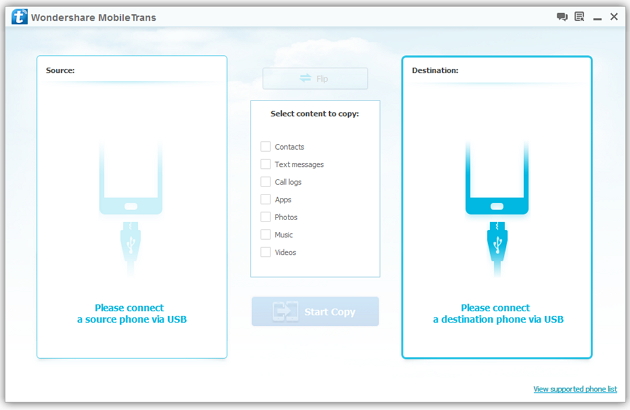
Step 2: Connect your HTC and Samsung S3 to the computer
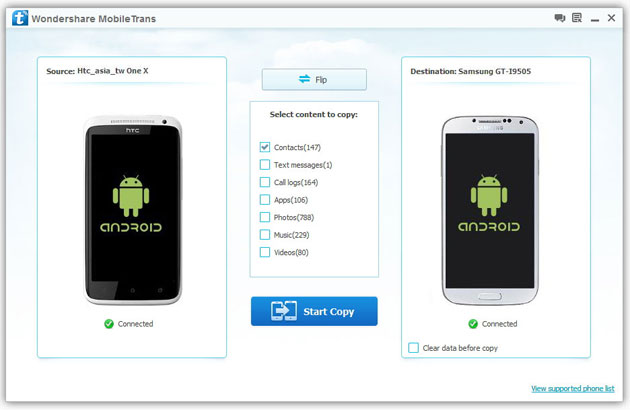
Step 3: Transfer contacts from THC to Samsung Galaxy S3
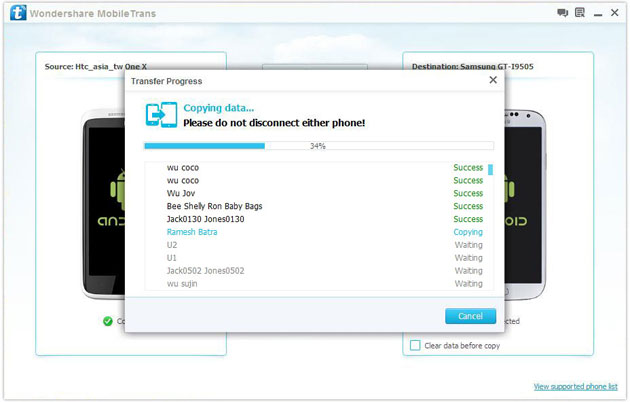
2) Not just contacts, transfer SMS, call logs, photos, music, videos and apps*
3) Comprehensive contact copy, including job title, email addresses, company name, etc.
4) Works with over 2,000 phones including Droid, Symbian (Nokia), and all models of iPhones, including new iPhone 5.
5) Transfers content between phones on different networks. AT&T, Verizon, Sprint, T-Mobile - no problem!
Need buying advise Mobile for my Daughter
I am planning mobile for my daughter which must have below feature
1) RAM min 1 GB
2) Battery Good one
3) Supports androids ( whats app and e-mail )
4) Can have wify connectivity
6) Media player to listen song
5) Good Display for viewing video
6) Good brand which can last 3 years without major repair cost
7)Price within range of Rs 5000 to 6000 . (Mobile comes with my many features and apps which are normaly unused and billed in your cost )
can any one help me out ,,,, I have been told samsung is expensive , nokia is not so user friendly , Motto & Micromax are good for their price
Confusion over a new cellphone
I use a Nokia Lumia 925 and I am an avid fan of the WP ecosystem. I am looking for an upgrade,confused between Lumia 930 and Iphone 5S as camera is a priority. Please help.
Need Buying Advice For Smartphone Under ₹7000....:-D....Anybody Help....!
Hi Friends. I m Lucky Wamanker. I want some buying advice from u guys about buying a smartphone. First of all i tell u my budget us ₹7000 and i cant increase it more than ₹7200. My basic requirements are ::--
1.Minimum 1 gig of RAM.
2.Quadcore Processor.
3.Decent GPU.
I want this gadget primarily for gaming and web browsing. And i dont want any suggestion for xiomi or yu or any brand that has no service center in Indore. And again i tell u i want this smartphone for gaming.
I have found some by myself. Tell me about whuch is best ::--
1.Nokia Lumia 638
2.ZTE grand quad lite
3.ZTE grand x2
4.Huawei Honor Holly/Bee
5.Lenovo A6000
6.Xolo Omega 5.0
And i dont care whether it is Windows or Android. Or Internal Storage. And i want to play games like Nfs, Asphalt 8 abd Modern Combat 4.

Which OS do you recommend? Windows or Android
I am planning a new phone and am contemplating between the Samsung Note 3 and the Nokia Lumia 1520... would appreciate ur expert comments... Cheers
Gaurav

