






















Trending Topics

Htc 826 vs. one plus one vs. samsung a7 vs. oneplus 2 vs. nexus 5
really confused what to do, looking for dual sim, good camera, good sound and decent features.

HTC desire 820- Lollipop update
When is the Lollipop update for HTC desire 820 expected to roll out in India???

HTC Desire 626 G+ OR (YU Yoreka, Lenovo A7000 & Honor 4X)
Please provide review for HTC Desire 626 G+ I am trying to compare it with YU Yoreka, Lenovo A7000 & Honor 4X. My primary focus is phone performance (it should not hang or lag after few month due to addition of multiple apps) and battery life should not be poor. Is it that YU Yoreka, Lenovo A7000 & Honor 4X have higher config on paper but they perform inferior compared to HTC Desire 626 G+. Thanks!

HTC 820 or One plus One
Hi , I would like to buy a phablet my budget is around 10,000 to 30,000. I planning to buy HTC 820 or One plus One, so can you please suggest me from both or any other option. Requirements 5.5' full HD screen, 2/3GB Ram, 13MP camera, 4G, Good Battery.

Bricked HTC One Max while Rooting
I tried to root my HTC One Max but it failed halfway through the process and now my phone won't even finish booting up now. I'm left with a very expensive paperweight, can someone please help me figure out what I can do to fix this?

How to Transfer Contacts from HTC to Samsung
Help! I recently purchased a Samsung S3 and want to transfer SIM and phone contacts from HTC Desire to Samsung S3. However, I have to use a new Mini-SIM with the S3 and I can’t put my old SIM in the phone. Is there an easy way to complete this task? Actually, if you want to cope HTC contacts to Samsung, like Samsung S3, you don't have to insert the old SIM card or edit the phone numbers one by one on your Samsung S3. With the help with Phone to Phone Transfer tool, you can transfer all your contacts including the ones in Gmail, How to Transfer Photos from iPhone/iPad/iPod to Computer ChatON and other accouts to the Samsung Galaxy S3 with I click. Download Phone to Phone Transfer tool to copy contacts from HTC to Samsung S3. Note: Phone to Phone Transfer works well with Samsung and HTC phones and tables. Check more supported Samsung and HTC phones and tablets and Android OS here. Download, install and run Phone to Phone Transfer on your computer. The primary window pops up like the screenshot shows below. Connect both of HTC phone and Samsung S3 to the computer via USB cables. Then this program will detect the two devices soon as possible. After that, you can see them in the primary window. On the left is your HTC phone, and on the right is Samsung S3. Between the two devices is "Flip", which lets you change the places of the two devices. It needs you can follow the similar steps to transfer contacts from Samsung S3 to HTC phone. If you decide to remove all contacts on your target Samsung S3 to save the being transferred contacts, you just need to tick off "Clear data before copy". Or just keep "Clear data before copy" unchecked if you don't want to delete the contacts. This Phone to Phone Transfer program empowers you to cope contacts, music, videos, SMS, apps, call logs and photos from HTC to Samsung within 1 click. Therefore,How to Transfer PDF to iPhone from Computer with Ease you can choose the data which you want to transfer. If you only want to cope the contacts, please uncheck the other data except contacts and click "Start Copy". You can check the process in the pop-up transfer window. When the contact transfer process comes to an end, please click "OK" button. That's all! More information about Phone to Phone Transfer tool: Zero quality loss & risk-free: everything you transfer is 100% same as the original and can be only read by yourself. 

How to cope contacts from HTC to Samsung Galaxy S3 in 1 click
Step 1: Run Phone to Phone Transfer tool
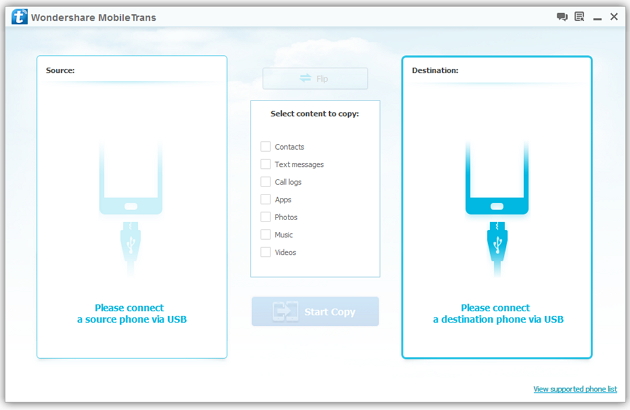
Step 2: Connect your HTC and Samsung S3 to the computer
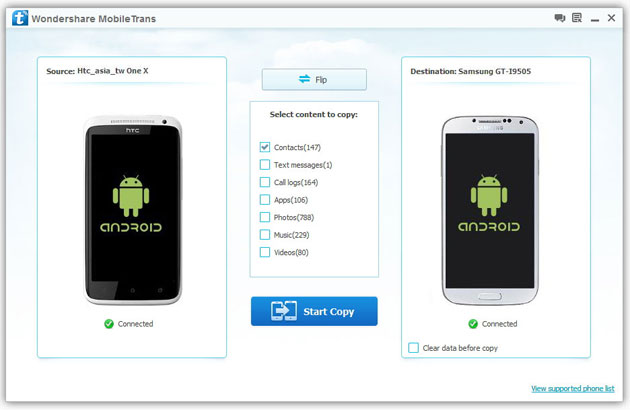
Step 3: Transfer contacts from THC to Samsung Galaxy S3
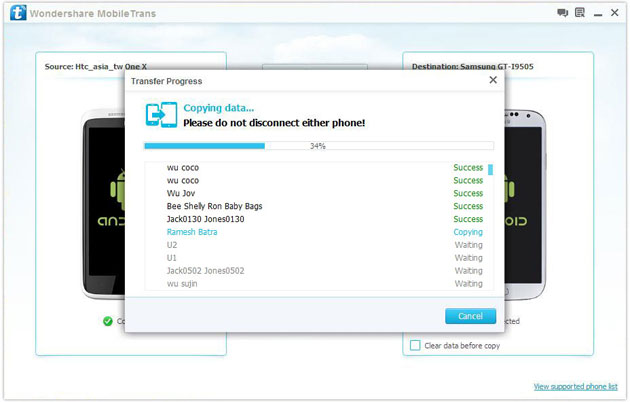
2) Not just contacts, transfer SMS, call logs, photos, music, videos and apps*
3) Comprehensive contact copy, including job title, email addresses, company name, etc.
4) Works with over 2,000 phones including Droid, Symbian (Nokia), and all models of iPhones, including new iPhone 5.
5) Transfers content between phones on different networks. AT&T, Verizon, Sprint, T-Mobile - no problem!

How to Transfer Contacts from HTC/LG to Note 5
The Samsung Galaxy Note 5 brings a huge redesign to the Note series: it adopts the glass and metal styling of the Galaxy S6, but in a larger, 5.7" form factor, and it features the signature S Pen stylus. The Note 5 sports the 14nm Exynos 7420 octa-core system chip with a whopping 4GB of LPDDR4 RAM.
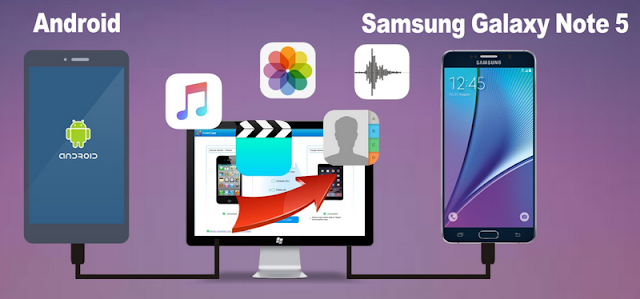
So, when you got a new samsung galaxy note 5, you may want to sync those important coantacts from your old HTC/LG to samsung galaxy note 5, how can i transfer contacts from htc/lg to samsung note 5?
Mobile Transfer can solve the problem to transfer contacts from LG/HTC to Samsung Galaxy Note 5, what's more, mobile transfer can also transfer text messages, videos, photos, call logs, calendar, music from htc/lg to samsung galaxy note 5.
You need three easy steps to transfer contacdts from lg/htc to samsung galaxy note 5:
Step 1: Download and install the Mobile Transfer on your computer
Step 2: Connect both your htc/lg and samsung note 5 to the pc
Step 3: Select contacts and transfer them to note 5
More steps details:
How to Transfer Contacts from HTC/LG/Sony/Huawei to Note 5
How to Recover Lost Data from Note 5

Iphone 6 Vs Samsung S6 Vs Nexus 6 Vs LG G4 Vs HTC one M9
Which one you guys rate the most in these flagship mobile and why? I even add flagship killer OnePlus two in this list too.
Transfer of files from Samsung ll to a new HTC desire 310 dual sim
Hi everyone, How does one sync files, which were back-up onto a computer from Samsung II via kies, to a brand new HTC 310 desire dual sim? Thanks
Unfortunately, Kies doesn't recognise HTC!
EA
Sony Z2 vs Htc E9+ vs yureka
hello everyone, I don't want a phone that heats up very soon. Basically my usage is little heavy and my current phone heats up very quickly, has a very bad battery life and hangs oftenly. please give your suggestions which phone should I go for.
I'm planning to buy a new phone currently I'm using Micromax canvas Gold.
I'm confused between Sony Xperia Z2 and HTC E9+ and yureka. My budget is upro 30,000.
I'm looking for a phone whose performace is good, a good camera resolution( Front & Back both) and a good battery life.
Thnanks.!

I have a HTC one m9 factory unlocked from USA. The phone is not detecting the airtel 4 g network. It detects the reliance jio network ? What is the problem?
Phone is compatible for 4g and supports all the 4g bands. Why can't I access only airtel 4 g network ?
How about HTC ONE ME or Xperia Z3+?
How about HTC ONE ME or Xperia Z3+ ? Please suggest a good phone. I am too confused. I want to buy a phone in the price range of 40,000-50,000

Guys i Want to get suggestion and your opinion about HTC Desire826 Indian Model over Samsung s4
Guys i Want to get suggestion and your opinion about HTC Desire826 Indian Model over Samsung s4
Moto X Gen 2 or HTC One M8(Eye).Which one will be a better buy?
Please advise me if Moto X gen 2 or HTC one M8(Eye) will be a better buy.

Apple iPad Air 2 vs. HTC Google Nexus 9
I'l rather pay more for a fluid performance and vast range of tablet-optimised apps than paying less and working on a laggy tablet, which is always ready to heat up.

Should I buy HTC RE(camera)?
Hellow
I'm confused over HTC RE. Please suggest me that should I buy it or not. If not, then suggest me some best or better alternate for cameras (DSLR).Plz reply az soon az poosib.
Decent Budget phone
I want to buy a good phone with decent configurations under 22k??
I have considered htc 816g ,samsung s4, moto x??
Which one would be better.
I would like it to last for atleast a couple of years and wants a decent camera and a processor which doesnot lags???
Honest review of Le1s after 2 months of usage
Hi Guys, This is Rajesh and today I am sharing my views on the LeEco Le 1s that I have been using for the past month. Yes, we all know that LeEco, formerly known as Letv, launched two smartphones in the market - Le 1s and Le Max. The Le 1s is priced at Rs. 10999 and the Le Max (64GB) is priced at Rs. 32999. Le 1s is their lowest priced phone but at the same time gives features of a flagship phone. LeEco claims that they are selling Le 1s at lesser than BOM (Bill of Materials) price (which is more than Rs. 16000). Let’s move on to the review then. BUILD & DESIGN SCREEN & MULTIMEDIA CAMERA PERFORMANCE CONNECTIVITY MEMORY SOUND QUALITY PROS: CONS:
The first time I opened the box I was like “Wow, awesome!”, yes guys it looks great, it really looks fantastic. One of the most beautiful phones I have ever seen. The mirror-surfaced fingerprint sensor, a smart looking camera and all metal body - all these things make Le 1s a looker! It looks premium and it feels premium. The weight is a bit on the upper side but still with a 5.5-inch Full HD display and bezel-less design it is very handy and easy to use.
9/10
Le 1s comes with a 5.5-inch LCD IPS Display covered by Gorilla Glass 3. The display is great with awesome colours and contrast levels. It is sharp enough and watching Full HD videos on the display is a visual treat. Mediatek’s clear motion technology is there, so there is not even a single frame drop. It can compete with flagship phones for sure.
9/10
Le 1s comes with a 13 MP rear camera and a 5 MP front camera. Rear camera is an ISOCELL unit with PDAF and high aperture for low light capturing. Still, with all these features, this is where Le 1s suffers a bit. The daylight pictures are good with good details and natural colours but in lowlight the camera is just okay. The pictures turned out to be noisy and macro shots turned out to be “whitish” in low light. I also found some reddish tint on the photo. Front camera is good enough for video calling but for selfie lovers it will be a “hit or miss” as the camera works sometime good and sometime bad. Lots of software optimisation is needed in the camera section as the basic things like “beauty mode” is missing. I hope LeEco will release an OTA update which can rectify these issues. UPDATE: The latest OTA improved the camera experience by a huge margin – both front and rear cameras!
8.5/10
This is where Le 1s outshines every other smartphone in the same category. Le 1s has Mediatek’s current flagship 64-bit Octa Core Processor MT6795 Turbo (aka Helio x10 Turbo) clocked at 2.2 Ghz. Almost every other smartphone in this price range uses cheaper processors while LeEco uses this flagship processor. We can find this processor even in the flagship phone of HTC M9 (Which costs almost 45 K). Le 1s also has 3GB RAM with the system using almost 1.5 GB RAM but still the phone performs very well. No lag at all. Almost every high end game plays butter smooth. I have tested Asphalt 8 and Temple Run, both run fluidly. As far as the performance is concerned, it is really a beast. It warms a little bit, but that is common for all metal smartphones, so not a deal breaker for me.
9.5/10
Le 1s supports 2G/3G/4G networks in India. Everything is working fine. I didn’t experience any network issue so far. Bluetooth and Wi-Fi are up to the mark. Le 1s supports dual SIM - one micro and one nano. Both are working perfectly fine. A small negative side is that it doesn’t support VoLTE, so for Reliance Jio users it is a deal breaker. Still it satisfied me. Thumbs up!
8.5/10
Le 1s comes with 32 GB of internal memory which is really good considering the price. It doesn’t support SD cards but it supports OTG. I was able to connect a 64 GB pen drive through USB Type C OTG cable and it was really fast and I had a nice experience. Overall at this price range it is really good.
8/10
The external speakers perform well and after plugging in earphones, it sounds really great. It is superior to the competition in this price range. Soothing to the ears and a good option for audiophiles.
8.5/10
Stunning design
Premium Feel
Great Display
Good Speakers & Sound Quality
Okay Camera
No VoLTE
No External SD card support
Considering the price point of 10999, LeEco provides a super “value for money” product which can break all records in the Indian mobile market. As their tag suggests a #SuperPhone at a #SuperPrice…
Overall Rating: 8.5/10
Verdict: Paisa Wasool..!
Phone buying advice
I am planning to buy a phone. My budget is somewhere around 20,000 - 25,000. The features I am looking for in a phone are as below: I am very much interested in HTC Desire 820 but am a little skeptical to use a phone with 5.5" display as I have not used a bigger display before. I also read about heating problems in HTC. Please suggest I should still go for HTC 820 or if there is any other option. Thanks in advance

Which Flagship is the Best Fit?
Hi!
I'm looking to buy a smartphone on Aug, a flagship. My budget is around 50k(Can stretch a bit). I've shortlisted the HTC 10 for now. The S7 has exynos in India, something which has issues and I'm not sold on Samsung. It does not help that S7 is a fingerprint magnet, can break and costly to repair. Are there any better upcoming alternatives? When is the Asus flagship launching in India?(ZenFone 3 Deluxe) Is it worth the wait? Any other alternatives? How's the Note 7 going to be?
Â

