






















Trending Topics

Is a countertop dishwasher enough for two people?
I don’t have space for a full-size machine, and the compact models look tempting. We cook most meals at home, including dishes that use several utensils.

Has anyone regretted buying a budget 4K TV?
I’m looking at Xiaomi and TCL models under Rs.40k, but some people keep telling me to spend more on Sony or LG. I don’t want to pay extra just for the logo.
Is buying an RO purifier during BBD a smart move?
I’ve seen a few discounts on Pureit and Livpure models, but I haven’t checked the water quality at home yet. I don’t want to buy the wrong type just because it’s cheaper
Would you buy an AC online without seeing it first?
Flipkart has a Daikin model listed at a price I haven’t found locally. I’m tempted by the deal but a little worried about installation and after-sales support.
Will I regret buying a 55-inch TV during BBD?
My current TV is 43 inches, and I keep looking at 55-inch models from LG and TCL. The bigger ones are tempting, but I don’t want to spend extra just for screen size.

Why Do Crypto Projects Offer Testnets Before Launch?
Before launching a blockchain or major application, projects often release testnets where users and developers can experiment with features without using the final network. Testnets allow teams to identify technical problems, test transaction capacity and receive feedback from the community. They can also give users an early look at how a project works before real assets are involved. For developers, participation can reveal issues that may not appear during internal testing. However, activity on a testnet doesn’t necessarily mean the final product will succeed. Should ordinary crypto users pay more attention to testnet activity when evaluating projects before their mainnet launches?
The Rise of Crypto Research Tools for Ordinary Investors
Crypto research was once dominated by traders who spent hours studying charts, project documents and blockchain data. Today, a growing number of platforms are trying to make research easier through dashboards, simplified metrics, alerts and automated analysis. This could help new investors understand a project without becoming professional traders. At the same time, easier access to information doesn’t guarantee that users will interpret it correctly. A polished dashboard can still present incomplete or misleading information. As crypto becomes more data-driven, should research tools focus on giving users more information or making the most important information easier to understand?
What Makes a Crypto Token Actually Useful?
A cryptocurrency can have a large community, an impressive roadmap and plenty of attention, but none of that necessarily means the token itself has real utility. A token might be required to pay network fees, access a service, participate in governance or unlock specific features. In other cases, the token may exist largely because the project uses it to incentivise users. Understanding the difference is important because a successful platform doesn’t always guarantee that its token will have sustainable demand. When evaluating a crypto project, should investors ask what they actually need the token for before looking at its price potential?

Why Does a Strong Crypto Community Matter?
A crypto project can have impressive technology, but its long-term success often depends on the people who actually use, support and build around it. A strong community can help spread awareness, provide feedback, attract developers and keep a project active during difficult market conditions. It can also create a sense of ownership that traditional products sometimes struggle to achieve. At the same time, a large social-media following doesn’t necessarily mean a project has genuine users or sustainable demand. So what really makes a crypto community valuable? Its size, activity, loyalty or ability to contribute to the ecosystem?
How Can You Tell If Crypto Is Entering a Bull or Bear Market?
Crypto markets can change direction quickly, and it isn’t always obvious whether a temporary correction is beginning or an entire cycle is changing. Price alone doesn’t tell the complete story. Investors often look at factors such as trading volume, market breadth, Bitcoin dominance, investor sentiment, liquidity and how long prices remain above or below important levels. Even these indicators can give conflicting signals, making it difficult to identify a trend in real time. Rather than trying to predict the exact top or bottom, could recognising broader market conditions be a more realistic strategy for crypto investors?
The Problem With Anonymous Crypto Teams
Some of crypto’s biggest projects were launched by anonymous or pseudonymous founders, proving that great technology doesn’t always need a public face. At the same time, anonymous teams have also been behind some of the industry’s biggest scams and rug pulls. As the market matures, should investors trust projects with anonymous founders, or has transparency become essential?

If You’re Building a Crypto Project Today, What’s the One Feature You Can’t Compromise On?
If I had to choose one non-negotiable feature when building a crypto project today, it would be security. Without strong smart contract audits, secure key management, and protection against exploits, even the most innovative idea can collapse overnight. Users don’t just invest money — they invest trust. Once that trust is broken, recovery is almost impossible in such a competitive space. That’s why security must be embedded at every stage of Blockchain Development, not treated as a final checklist item. From consensus mechanisms to transaction validation and smart contract logic, everything should be designed with resilience in mind. A secure foundation naturally supports scalability, transparency, and long-term adoption. For me, security is the backbone of Blockchain Development. Without trust, no token, platform, or ecosystem can survive or scale sustainably in today’s competitive crypto landscape.

Which is the best application for editing Instagram Reels or YouTube Shorts?
For my short video content, I generally use Capcut, which helps me in editing trending videos and audios, adding auto effects and auto captions. But it doesn’t let me stack multiple videos at once. I want to grow my viewers on Reels or Shorts. Suggest a few more best applications, as my content demands high-quality editing tools. My bio is a food blogger where I showcase my food recipes.

Meta's latest round of layoffs
Meta is reportedly laying off thousands again, and it’s hard not to wonder if the metaverse dream has fizzled. Is this just another corporate reset or the quiet admission that the virtual world isn’t ready for primetime?Every few months, another round of layoffs at a big tech company. Will AI take up all the jobs?
Where to sell broken mobile phones to get instant payment?
Hello, Hope everybody is doing fine. I am ABC and want to sell broken mobile phones. As I searched online where to sell broken mobile phone, I got the long list of the buyers. But as I saw the prices of them are too less for old phones. They buy the old phones at very fewer prices that even with delay payment. I didn’t find any of them relevant. So, I need help. If anyone of you knows some website that buys old or broken mobile phones at a good rate along with instant delivery, and then please tell me. I would be highly thankful to you. Please share your story with me and tell me the name of a trusted buyer to me. I am looking forward to your response.
How to Transfer Contacts from HTC to Samsung
Help! I recently purchased a Samsung S3 and want to transfer SIM and phone contacts from HTC Desire to Samsung S3. However, I have to use a new Mini-SIM with the S3 and I can’t put my old SIM in the phone. Is there an easy way to complete this task? Actually, if you want to cope HTC contacts to Samsung, like Samsung S3, you don't have to insert the old SIM card or edit the phone numbers one by one on your Samsung S3. With the help with Phone to Phone Transfer tool, you can transfer all your contacts including the ones in Gmail, How to Transfer Photos from iPhone/iPad/iPod to Computer ChatON and other accouts to the Samsung Galaxy S3 with I click. Download Phone to Phone Transfer tool to copy contacts from HTC to Samsung S3. Note: Phone to Phone Transfer works well with Samsung and HTC phones and tables. Check more supported Samsung and HTC phones and tablets and Android OS here. Download, install and run Phone to Phone Transfer on your computer. The primary window pops up like the screenshot shows below. Connect both of HTC phone and Samsung S3 to the computer via USB cables. Then this program will detect the two devices soon as possible. After that, you can see them in the primary window. On the left is your HTC phone, and on the right is Samsung S3. Between the two devices is "Flip", which lets you change the places of the two devices. It needs you can follow the similar steps to transfer contacts from Samsung S3 to HTC phone. If you decide to remove all contacts on your target Samsung S3 to save the being transferred contacts, you just need to tick off "Clear data before copy". Or just keep "Clear data before copy" unchecked if you don't want to delete the contacts. This Phone to Phone Transfer program empowers you to cope contacts, music, videos, SMS, apps, call logs and photos from HTC to Samsung within 1 click. Therefore,How to Transfer PDF to iPhone from Computer with Ease you can choose the data which you want to transfer. If you only want to cope the contacts, please uncheck the other data except contacts and click "Start Copy". You can check the process in the pop-up transfer window. When the contact transfer process comes to an end, please click "OK" button. That's all! More information about Phone to Phone Transfer tool: Zero quality loss & risk-free: everything you transfer is 100% same as the original and can be only read by yourself. 

How to cope contacts from HTC to Samsung Galaxy S3 in 1 click
Step 1: Run Phone to Phone Transfer tool
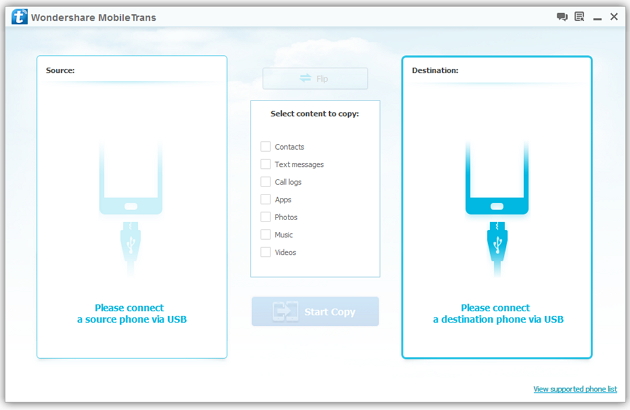
Step 2: Connect your HTC and Samsung S3 to the computer
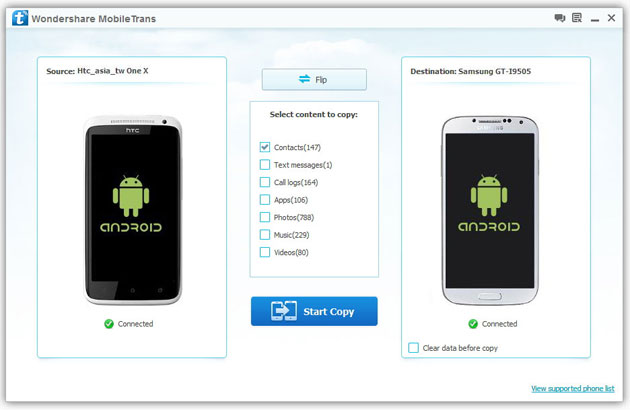
Step 3: Transfer contacts from THC to Samsung Galaxy S3
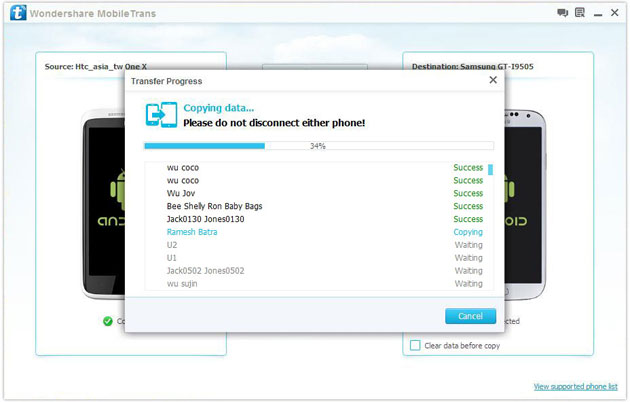
2) Not just contacts, transfer SMS, call logs, photos, music, videos and apps*
3) Comprehensive contact copy, including job title, email addresses, company name, etc.
4) Works with over 2,000 phones including Droid, Symbian (Nokia), and all models of iPhones, including new iPhone 5.
5) Transfers content between phones on different networks. AT&T, Verizon, Sprint, T-Mobile - no problem!

