






















Trending Topics

Apple is planning to bring OLED technology to the iPad mini
Apple is finally ditching LCD screens and planning to bring OLED technology to its iPad mini. This new iPad mini will be released early in October. How excited are you about this?

Is the iPad mini (2026) worth buying for reading and travel?
I am thinking about getting a tablet, should I opt for the iPad mini (2026). Has anyone used it yet? I want to know if buying this is worth the price?

OUKITEL C3 spec confirmed, will be first MT6580 device to do android 6.0
Last week we get the OUKITEL C3 design script, according to the design photo, it features a 3D diamond design for the back cover which is quite special. But diamond is hard to control. Now we get the real photo of the device.

Take a closer look, you will find the pattern on the back cover, this is not only fashionable but also avoid hand slide.
Released in April, OUKITEL C3 will be the first 5inch MT6580 devices to take Android 6.0 Marshmallow. No need to wait for updating.
As OUKITEL product manager said, OUKITEL C3 will feature the best screen, best camera and most fashionable design with most wallet-friendly price among 5 inch MT6580 smartphones.
C3 features HD IPS display with 1280*720 resolution and for touch screen, and , it is using AUO brand screen for the display which is the same display as iPad mini. Carrying the MT6580 Quad-core chip set with 1GB RAM and 8GB ROM, C3 can manage multi-tasks freely.
It gets a 8MP rear camera and a 2MP front camera for wonderful shooting experience. Though the battery is only 2000mAh battery, OUKITEL make the battery lasts longer due to the intelligent power saving management system.
To thanks for consumers' feedback for us, OUKITEL is offering April's welfare on official Facebook which is: Giveaway 5 devices for fans to experience. C3 presale will start soon in mid-April, the earlier you order, the earlier you will get a android 6.0 device to experience.

How to Transfer Contacts from HTC to Samsung
Help! I recently purchased a Samsung S3 and want to transfer SIM and phone contacts from HTC Desire to Samsung S3. However, I have to use a new Mini-SIM with the S3 and I can’t put my old SIM in the phone. Is there an easy way to complete this task? Actually, if you want to cope HTC contacts to Samsung, like Samsung S3, you don't have to insert the old SIM card or edit the phone numbers one by one on your Samsung S3. With the help with Phone to Phone Transfer tool, you can transfer all your contacts including the ones in Gmail, How to Transfer Photos from iPhone/iPad/iPod to Computer ChatON and other accouts to the Samsung Galaxy S3 with I click. Download Phone to Phone Transfer tool to copy contacts from HTC to Samsung S3. Note: Phone to Phone Transfer works well with Samsung and HTC phones and tables. Check more supported Samsung and HTC phones and tablets and Android OS here. Download, install and run Phone to Phone Transfer on your computer. The primary window pops up like the screenshot shows below. Connect both of HTC phone and Samsung S3 to the computer via USB cables. Then this program will detect the two devices soon as possible. After that, you can see them in the primary window. On the left is your HTC phone, and on the right is Samsung S3. Between the two devices is "Flip", which lets you change the places of the two devices. It needs you can follow the similar steps to transfer contacts from Samsung S3 to HTC phone. If you decide to remove all contacts on your target Samsung S3 to save the being transferred contacts, you just need to tick off "Clear data before copy". Or just keep "Clear data before copy" unchecked if you don't want to delete the contacts. This Phone to Phone Transfer program empowers you to cope contacts, music, videos, SMS, apps, call logs and photos from HTC to Samsung within 1 click. Therefore,How to Transfer PDF to iPhone from Computer with Ease you can choose the data which you want to transfer. If you only want to cope the contacts, please uncheck the other data except contacts and click "Start Copy". You can check the process in the pop-up transfer window. When the contact transfer process comes to an end, please click "OK" button. That's all! More information about Phone to Phone Transfer tool: Zero quality loss & risk-free: everything you transfer is 100% same as the original and can be only read by yourself. 

How to cope contacts from HTC to Samsung Galaxy S3 in 1 click
Step 1: Run Phone to Phone Transfer tool
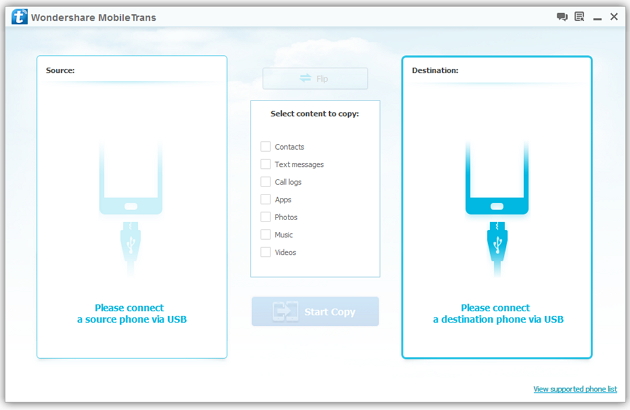
Step 2: Connect your HTC and Samsung S3 to the computer
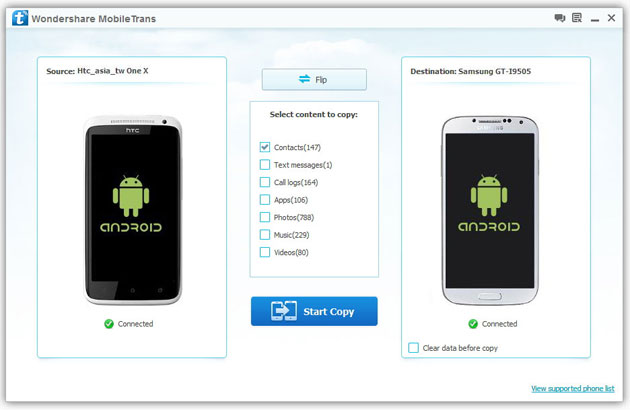
Step 3: Transfer contacts from THC to Samsung Galaxy S3
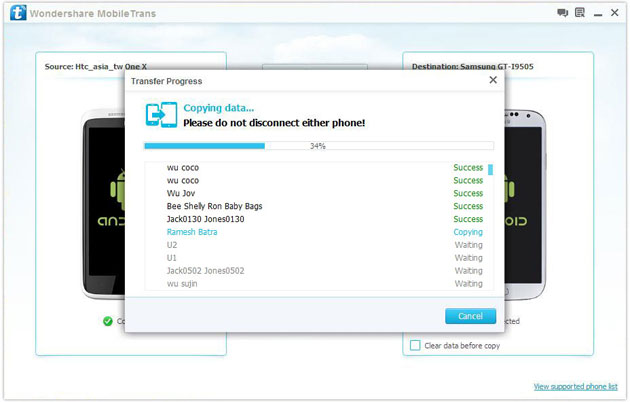
2) Not just contacts, transfer SMS, call logs, photos, music, videos and apps*
3) Comprehensive contact copy, including job title, email addresses, company name, etc.
4) Works with over 2,000 phones including Droid, Symbian (Nokia), and all models of iPhones, including new iPhone 5.
5) Transfers content between phones on different networks. AT&T, Verizon, Sprint, T-Mobile - no problem!

Help.Stylus buying
Which stylus should I buy for ipad mini 1? Can go up to rs.1000.Please reply fast.

