






















Trending Topics

What’s one tech purchase you regret buying?
We’ve all bought some gadget that looked amazing in reviews but turned out disappointing in real life, maybe bad battery, buggy software, or just didn’t use it as much as expected. What’s one tech purchase you regret the most, and what went wrong?

Recommendations needed for fitness watch to buy
Please recommend a good fitness tracking wristband / watch. I need accurate pulse, BP, SPO2, activity tracking (walking, cycling, yoga), and ECG. I have a OnePlus 5 phone and do not want to buy another phone.
Have used a Fitbit Charge HR and was very disappointed with the life of the watch i.e. 18 months (happened to me 2 times)

How to Transfer Contact from iPhone to Computer - iPhone Contact Transfer
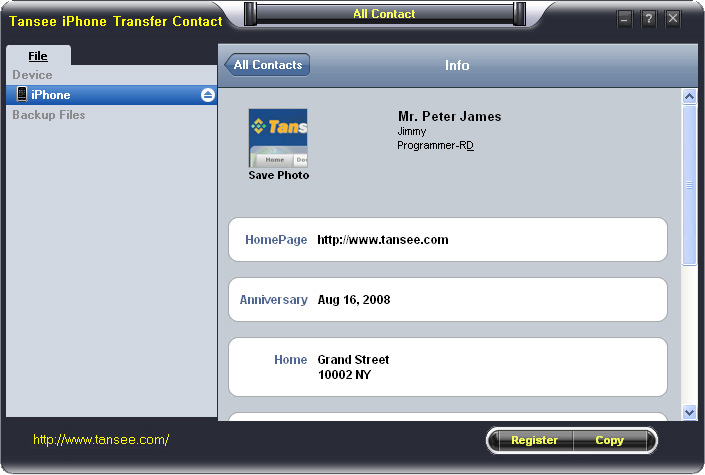
iPhone Transfer Contact can provide you: Tutorial 1: Transfer Contact from iPhone to Computer Tutorial 2: Transfer Contact’s photo from iPhone to Computer Tutorial 3: Restore Contact from CSV file to Outlook Tutorial 4: Restore Contact from CSV file to iPhone Step 2: Connect your iPhone to your computer, mobiletrans and run iPhone Transfer Contact. Then, your contacts on iPhone memory will display as shown in your iPhone screen automatically as fig 1. You can click on single name, all his or her information will display as fig 2 shown.
- Backup iPhone Contact’s Photos.
- Export two types of file format (Antc file, Text file).
- Export full screen of iPhone contact’s Photos.
- View Contacts in Text file format (.txt) or ANTC file format (.antc) on PC.
- Password protection support (ANTC file only).
Tutorial 1: How to transfer contact from iPhone to computer
Step 1: You can download iPhone Transfer Contact free version here, and install the software (skip if done yet). 

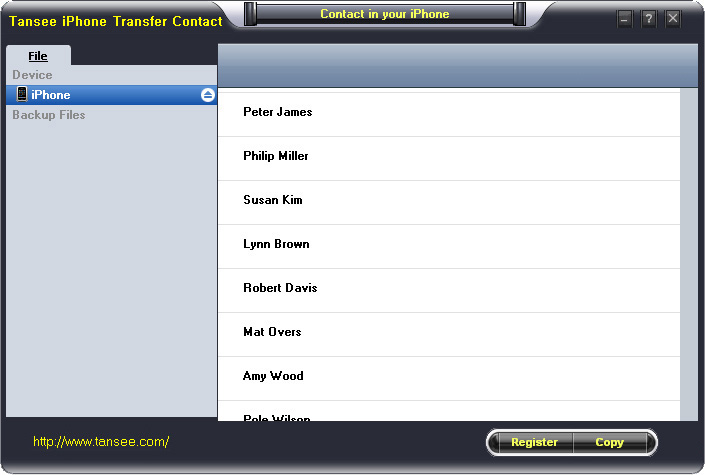
Step 3-a: In fig 1 situation, click button "Copy" to copy all contacts from your iPhone to your computer , then select options:
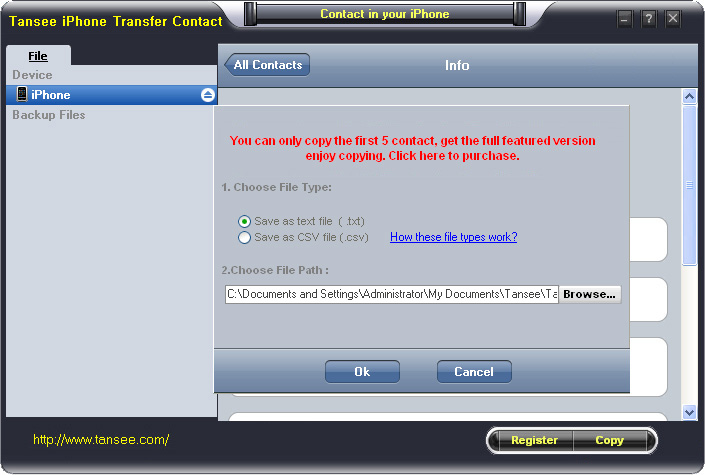
1: Choose File Type: backup to TXT file, ANTC file or CSV file;
2: Choose File Path: You also can change the backup path if you don’t use default path.
3: Advanced Option: if you choose ANTC format in step 1, you can add a password to protect the file.
Note: You must remember your password, because we don’t know the it except yourself. So please remember it well.
Click "OK" Button to finish the Copy. Please see fig 3.
Note: With trail version, you can only copy the first 5 contacts .

1: Choose File Type: Backup contacts to TXT file, and CSV file in single contact transfer;
2: Choose File Path: You can change the backup path if you do not use default path;
3: Advanced Option: Disabled in single contact transfer.
Click OK Button to finish the Copy. See fig 4.
Note: You can only copy the first 5 contacts in trail version.
Tutorial 2: How to transfer iPhone contact’s photo to computer?
In fig 2 above, you can click the photo of single person to save it to your computer., then you can transfer iPhone contact’s photo to computer. See fig 5.

Tutorial: 3:How to restore contact from CSV file to outlook?
Step 1: Backup all your contacts from iPhone to computer as .csv file format using iPhone Transfer Contact.
Step 2: Click on Start - All Programs - Accessories, click to open Address Book.
In Address Book, click File - Import - Other Address Book..., select "Text File (Comma Separated Values)", click Import, then browser the CSV file, click Next, Map the fields you wish to import, click finish.After all this, you had import the contacts to your Windows Address Book.
Step 3: Open Outlook; Open the File menu; Choose “Import and Export”; In the “Import and Export Wizard” dialog box choose “Import Internet email and address", then choose "OUTLOOK EXPRESS 4.X 5.X 6.X", click "Next".
Tutorial 4: How to restore contact from CSV file to iPhone?
Step 1: Backup all your iPhone contacts computer as .csv file format using iPhone Transfer Contact.
Step 2: Click on Start - All Programs - Accessories, click to open Address Book.
In Address Book, click File - Import - Other Address Book..., select "Text File (Comma Separated Values)", click Import, then browser the CSV file, click Next, Map the fields you wish to import, click finish.After all this,how to use anytrans you had import the contacts to your Windows Address Book.
Step 3: Open iTunes, connect iPhone, click to select the iPhone on iTunes, choose Info tab, in Contact section, check "Sync contacts with Window Address Book", click apply. Back To Homepage.

Asus ZenFone Selfie, ZenFone 2 Deluxe, and ZenFone 2 Laser 5.5
The new Zenfone Selfie, Zenfone 2 Deluxe, and Zenfone 2 Laser 5.5 from Asus will go up for pre-orders on Flipkart from Wednesday? Any guesses when they will start shipping? Which one of the three are you looking forward to the most? Answer and stand a chance to win a smartphone + goodies from Asus. Here's a little refresher on what the phones offer. The ZenFone Selfie comes with dual rear and front 13-megapixel cameras. The front camera's 88-degree wide-angle lens, f/2.2 aperture, dual LED front flash, and 140-degree panoramas ensure you and your friends will never miss out on the perfect selfie. The rear camera's just as good, with dual LED flash of its own, and f/2.0 aperture for improved low-light performance. The ZenFone Selfie comes in stylish Pure White, Chic Pink and Aqua Blue colours, making sure you stand out from the crowd. It's backed by an octa-core 64-bit CPU, 3GB RAM, and Gorilla Glass 4 for protection. The Asus ZenFone 2 5.5 Laser looks modest in comparison on paper, but it's no slouch either when it comes to features and specifications. It packs in a 5.5-inch HD display with Gorilla Glass 4, with 2GB RAM and dual SIM 4G support. The highlight of the device is its rear camera's laser auto-focus technology, which enables near-instant focus as fast as 0.3 seconds, especially in dim light conditions. The 13-megapixel camera packs in a five-element lens and f/2.0 aperture for good low light performance. The ZenFone 2 Laser 5.5 comes with ZenUI which has features like ZenMotion, SnapView, Trend Micro Security, and ZenUI Instant Updates that enhance usability, ensure security and privacy, and deliver a seamless user experience. Last, but definitely not the least is the Asus ZenFone 2 Deluxe, which brings the popular ZenFone 2 in a new avatar with enhanced storage.

Tata docom sim card
hi i want switch over to vodofone to tata docomo, i have prepaid sim. now i approach to nanganallur tata docomo shop for past ten days.but he has no stock prepaid sim for past 10days. he has given no 9043191332. portability is hardone for me. you will arrange for prepaid sim as early as possible. with regards Dear nalini Warm Regards, Raju, Customer Care -Tata Docomo -----Original Message----- sir you shop in nanganallur people told he has not stock prepaid sim for portablity for past ten days. please send prepaid sim to nanganllur. can you understand. there is no prepaid sim in your nanganallur branch. that is your tata docomo shop with regards From: listen@tatadocomo.com Dear nalini, This is with reference to your email dated 14-09-2015 regarding SIM concern for your Tata Docomo Mobile number.I regret to inform you that, the number which you have mentioned is not reflecting in our records. Hence, I request you to revert us with the complete outlet details where you have visited for the prepaid SIM for further assistance If there is anything else that you want to share with us, we are all ears. You can call us at 1860-266-5555 or write to us at listen@tatadocomo.com. Assuring you of our best services at all times. Warm Regards, Satya, Tata Docomo. We would love to hear from you,Click here to share your valuable feedback. CIN- U74899DL1995PLC066685 Visit our Website at www.tatadocomo.com Email us at listen@tatadocomo.com For Postpaid and Prepaid - 121 from Tata connection. For Photon Tata Docomo - 1800-266-121(toll free) We are also accessible from non Tata mobile phones on 1860-266-5555. Toll free from TATA Mobile phones only. -----Original Message----- From: masi1981@rediffmail.com Sent: 2015-09-14 12:19:33.0 To : listen@tatadocomo.com Cc: null Subject: prepaid sim~~M24215879 [Note: Please don't change the subject for internal tracking purpose and immediate action. can anybody above content known. because i wnat only new prepiad sim but tata docomo shop no stock that is why i contact tata dodomo listen. but reply is above. what can i do
sir/madam
c nalini
This is with reference to your email dated 17-09-2015 regarding activation concern for your number 9043191332
I regret to inform you that, I am unable to process your request from our end as your number is not reflecting with our data base. Hence I request you to check with the outlet or retailer where you have purchased the SIM for further proceedings.
For your convenience, I am attaching the link where you can check the all the outlet details online. Click here - http://www.tatadocomo.com/brand-stores.aspx.
If there is anything else that you want to share with us, we are all ears. You can call us at 1860-266-5555 or write to us at listen@tatadocomo.com
Assuring you of our best services at all times.
Registered Office : Tata Teleservices Limited, Jeevan Bharati, Tower 1,10th Floor, Tower 1, Jewan Bharathi, 124 Connaught Circus, New Delhi 110001.
CIN- U74899DL1995PLC066685
Visit our Website at www.tatadocomo.com
Email us at listen@tatadocomo.com
* For Postpaid and Prepaid - 121 from Tata connection.
* For Photon Tata Docomo - 1800-266-121(toll free)
* We are also accessible from non Tata mobile phones on 1860-266-5555. Toll free from TATA Mobile phones only.
From: masi1981@rediffmail.com
Sent:2015-09-17 09:43:48.0
To : "listen@tatadocomo.com" LISTEN@TATADOCOMO.COM
Subject:Re: prepaid sim~~M24215879
[Note: Please don't change the subject for internal tracking purpose and immediate action.
nalini
Sent: Tue, 15 Sep 2015 13:02:28
To: masi1981@rediffmail.com
Subject: prepaid sim~~M24215879
Note : The feedback link will go inactive in 3 days.Registered Office : Tata Teleservices Limited, Jeevan Bharati, Tower 1,10th Floor, Tower 1, Jewan Bharathi, 124 Connaught Circus, New Delhi 110001.

