






















Trending Topics

MINI PC Configuration
Friends, I require configuration of MINI PC CPU(Without Monitor) under ₹14K. It'll be used for basic software running(Word/excel), no gaming but media playing(1080p videos) & everyday use. Reply in the following manner: CPU Component Name - Approx. Price(₹) *** DVD Drive Not Required.
1. Cabinet(MINI ITX)
2. Processor(intel only)
3. Motherboard(with HDMI+USB 3.0)
4. RAM
5. HDD

How to Transfer Contacts from HTC to Samsung
Help! I recently purchased a Samsung S3 and want to transfer SIM and phone contacts from HTC Desire to Samsung S3. However, I have to use a new Mini-SIM with the S3 and I can’t put my old SIM in the phone. Is there an easy way to complete this task? Actually, if you want to cope HTC contacts to Samsung, like Samsung S3, you don't have to insert the old SIM card or edit the phone numbers one by one on your Samsung S3. With the help with Phone to Phone Transfer tool, you can transfer all your contacts including the ones in Gmail, How to Transfer Photos from iPhone/iPad/iPod to Computer ChatON and other accouts to the Samsung Galaxy S3 with I click. Download Phone to Phone Transfer tool to copy contacts from HTC to Samsung S3. Note: Phone to Phone Transfer works well with Samsung and HTC phones and tables. Check more supported Samsung and HTC phones and tablets and Android OS here. Download, install and run Phone to Phone Transfer on your computer. The primary window pops up like the screenshot shows below. Connect both of HTC phone and Samsung S3 to the computer via USB cables. Then this program will detect the two devices soon as possible. After that, you can see them in the primary window. On the left is your HTC phone, and on the right is Samsung S3. Between the two devices is "Flip", which lets you change the places of the two devices. It needs you can follow the similar steps to transfer contacts from Samsung S3 to HTC phone. If you decide to remove all contacts on your target Samsung S3 to save the being transferred contacts, you just need to tick off "Clear data before copy". Or just keep "Clear data before copy" unchecked if you don't want to delete the contacts. This Phone to Phone Transfer program empowers you to cope contacts, music, videos, SMS, apps, call logs and photos from HTC to Samsung within 1 click. Therefore,How to Transfer PDF to iPhone from Computer with Ease you can choose the data which you want to transfer. If you only want to cope the contacts, please uncheck the other data except contacts and click "Start Copy". You can check the process in the pop-up transfer window. When the contact transfer process comes to an end, please click "OK" button. That's all! More information about Phone to Phone Transfer tool: Zero quality loss & risk-free: everything you transfer is 100% same as the original and can be only read by yourself. 

How to cope contacts from HTC to Samsung Galaxy S3 in 1 click
Step 1: Run Phone to Phone Transfer tool
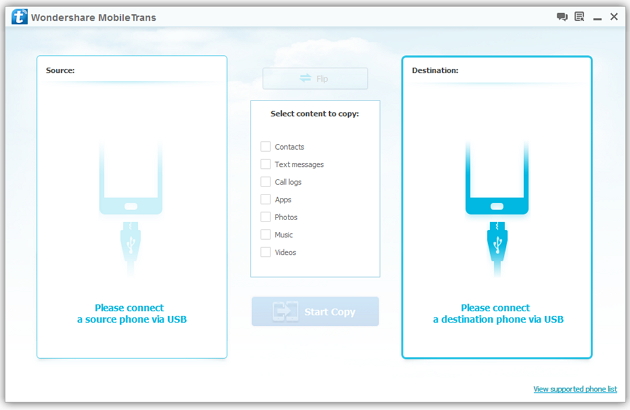
Step 2: Connect your HTC and Samsung S3 to the computer
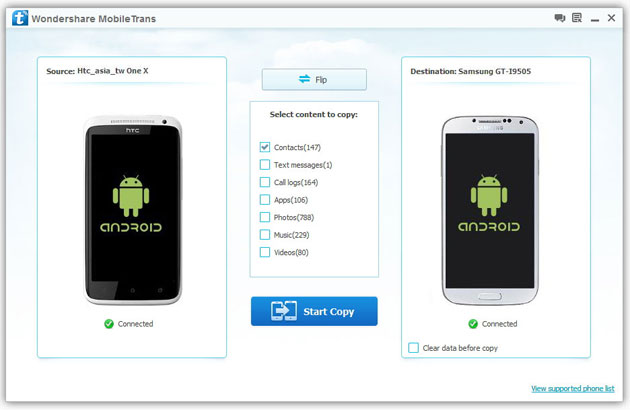
Step 3: Transfer contacts from THC to Samsung Galaxy S3
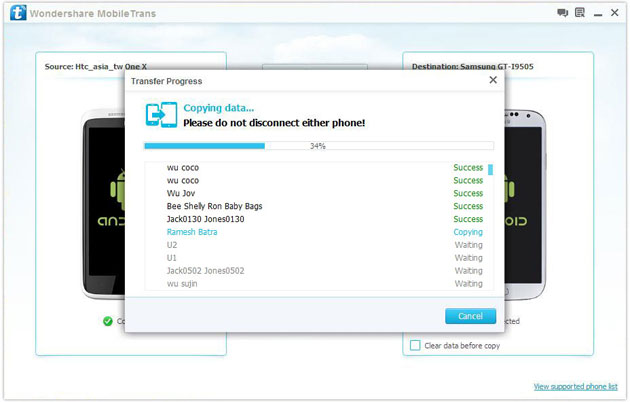
2) Not just contacts, transfer SMS, call logs, photos, music, videos and apps*
3) Comprehensive contact copy, including job title, email addresses, company name, etc.
4) Works with over 2,000 phones including Droid, Symbian (Nokia), and all models of iPhones, including new iPhone 5.
5) Transfers content between phones on different networks. AT&T, Verizon, Sprint, T-Mobile - no problem!
How to Transfer Music from Samsung Galaxy to iPhone 6s
Many people, especially youngster, like editing and creating their own songs or music with some useful and fabulous music-editing apps on Samsung smartphone, for instance Galaxy S6/ S6 Edge, Galaxy Note 4. However, if you buy a new iPhone 6s and you want to transfer the edited music from Samsung device to your iPhone 6s, how could you get it done? I guess you will firstly save the songs from Samsung to PC/Mac, then,mobiletrans import the music into iTunes and sync iPhone 6s with iTunes Library. This is exactly a workable solution yet inconvenient. Here is another way helping you to directly transfer music from Samsung devices to iPhone 6s.
TunesGo is a professional tool which supports you to straightforwardly transfer music in between iPhone and Android, iTunes and Android as well as iOS and iOS. Besides, it also enables you to download song tracks from YouTube, manage and organize albums in iTunes.Tutorial about Transferring Music from Samsung to iPhone 6s
Step 1 Download and Install TunesGo
Hit the buttons to download the software on your computer: Windows users click the left button and Mac users the right one. When download finished, set up the program.
Step 2 Plug Samsung and iPhone 6s in the Computer
Run the TunesGo on the computer after installation. Connect both your Android and iOS device to PC/Mac via USB cable.
For Samsung device, you need to enable USB debugging on the phone so as to build the connection.
1) For Android 4.2 or newer: Go to "Settings" > "About Phone" on your Samsung. Press "Build number" for several times until "You are under developer mode". Then enter "Settings" again, and choose "Developer options" > "USB debugging".
2) For Android 3.0 to 4.1: Go to "Settings" > "Developer options" > "USB debugging".
3) For Android 2.3 or earlier: Go to "Settings" > "Applications" > "Development". Check "USB debugging".
When it's connected, you can see it as the below interface.
As for iPhone, you need to tap "Trust" in the phone screen to build the connection.
Step 3 Copy Music from Samsung to iPhone 6s
Click the Samsung device in the left menu and hit the "Music" option under the Samsung panel to open the playlists. All the songs in Samsung Galaxy will be listed in the main window. Select the songs you want to transfer and click the "Export" button. A pop-up box will show you three options, how to transfer candy crush to new iphone hit "Export to iPhone 6s (the name of your iPhone)", the selected music will start transferring from Samsung Galaxy to iPhone 6s. 
More Feature: Manage iTunes Library
TunesGo also works as the iTunes Library manager. With it, you can fix the missing and inaccurate tags and covers of iTunes music. Clean up duplicated songs as well as remove missing tracks.
There are more impressive features on TunesGo waiting for your exploration. Hurry to download it and give it a shot.
How to Recover Deleted Contacts from Water Damaged iPhone 6S
Summary: Do not panic if you lose contacts when your iPhone is water damaged, iPhone Data Recovery can help you recover deleted contacts from water damaged iPhone 6S . As we all know, letters for contacting and communication has withdrew from our life for many years. With the rapid development of science and technology in the modern society, we are in favor of iPhone 6S and always enjoy the convince that mobile phone bring to us, as long as you have someone’s contact number, you can take up your iPhone 6S to click his contact number and begin to talk to him or her, no matter how far this people is from you. As a result, it is obvious that contacts are very necessary to store in your device and so we do. I bet nowadays, no one will be so “hard working” to write the contacts down on the notebook,How to Transfer Music from Android to Another Android because that is really troublesome and inconvenient. Everyone are used to directly store the contacts in iPhone 6S. Here, sometimes unavoidably, trouble comes to you, especially the device is really waterproof as some other electronic products, such as Tank007 flashlights IP68. I mean, it often occurs that our iPhone 6S are water damaged when we bend down in the bathroom, when we go walking along a small river, when we wash our hands in the kitchen, etc. And then you will be crazy about the following results. All the contacts in your device are lost, including your sweetheart’s, your families’, your best friends’, your important customers’, your colleagues’, etc. “Oh, my god, what a big loss caused by an small accident! Shit!” Ok, good guy, If you are just keeping sad and annoyed about that, than you can only be regretful; But if you come to us, then all this messy condition can be solved with an amazing tool from us—-iPhone Data Recovery. This tool is absolutely multi-functional and perfect choice for you to save your loss, such as contacts, messages, photos, videos, call history, notes, reminders, bookmarks, music, documents, etc. Do not think that this can just be believable in magic suppositional world, or just think I am fooling you around. You may think how can it recover something that doesn’t exist in your device any more. No, not exactly. Let me explain to you. In fact, your iPhone 6S data have not truly get away from your device, but secretly hidden in some invisible place. What you need to do for recovery is to draw support from outside tool to scan your device and find them out. How to Recover Deleted Contacts from Water Damaged iPhone 6S Step 1: Take up seconds to download iPhone Data Recovery and set up this software system in your computer. Then your device need to be connected to computer by USB cable.
Ok, let me tell you how you can make it!
Step 2: Focus on your iPhone 6S device and choose ”Recover”, then all the categories of your device turn up.
Step 3: Choose “ Contacts “ category, How to Manage iTunes Transfer Easily then click the “Scan “ buttom to scan all your contacts.
Step 4: Carefully selecting the contacts which you think are essential and want to be get back.
Now you can see the surprise. So in the future, no matter how many contacts you have stored in the iPhone 6S and unfortunately your device are water damaged, just follow my above step, then you can be completely satisfied and feel happy again.

Help me purchase my new lap top
Most important spec of all is "build quality, service, support". I am willing to pay for that quality! General Specs. 1) What is your budget? Up to $1500 2) What size notebook would you prefer? e. Desktop Replacement; 17"+ screen 3) Where will you buying this notebook?
I have nothing against large PC companies, HP, Dell, Lenovo, Sony, etc. That said, it seems very difficult to get close to what I'm looking for from these main suppliers. I live in the US but discovered in my research, small PC builders, they seem to cater to gamers, hi end business machines, but some will work with someone like me. Some were even in the UK and seemed to be well thought of and some even seemed competitive in price, even with shipping. A question is, is it silly for me to consider looking at these small builders, I might be incorrect in thinking that these smaller shops might take quality/service/support as more important, then say a multinational corp. I'm open to any and all suggestions, directions, opinions. Anybody who has weighed through this long winded request and wants to comment, hey, feel free, I'll be happy to hear any thing you all have to say.
US if possible UK if necessary
4) Are there any brands that you prefer or any you really don't like?
N/A
5) Would you consider laptops that are refurbished/redistributed?
Yes
6) What are the primary tasks will you be performing with this notebook?
Watching/streaming videos, uTube, TV...Web surfing...Email...letter writing
7) Will you be taking the notebook with you to different places, leaving it on your desk or both?
Notebook will travel but will be plugged in most of the time, no matter where it is.
8) Will you be playing games on your notebook? If so, please state which games or types of games?
No games.
9) How many hours of battery life do you need?
Machine will rarely run on battery longer than 1 hour.
10) Would you prefer to see the notebooks you're considering before purchasing it or buying a notebook on-line without seeing it is OK?
I do not need to physically see/touch machine before buying.
11) What OS do you prefer? Windows (Windows 7 / 8), Mac OS, Linux, etc.
I'm hoping to buy PC with Win 10 installed, hopefully without bloatware/crapware, a clean install.
Screen Specifics
17.3
12) What screen resolution would you prefer?
Text should be big and east to read, very good resolution a must. Something like a 1920x1080 display would be fine.
13) Do you want a Glossy/reflective screen or a Matte/non-glossy screen?
No preference, open to suggestions.
Build Quality and Design
Build quality is most important also warranty, support (Will pay for quality)
14) Are the notebook's looks and stylishness important to you?
No
15) When are you buying this laptop?
Right away, if my old one dies, or end of July, when Win 10 is available, I have Win 7 now and I am eligible for the upgrade to Win 10, either as OE or when Win 10 media is available.
16) How long do you want this laptop to last?
As long as my old one, 5+ years
Notebook Components
CPU, a decent dual core or a lower end Core i3-5-7 processor core may be a better choice down the road.
GPU, any Intel IGP should do, or a lower end dedicated chip.
RAM: 12GB sounds good, open to suggestions.
Networking: A good Intel or Atheros chip will do the trick quite well. plus Blue Tooth.
Extras Card readers, fingerprint stuff, docking station. not important. Connections for USB 2 and 3, MDMI, ethernet, yes important.
Battery, What ever battery comes with this PC will be hard pressed to keep up with a 17" display, as stated above, unit will be plugged in most of the time.
Thank you for any help, direction or suggestions.

