






















Trending Topics

Fitbit vs Amazfit around Rs. 10,000: which would you pick mainly for health and activity tracking?
I don't need many calling features or a huge app library. I want a comfortable watch that tracks everyday activity and sleep without charging another daily task.

Why Are Crypto Developers Moving Towards Modular Blockchains?
Not every blockchain needs to handle every task itself. Modular blockchain designs separate responsibilities such as execution, consensus, settlement and data availability across different layers or networks. The idea is that specialised components can potentially improve scalability and allow developers to build networks suited to specific applications. However, greater modularity can also introduce more technical complexity and dependencies between different systems. As blockchain infrastructure evolves, the debate is shifting from simply asking which blockchain is fastest to asking how different networks can work together. Could modular architecture become the standard way future blockchains are designed?
I did not realise how much time I spend washing glasses and cups until I stopped doing it myself
They never felt like a big task individually. But together they somehow take more time than expected.

How I Recovered My Lost Bitcoin | Digital Light Solution Review
The most well-known cryptocurrency in the world, Bitcoin, has become extremely well-known in recent years. But because of its extensive use and high value, hackers and cybercriminals now find it to be a desirable target. Unfortunately, there has been an increase in Bitcoin theft cases, which puts people and companies at risk of suffering large financial losses. Although recovering lost Bitcoin is a complicated process, [Digital Light Solution] is an expert at it. They start their approach by taking a close look at the circumstances and compiling all relevant data and proof. From then on, their team of professionals tracks down the Bitcoins that have been stolen, finds the offenders, and attempts to get the money back. They do this by using state-of-the-art methods and instruments. [Digital Light Solution] team of professionals has years of experience in the industry and has perfected their technique of Bitcoin recovery. To increase their chances of winning, they combine legal tactics, blockchain research, and digital forensics.[Digital Light Solution] has emerged as a ray of light for people who have been defrauded of Bitcoin through their unwavering pursuit of justice.[Digital Light Solution] boasts a team of brilliant minds who are not only well-versed in the intricacies of Bitcoin and blockchain technology but also possess a deep understanding of cybercrime and the tactics employed by hackers. Their extensive knowledge and experience make them the go-to experts when it comes to recovering stolen Bitcoin. Modern technologies and solutions created especially for the challenging task of Bitcoin recovery are used by [Digital Light Solution] to stay ahead of the curve. Their goal is to provide their clients with justice, and they achieve this by using cutting-edge analytics platforms and specialized tools. Against Bitcoin thieves, if you find yourself in a similar situation, I recommend reaching out to them. Their expertise and dedication can make all the difference in recovering lost funds, and I am living proof of their capabilities.E ma i l:digitallightsolution @ q uality service.com and Whats A p p: 19548568045 [TelegramID digitallightsolution]

Samsung Galaxy S26 Ultra LOG Video for Food Creators
Editing content around food is a difficult task, especially when dealing with reflective surfaces and mixed indoor lighting. Someone I know told me to use LOG video recording on my Galaxy S26 Ultra. Simply record the footage first and then colour grade it later.

Is “agentic AI” hype overrated compared with basic chatbot usefulness?
Everyone talks about autonomous task-executing bots, but for most people simple answer engines are more practical. Are we overhyping autonomy?

Top 9: Features of Honor 7 do you know
1) knuckles EMUI3.1 screenshots is a highlight function, using the knuckles, double-click the interception of the full screen, or draw a closed pattern intercepts all screen.
2) Rapid capture : Speaking of screenshots, I must mention the rapid capture, these two functions in EMUI3.0 already have. Under black state, double-click the volume down button to capture successful time in about one second, the focus imaging is also very clear.
3) drop-down at the top of the screen - Open the "switch" - Long press a switch will be able to enter the function settings interface is really practical and easy to do.
4) the main screen or blank screen, you can open the search function down, and it will list the eight most recently used application.
5) double-click function. In Settings - gesture control - Double-click to open.
6) painting the letters to open applications, experience super like it! For example, under the black screen, the screen will be able to draw the letter M to open the music it!
7) long press the navigation bar small box "key task", recently used application will switch turns friends. Before you find this feature yet?
8) want to clean up the background, but do not want to clean up all at once, a separate clean-up and too much trouble. Do not upset, I'll give you Weapon! Just slide down the application in recent tab list and clear, that slide down application will be locked
9) Speak to wake up Dear Honor !! I loved it...
How to Transfer Contacts from HTC to Samsung
Help! I recently purchased a Samsung S3 and want to transfer SIM and phone contacts from HTC Desire to Samsung S3. However, I have to use a new Mini-SIM with the S3 and I can’t put my old SIM in the phone. Is there an easy way to complete this task? Actually, if you want to cope HTC contacts to Samsung, like Samsung S3, you don't have to insert the old SIM card or edit the phone numbers one by one on your Samsung S3. With the help with Phone to Phone Transfer tool, you can transfer all your contacts including the ones in Gmail, How to Transfer Photos from iPhone/iPad/iPod to Computer ChatON and other accouts to the Samsung Galaxy S3 with I click. Download Phone to Phone Transfer tool to copy contacts from HTC to Samsung S3. Note: Phone to Phone Transfer works well with Samsung and HTC phones and tables. Check more supported Samsung and HTC phones and tablets and Android OS here. Download, install and run Phone to Phone Transfer on your computer. The primary window pops up like the screenshot shows below. Connect both of HTC phone and Samsung S3 to the computer via USB cables. Then this program will detect the two devices soon as possible. After that, you can see them in the primary window. On the left is your HTC phone, and on the right is Samsung S3. Between the two devices is "Flip", which lets you change the places of the two devices. It needs you can follow the similar steps to transfer contacts from Samsung S3 to HTC phone. If you decide to remove all contacts on your target Samsung S3 to save the being transferred contacts, you just need to tick off "Clear data before copy". Or just keep "Clear data before copy" unchecked if you don't want to delete the contacts. This Phone to Phone Transfer program empowers you to cope contacts, music, videos, SMS, apps, call logs and photos from HTC to Samsung within 1 click. Therefore,How to Transfer PDF to iPhone from Computer with Ease you can choose the data which you want to transfer. If you only want to cope the contacts, please uncheck the other data except contacts and click "Start Copy". You can check the process in the pop-up transfer window. When the contact transfer process comes to an end, please click "OK" button. That's all! More information about Phone to Phone Transfer tool: Zero quality loss & risk-free: everything you transfer is 100% same as the original and can be only read by yourself. 

How to cope contacts from HTC to Samsung Galaxy S3 in 1 click
Step 1: Run Phone to Phone Transfer tool
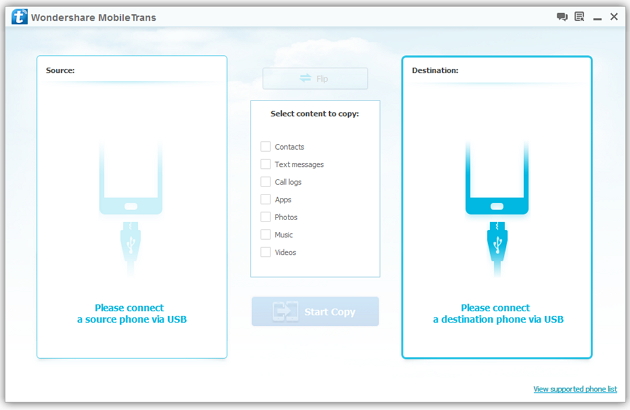
Step 2: Connect your HTC and Samsung S3 to the computer
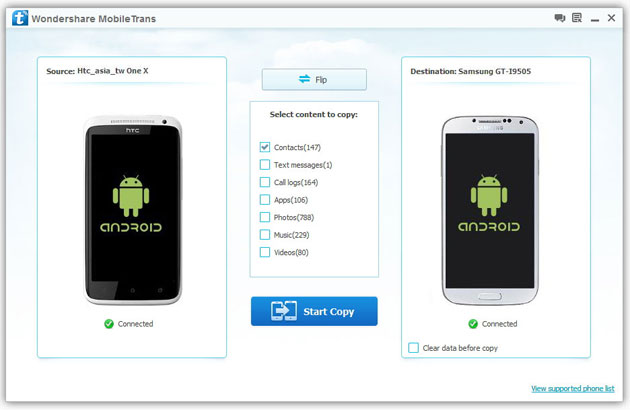
Step 3: Transfer contacts from THC to Samsung Galaxy S3
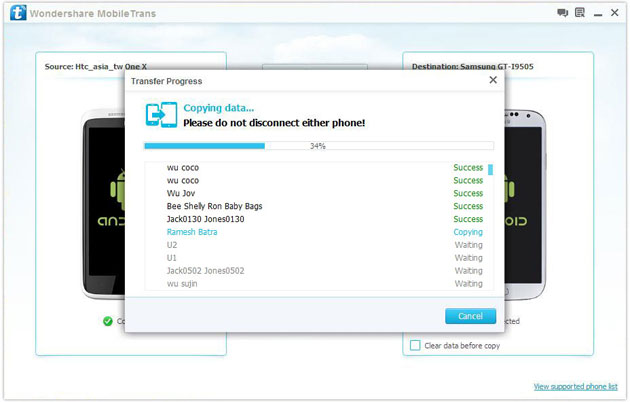
2) Not just contacts, transfer SMS, call logs, photos, music, videos and apps*
3) Comprehensive contact copy, including job title, email addresses, company name, etc.
4) Works with over 2,000 phones including Droid, Symbian (Nokia), and all models of iPhones, including new iPhone 5.
5) Transfers content between phones on different networks. AT&T, Verizon, Sprint, T-Mobile - no problem!

Moto 3rd gen vs Samsung J7
Looking at specs i liked both of them but yet couldn't decide which one to buy However when i review specs of samsung J7 is equally good and display is indeed better. I am planning to use phone for atleast 2 years so its tough to decide one. Pls help me to pick one as its indeed a difficult task
Alot of my friends suggested me to buy moto 3rd gen because of past experience with samsung was bad
like 1.slow processing 2. Sound Quality 3. camera Quality

