






















Trending Topics

Tata docom sim card
hi i want switch over to vodofone to tata docomo, i have prepaid sim. now i approach to nanganallur tata docomo shop for past ten days.but he has no stock prepaid sim for past 10days. he has given no 9043191332. portability is hardone for me. you will arrange for prepaid sim as early as possible. with regards Dear nalini Warm Regards, Raju, Customer Care -Tata Docomo -----Original Message----- sir you shop in nanganallur people told he has not stock prepaid sim for portablity for past ten days. please send prepaid sim to nanganllur. can you understand. there is no prepaid sim in your nanganallur branch. that is your tata docomo shop with regards From: listen@tatadocomo.com Dear nalini, This is with reference to your email dated 14-09-2015 regarding SIM concern for your Tata Docomo Mobile number.I regret to inform you that, the number which you have mentioned is not reflecting in our records. Hence, I request you to revert us with the complete outlet details where you have visited for the prepaid SIM for further assistance If there is anything else that you want to share with us, we are all ears. You can call us at 1860-266-5555 or write to us at listen@tatadocomo.com. Assuring you of our best services at all times. Warm Regards, Satya, Tata Docomo. We would love to hear from you,Click here to share your valuable feedback. CIN- U74899DL1995PLC066685 Visit our Website at www.tatadocomo.com Email us at listen@tatadocomo.com For Postpaid and Prepaid - 121 from Tata connection. For Photon Tata Docomo - 1800-266-121(toll free) We are also accessible from non Tata mobile phones on 1860-266-5555. Toll free from TATA Mobile phones only. -----Original Message----- From: masi1981@rediffmail.com Sent: 2015-09-14 12:19:33.0 To : listen@tatadocomo.com Cc: null Subject: prepaid sim~~M24215879 [Note: Please don't change the subject for internal tracking purpose and immediate action. can anybody above content known. because i wnat only new prepiad sim but tata docomo shop no stock that is why i contact tata dodomo listen. but reply is above. what can i do
sir/madam
c nalini
This is with reference to your email dated 17-09-2015 regarding activation concern for your number 9043191332
I regret to inform you that, I am unable to process your request from our end as your number is not reflecting with our data base. Hence I request you to check with the outlet or retailer where you have purchased the SIM for further proceedings.
For your convenience, I am attaching the link where you can check the all the outlet details online. Click here - http://www.tatadocomo.com/brand-stores.aspx.
If there is anything else that you want to share with us, we are all ears. You can call us at 1860-266-5555 or write to us at listen@tatadocomo.com
Assuring you of our best services at all times.
Registered Office : Tata Teleservices Limited, Jeevan Bharati, Tower 1,10th Floor, Tower 1, Jewan Bharathi, 124 Connaught Circus, New Delhi 110001.
CIN- U74899DL1995PLC066685
Visit our Website at www.tatadocomo.com
Email us at listen@tatadocomo.com
* For Postpaid and Prepaid - 121 from Tata connection.
* For Photon Tata Docomo - 1800-266-121(toll free)
* We are also accessible from non Tata mobile phones on 1860-266-5555. Toll free from TATA Mobile phones only.
From: masi1981@rediffmail.com
Sent:2015-09-17 09:43:48.0
To : "listen@tatadocomo.com" LISTEN@TATADOCOMO.COM
Subject:Re: prepaid sim~~M24215879
[Note: Please don't change the subject for internal tracking purpose and immediate action.
nalini
Sent: Tue, 15 Sep 2015 13:02:28
To: masi1981@rediffmail.com
Subject: prepaid sim~~M24215879
Note : The feedback link will go inactive in 3 days.Registered Office : Tata Teleservices Limited, Jeevan Bharati, Tower 1,10th Floor, Tower 1, Jewan Bharathi, 124 Connaught Circus, New Delhi 110001.

Best feature phone with the following features
I am looking to buy a feature phone. I need to have the following features: I have smartphone but now looking for a feature phone alongwith it.
Dual SIM
Excellent call quality
Music
32gb memory card support.
Good battery.
Please suggest which would be the best.
No Android/Social media/whatsapp etc necessary. Just a basic good looking, fully featured phone.

Honest review of Le1s after 2 months of usage
Hi Guys, This is Rajesh and today I am sharing my views on the LeEco Le 1s that I have been using for the past month. Yes, we all know that LeEco, formerly known as Letv, launched two smartphones in the market - Le 1s and Le Max. The Le 1s is priced at Rs. 10999 and the Le Max (64GB) is priced at Rs. 32999. Le 1s is their lowest priced phone but at the same time gives features of a flagship phone. LeEco claims that they are selling Le 1s at lesser than BOM (Bill of Materials) price (which is more than Rs. 16000). Let’s move on to the review then. BUILD & DESIGN SCREEN & MULTIMEDIA CAMERA PERFORMANCE CONNECTIVITY MEMORY SOUND QUALITY PROS: CONS:
The first time I opened the box I was like “Wow, awesome!”, yes guys it looks great, it really looks fantastic. One of the most beautiful phones I have ever seen. The mirror-surfaced fingerprint sensor, a smart looking camera and all metal body - all these things make Le 1s a looker! It looks premium and it feels premium. The weight is a bit on the upper side but still with a 5.5-inch Full HD display and bezel-less design it is very handy and easy to use.
9/10
Le 1s comes with a 5.5-inch LCD IPS Display covered by Gorilla Glass 3. The display is great with awesome colours and contrast levels. It is sharp enough and watching Full HD videos on the display is a visual treat. Mediatek’s clear motion technology is there, so there is not even a single frame drop. It can compete with flagship phones for sure.
9/10
Le 1s comes with a 13 MP rear camera and a 5 MP front camera. Rear camera is an ISOCELL unit with PDAF and high aperture for low light capturing. Still, with all these features, this is where Le 1s suffers a bit. The daylight pictures are good with good details and natural colours but in lowlight the camera is just okay. The pictures turned out to be noisy and macro shots turned out to be “whitish” in low light. I also found some reddish tint on the photo. Front camera is good enough for video calling but for selfie lovers it will be a “hit or miss” as the camera works sometime good and sometime bad. Lots of software optimisation is needed in the camera section as the basic things like “beauty mode” is missing. I hope LeEco will release an OTA update which can rectify these issues. UPDATE: The latest OTA improved the camera experience by a huge margin – both front and rear cameras!
8.5/10
This is where Le 1s outshines every other smartphone in the same category. Le 1s has Mediatek’s current flagship 64-bit Octa Core Processor MT6795 Turbo (aka Helio x10 Turbo) clocked at 2.2 Ghz. Almost every other smartphone in this price range uses cheaper processors while LeEco uses this flagship processor. We can find this processor even in the flagship phone of HTC M9 (Which costs almost 45 K). Le 1s also has 3GB RAM with the system using almost 1.5 GB RAM but still the phone performs very well. No lag at all. Almost every high end game plays butter smooth. I have tested Asphalt 8 and Temple Run, both run fluidly. As far as the performance is concerned, it is really a beast. It warms a little bit, but that is common for all metal smartphones, so not a deal breaker for me.
9.5/10
Le 1s supports 2G/3G/4G networks in India. Everything is working fine. I didn’t experience any network issue so far. Bluetooth and Wi-Fi are up to the mark. Le 1s supports dual SIM - one micro and one nano. Both are working perfectly fine. A small negative side is that it doesn’t support VoLTE, so for Reliance Jio users it is a deal breaker. Still it satisfied me. Thumbs up!
8.5/10
Le 1s comes with 32 GB of internal memory which is really good considering the price. It doesn’t support SD cards but it supports OTG. I was able to connect a 64 GB pen drive through USB Type C OTG cable and it was really fast and I had a nice experience. Overall at this price range it is really good.
8/10
The external speakers perform well and after plugging in earphones, it sounds really great. It is superior to the competition in this price range. Soothing to the ears and a good option for audiophiles.
8.5/10
Stunning design
Premium Feel
Great Display
Good Speakers & Sound Quality
Okay Camera
No VoLTE
No External SD card support
Considering the price point of 10999, LeEco provides a super “value for money” product which can break all records in the Indian mobile market. As their tag suggests a #SuperPhone at a #SuperPrice…
Overall Rating: 8.5/10
Verdict: Paisa Wasool..!
Please suggest me a smartphone under 25k
My priorities are-
1. Dual sim
2. Micro SD card support and USB OTG support
3. Excellent battery life

OUKITEL K6000 Pro Smartphone Parameter Revealed - 6000mAh, Android 6.0, 3GB RAM
Chinese phone manufacturer (OUKITEL) released a new phone - OUKITEL K6000 Pro with 6000mAh battery, Android 6.0 OS, fast charging and 3GB + 32GB storage. It is said that this phone would on pre-sale at the beginning of April and be available at the end of April. Check out the full and newest parameter of it.

Brand: Oukitel
Model: K6000 Pro
Color: Silver/Grey
Dimensions: 10x76.7x154.3 mm
Weight: 213.88g (Build-in Battery)
Operating System: Android 6.0
Fingerprint ID: unlock in 0.3 second
CPU: 64 bit Octa core MT6753
GPU: Mali-T720 GPU
RAM: 3GB LPDDR3
ROM: 32GB, TF card support up to 32GB
Battery: SCUD 6000mAh Lithium Polymer
Talk time: 46 hours
Music: 45 hours
Videos: 10 hours
Charger: MTK Pump Express Flash Charging
5V/7V/9V-2A Intelligent flash charge
Display:
Size: 5.5 inch
Resolution: FHD 1920x1080 pixels
Type: LTPS 2.5D
Material: Dragontrail X
Camera:
Rear camera: 13MP, Front camera: 5MP
Rear camera: 16MP, Front camera:8MP(Interpolated)
F2.0 Aperture, Dual Flash
Video: 1080P
Connection:
Network: GSM: 850/900/1800/1900 (Band5, Band8, Band3, Band2)
WCDMA: 900/2100 (Band8, Band1)
FDD: 800/1800/2100/2600 (Band20 , Band3, Band1, Band7)
SIM: Dual SIM dual standby
Wifi: Support
Bluetooth: Bluetooth 4.0
Positioning: GPS, A-GPS, GLONASS
Sensors: G-sensor, Light sensor, Proximity sensor, Hall Effect sensor
Functions: FM radio, OTG, Hotknot, Miracast, Off-screen gesture, Super power saving mode
Huawei Honor 6 Plus review
Honor, if you didn't know, is the brand Huawei uses to sell some of its phones in Europe and it's the name attached to the new Honor 6 Plus. A 5.5-inch Android smartphone with a full HD display, an octa-core processor and a quirky dual 8-megapixel camera, it's got everything you need to cope with your social network and Netflix addiction. And true to the Honor brand's affordable promise, the 6 Plus comes with a low price. Now, here's where it gets confusing: though Honor as a separate brand is supposed to exist only in Europe, the Honor 6 Plus has been on sale since December 2014 in China, but sold as the Huawei Honor 6 Plus. What's more, Huawei does sell phones in Europe with its own name attached -- the flagship P8 , for example, launched in London in April. What's the difference between them all? Not much, really. Strip away the Honor branding and you're left with a signature Huawei phone complete with the same Emotion user interface. That's not a criticism, really, but you shouldn't forget that a phone bearing the Honor name doesn't deliver a unique experience from a Huawei-branded counterpart. Like other Honor phones, you can pick up the Honor 6 Plus in the UK, SIM-free directly from Amazon for £300. Yet, the 6 Plus also is the first of Honor's phones to be available through a UK network, showing a definite commitment by Honor (or Huawei) for it to become a recognised brand, selling in stores. The Three network has the phone available on a range of contracts from £24 per month, with a £19 up front charge. In the US, you can buy the Huawei Honor 6 Plus through Amazon for $472. The design of the 6 Plus is possibly best described as that of a larger, cheaper iPhone 4. The black glass front and back together with the metal-effect band running around the edge are similar to Apple's earlier phone, although 6 Plus' band is plastic, rather than metal, meaning it doesn't feel as solid or indeed as premium. The back panel has a very subtle criss-cross pattern which you can only really see under certain lights. Honor could have made this a bit more prominent, which would have helped add a bit of interest and separate its design more from the iPhone 4. With its 5.5-inch display, the Honor 6 Plus is significantly larger than the iPhone 4, measuring 150mm long and 75mm wide. It's comfortable to hold and easy to slide into a pocket, but you'll need two hands to type properly. The phone comes with 32GB of storage as standard, which is a generous amount for a more budget-conscious phone. Cheaper phones typically skimp on the storage by offering 16GB or even 8GB of space, so it's nice to see a more healthy offering that doesn't force you to also buy a microSD card. It does accept microSD cards though, which is worth bearing in mind if you save a lot of music and videos to your phone, rather than streaming them. The 5.5-inch screen has a full-HD (1,920x1,080-pixel) resolution, giving it a pixel density of 400 pixels per inch. That's the same size and resolution as the iPhone 6 Plus, and in terms of clarity, there's nothing to differentiate the two. Small text beneath icons is sharp and easy to read and high-res photos look crisp and sharp. The Honor's display is reasonably bright, sufficiently countering the harsh overhead office lights in the CNET UK office, although outside in the bright sun it did become a bit more difficult to see, even when set to max brightness. Colours are bold and vibrant, making Netflix shows like 'Breaking Bad," "SpongeBob" or indeed "Power Rangers" look good. The Honor 6 Plus runs Android 4.4.2 KitKat, which is several versions out of date. The most up-to-date version of Android is Lollipop, which you can find on even rock-bottom budget phones, so it's very disappointing to see such an old version of the software on a midrange mobile. On the surface you probably won't be able to tell, however, as Honor has heavily skinned the phone with the same Emotion user interface you'll see on most of Huawei and Honor's recent phones. It makes huge changes to the stock Android interface, including the colour schemes and the fonts (which you can alter using various themes), but the biggest change is that there's no app tray. I don't like this change as it forces you to keep all of your apps scattered across the homescreens. Once you throw widgets into the mix, it quickly becomes cluttered and difficult to navigate. The phone is powered by a Kirin 925 processor -- an octa-core chip that apparently uses four lower-powered processing cores for everyday tasks, and four burlier cores for more intense processing needs. That's backed up by 3GB of RAM. It performed well on benchmark tests, scoring an impressive 4,456 on the Geekbench 2 test, How to transfer app and data from iPad to iPhone 6? although a less impressive 11,982 on the Quadrant test. By comparison, the Sony Xperia Z3 and LG G4 scored over 20,000 on the Quadrant test and the Galaxy S6 managed to achieve over 36,000. Still, it was able to play the demanding game Grand Theft Auto: San Andreas extremely smoothly, and photo editing in Snapseed was handled without any trouble at all. Everyday essential apps like Instagram were also handled perfectly well, but navigating around the phone's interface was less smooth, with noticeable stutters and lag creeping in -- an issue I would bet is caused by the bloated Emotion software. I'd really like to see how a stock Android version of this phone performs as I'm sure it would be a lot more smooth to use. On the back of the phone are two 8-megapixel cameras. One takes regular shots, but the second allows some interesting depth of field effects and also lets you refocus a scene after you've taken it. I'll start with testing the phone's standard photo quality. I was pleased with this first shot of the London Eye. There's a great balance in exposure between the bright sky and the River Thames and a nice rich blue colour in the sky as well. There's a lack of clarity on the fine details when you zoom right in, but it displays full-screen well, making it great for Facebook. This second shot of a fruit stand is not bad either,transfer candy crush to new iphone although the white garlic has been rather overexposed. Again, when zooming in there's a noticeable fuzziness to the picture.

How to Transfer Contacts from HTC to Samsung
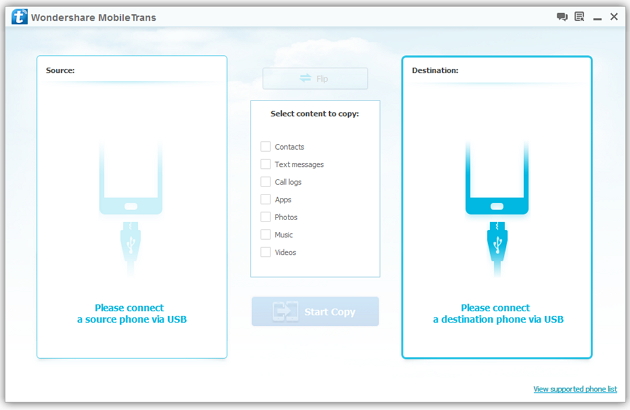
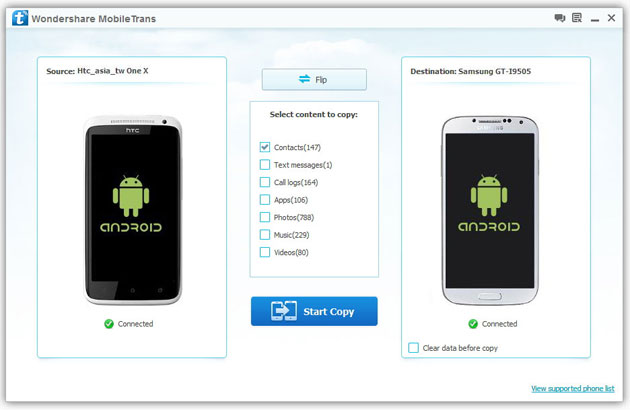
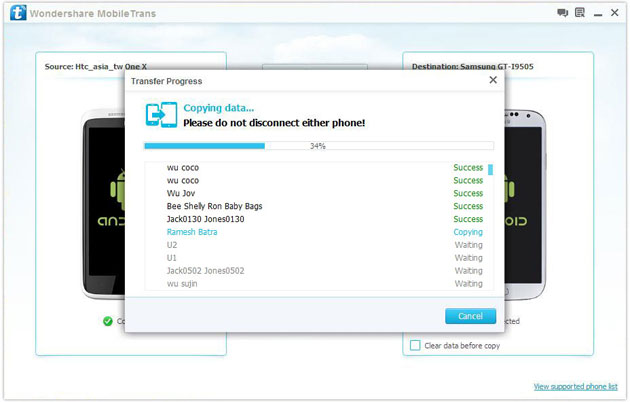
Help! I recently purchased a Samsung S3 and want to transfer SIM and phone contacts from HTC Desire to Samsung S3. However, I have to use a new Mini-SIM with the S3 and I can’t put my old SIM in the phone. Is there an easy way to complete this task? Actually, if you want to cope HTC contacts to Samsung, like Samsung S3, you don't have to insert the old SIM card or edit the phone numbers one by one on your Samsung S3. With the help with Phone to Phone Transfer tool, you can transfer all your contacts including the ones in Gmail, How to Transfer Photos from iPhone/iPad/iPod to Computer ChatON and other accouts to the Samsung Galaxy S3 with I click. Download Phone to Phone Transfer tool to copy contacts from HTC to Samsung S3. Note: Phone to Phone Transfer works well with Samsung and HTC phones and tables. Check more supported Samsung and HTC phones and tablets and Android OS here. Download, install and run Phone to Phone Transfer on your computer. The primary window pops up like the screenshot shows below. Connect both of HTC phone and Samsung S3 to the computer via USB cables. Then this program will detect the two devices soon as possible. After that, you can see them in the primary window. On the left is your HTC phone, and on the right is Samsung S3. Between the two devices is "Flip", which lets you change the places of the two devices. It needs you can follow the similar steps to transfer contacts from Samsung S3 to HTC phone. If you decide to remove all contacts on your target Samsung S3 to save the being transferred contacts, you just need to tick off "Clear data before copy". Or just keep "Clear data before copy" unchecked if you don't want to delete the contacts. This Phone to Phone Transfer program empowers you to cope contacts, music, videos, SMS, apps, call logs and photos from HTC to Samsung within 1 click. Therefore,How to Transfer PDF to iPhone from Computer with Ease you can choose the data which you want to transfer. If you only want to cope the contacts, please uncheck the other data except contacts and click "Start Copy". You can check the process in the pop-up transfer window. When the contact transfer process comes to an end, please click "OK" button. That's all! More information about Phone to Phone Transfer tool: Zero quality loss & risk-free: everything you transfer is 100% same as the original and can be only read by yourself. How to cope contacts from HTC to Samsung Galaxy S3 in 1 click
Step 1: Run Phone to Phone Transfer tool
Step 2: Connect your HTC and Samsung S3 to the computer
Step 3: Transfer contacts from THC to Samsung Galaxy S3
2) Not just contacts, transfer SMS, call logs, photos, music, videos and apps*
3) Comprehensive contact copy, including job title, email addresses, company name, etc.
4) Works with over 2,000 phones including Droid, Symbian (Nokia), and all models of iPhones, including new iPhone 5.
5) Transfers content between phones on different networks. AT&T, Verizon, Sprint, T-Mobile - no problem!

