






















Trending Topics

Could Any Altcoin Ever Replace Bitcoin?
Bitcoin has maintained its position as the largest cryptocurrency for years, but the crypto industry continues to produce networks with faster transactions, different use cases and new technological approaches. Ethereum, Solana and other major altcoins have built ecosystems that go far beyond simply transferring value. Still, replacing Bitcoin would require more than technological improvements. Network security, liquidity, brand recognition, decentralisation, institutional acceptance and user confidence all play a role in Bitcoin’s dominance. Could another cryptocurrency eventually become the market’s primary store of value, or has Bitcoin built an advantage that will be extremely difficult for any altcoin to overcome?
Your mobile phone will be safer with this application

 Hello guys, I'd like to share one application we made.
Most downloaded app lock in Play Store. Protect privacy with password, pattern, fingerprint lock.
Â
Applock Aurora allows you to set numeric password or pattern lock to lock individual apps preventing snooper or intruders from accessing or enabling information you want keep private.
Play Store Link:
https://play.google.com/store/apps/details?id=com.freejoyapps.applock.Aurora&referrer=utm_source%3Dforumseo
Â

Â
With Applock Aurora:
Never worry about a friend borrows your phone to play games with mobile data again!
Never worry about a workmate gets your phone to look the gallery again!
Never worry about someone reads private data in your apps again!
Never worry about kids mess up Settings, send wrong messages, paying games again!
Â
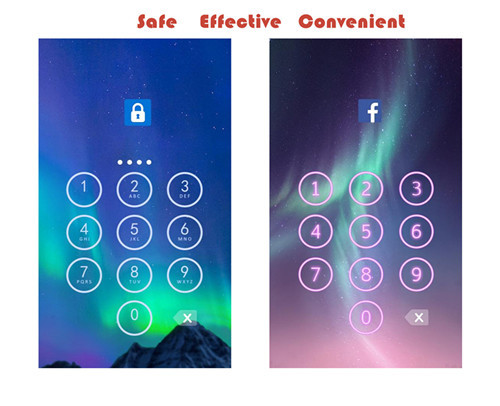
Apps you want lock include:
-System settings
-Call log
-Text messages (SMS)
-Social media accounts like Facebook, Instagram, Twitter, Tumblr, Snapchat etc.
-Contacts
Features of applock password & pattern:
-Private image: hide and encrypt your private photos. Lock them with password lock or pattern lock
-Private video: Hide and encrypt your private videos. Lock them with password as PIN code or pattern
-Lock cover: Disguise your lock screen as something else like calculator, weather, Clock. Force Close & Finger Print screen cover to confuse snoopers or intruders.
-Prevent uninstall: After you enable Advanced Security feature, others are unable to delete this applock password & pattern without your permission. This can better protect your privacy and secret.
Hope you will like it
Thanks a lot!!!!!

Code Integrating Google Play Services on Android
By integrating your Android apps with the Google Play Services, you can access Google services, such as Maps, Drive, and Google+. Once you have your apps set up to use these services, accessing them is typically straightforward. The setup process does require a few steps, but you only need to carry them out once. In this tutorial we will go through the process of integrating Google Play Services with Android apps.
Throughout the tutorial, we will outline what you need to do to integrate apps with Play Services in both Eclipse and Android Studio. You will need access to the Google Developer Console and to the Keytool utility. Once you are set up with Play Services, the development process itself will be determined by what you want your apps to do. The the setup procedure, however, remains the same. By using the client library to access platform services, your apps will benefit from automatic updates through the Play Store.Introduction

Help help android users
Help Required. How to download paid books from play store for free?reply fast.

My Nexus 5 Crashed because of Lollipop 5.0.1
I've had a rather bad experience with the Nexus 5 in the last few days. The 5.0.1 update crashed my phone and now, i'm not even able to get into the bootloader menu. When I took it to an authorized service centre, they said i'd have to replace the motherboard at my expense. I asked who i can contact about it, they said Google.
When i called google, they told me that since i didn't buy the phone on the play store, they can't help. Now that doesn't make sense to me. It is a Google phone. And the operating system, made by Google, is what messed up my phone. Why aren't they taking responsibility for it? How can they choose what phones can be repaired and what can't? Have they suddenly become elitist like Apple? I asked around and many of my friends and their friends have also faced similar problems.
I went to the Nexus forums, and found the same. Has anybody here had similar experiences?
The New Xolo Hive!
Xolo, on the other hand has started promoting its unannounced Hive UI with a dedicated page that come with taglines such as "And right now there's something different brewing at Xolo. Stay curious," "Soon you will too. The revolution has begun," and "A revolution is in the works. Stay tuned." Other quotes from the Hive teaser page, read, "Imagine if you had the power to change your phone the way you want to. Like play dough. The music player is yours. The contact book is yours. The themes are yours. Imagine what it would be like to create things based on your ideas. Wouldn't that be wonderful?... So the next probable question itself is what exactly is Hive? We would say, imagine a forge. You are the knights who would want blades made of Valerian steel. We the forgers make that possible because the steel we create is malleable to your likes and dislikes. Hive is that forge. It's a platform where we follow democracy in creation... The Hive pits the thinkers and the doers together under one huge umbrella so that the result is beneficial for both." All this seems to indicate a UI that is very customisable, and that partially ties-in with the fact that Xolo is also said to be working with a designer community to create themes for its new UI and might also announce a new store for its smartphone consumers where all the exclusive content will be available for download. Earlier on Monday, Xolo's first Windows Phone 8.1-based smartphone, the Win Q900s went up for pre-order at Rs. 9,999. Last week, the company launched a new Android 4.4 KitKat-based smartphone in India, the Q1011 at Rs. 9,999. Official Coverage

