






















Trending Topics

Has anyone used MirrorFly for team collaboration?
 (1).jpg "Has anyone used MirrorFly for team collaboration?")
We are looking for a team collaboration solution for our team. We were using different tools for chat, file sharing, and calls and it became a little difficult to keep everything in one place and also the monthly subscription.
We mainly needed 1-to-1 messaging, group chats, file sharing, voice/video calls, notifications, and something that our admins could manage easily.
While looking at different options, we came across MirrorFly Teams. What interested us was the flexibility around customization and deployment. We were also looking for something that could be adapted to our own workflow instead of having to change our workflow around the software.
The messaging and communication features were the main things we looked at. We also paid attention to mobile support, admin controls, security, and how much control we would have over the platform.
One thing I noticed is that MirrorFly is more focused on communication and building a customized collaboration experience, whereas tools like Microsoft Teams and Slack come with a much broader set of ready-made workplace features.
So it really depends on what you need. If you're looking for an out-of-the-box collaboration suite, there are plenty of options. But if you want more control and customization, I think it's worth looking at platforms like MirrorFly.
Has anyone else used MirrorFly for team collaboration? I'd be interested to know how it worked for you after actually using it with a team.

Trying out the new automated APV video codec for mobile production
One of my friends is doing a filmmaking course, and recently he shot a documentary on the Samsung Galaxy S26 Ultra. The film has rich colours with perfect grading. I got really impressed with its flexibility in adjusting highlights. The video was shot in 8k resolution, but we did not find any decline in the video accuracy at all.

Netflix has added a vertical video feed to its mobile app? How many Reels are are too many Reels?
Netflix has introduced vertical video feed. And I think we have too many platforms offering vertical videos now? How many Reels or YouTube Shorts are too many? Who decides?
Your mobile phone will be safer with this application

 Hello guys, I'd like to share one application we made.
Most downloaded app lock in Play Store. Protect privacy with password, pattern, fingerprint lock.
Â
Applock Aurora allows you to set numeric password or pattern lock to lock individual apps preventing snooper or intruders from accessing or enabling information you want keep private.
Play Store Link:
https://play.google.com/store/apps/details?id=com.freejoyapps.applock.Aurora&referrer=utm_source%3Dforumseo
Â

Â
With Applock Aurora:
Never worry about a friend borrows your phone to play games with mobile data again!
Never worry about a workmate gets your phone to look the gallery again!
Never worry about someone reads private data in your apps again!
Never worry about kids mess up Settings, send wrong messages, paying games again!
Â
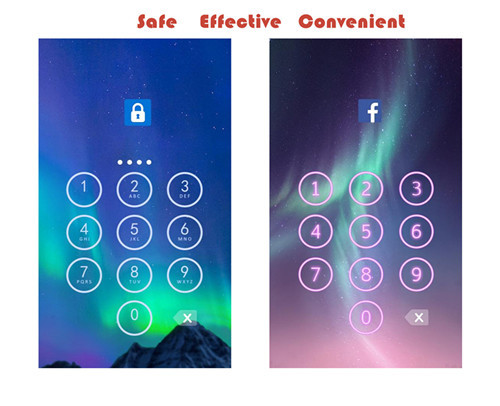
Apps you want lock include:
-System settings
-Call log
-Text messages (SMS)
-Social media accounts like Facebook, Instagram, Twitter, Tumblr, Snapchat etc.
-Contacts
Features of applock password & pattern:
-Private image: hide and encrypt your private photos. Lock them with password lock or pattern lock
-Private video: Hide and encrypt your private videos. Lock them with password as PIN code or pattern
-Lock cover: Disguise your lock screen as something else like calculator, weather, Clock. Force Close & Finger Print screen cover to confuse snoopers or intruders.
-Prevent uninstall: After you enable Advanced Security feature, others are unable to delete this applock password & pattern without your permission. This can better protect your privacy and secret.
Hope you will like it
Thanks a lot!!!!!

Honest review of Le1s after 2 months of usage
Hi Guys, This is Rajesh and today I am sharing my views on the LeEco Le 1s that I have been using for the past month. Yes, we all know that LeEco, formerly known as Letv, launched two smartphones in the market - Le 1s and Le Max. The Le 1s is priced at Rs. 10999 and the Le Max (64GB) is priced at Rs. 32999. Le 1s is their lowest priced phone but at the same time gives features of a flagship phone. LeEco claims that they are selling Le 1s at lesser than BOM (Bill of Materials) price (which is more than Rs. 16000). Let’s move on to the review then. BUILD & DESIGN SCREEN & MULTIMEDIA CAMERA PERFORMANCE CONNECTIVITY MEMORY SOUND QUALITY PROS: CONS:
The first time I opened the box I was like “Wow, awesome!”, yes guys it looks great, it really looks fantastic. One of the most beautiful phones I have ever seen. The mirror-surfaced fingerprint sensor, a smart looking camera and all metal body - all these things make Le 1s a looker! It looks premium and it feels premium. The weight is a bit on the upper side but still with a 5.5-inch Full HD display and bezel-less design it is very handy and easy to use.
9/10
Le 1s comes with a 5.5-inch LCD IPS Display covered by Gorilla Glass 3. The display is great with awesome colours and contrast levels. It is sharp enough and watching Full HD videos on the display is a visual treat. Mediatek’s clear motion technology is there, so there is not even a single frame drop. It can compete with flagship phones for sure.
9/10
Le 1s comes with a 13 MP rear camera and a 5 MP front camera. Rear camera is an ISOCELL unit with PDAF and high aperture for low light capturing. Still, with all these features, this is where Le 1s suffers a bit. The daylight pictures are good with good details and natural colours but in lowlight the camera is just okay. The pictures turned out to be noisy and macro shots turned out to be “whitish” in low light. I also found some reddish tint on the photo. Front camera is good enough for video calling but for selfie lovers it will be a “hit or miss” as the camera works sometime good and sometime bad. Lots of software optimisation is needed in the camera section as the basic things like “beauty mode” is missing. I hope LeEco will release an OTA update which can rectify these issues. UPDATE: The latest OTA improved the camera experience by a huge margin – both front and rear cameras!
8.5/10
This is where Le 1s outshines every other smartphone in the same category. Le 1s has Mediatek’s current flagship 64-bit Octa Core Processor MT6795 Turbo (aka Helio x10 Turbo) clocked at 2.2 Ghz. Almost every other smartphone in this price range uses cheaper processors while LeEco uses this flagship processor. We can find this processor even in the flagship phone of HTC M9 (Which costs almost 45 K). Le 1s also has 3GB RAM with the system using almost 1.5 GB RAM but still the phone performs very well. No lag at all. Almost every high end game plays butter smooth. I have tested Asphalt 8 and Temple Run, both run fluidly. As far as the performance is concerned, it is really a beast. It warms a little bit, but that is common for all metal smartphones, so not a deal breaker for me.
9.5/10
Le 1s supports 2G/3G/4G networks in India. Everything is working fine. I didn’t experience any network issue so far. Bluetooth and Wi-Fi are up to the mark. Le 1s supports dual SIM - one micro and one nano. Both are working perfectly fine. A small negative side is that it doesn’t support VoLTE, so for Reliance Jio users it is a deal breaker. Still it satisfied me. Thumbs up!
8.5/10
Le 1s comes with 32 GB of internal memory which is really good considering the price. It doesn’t support SD cards but it supports OTG. I was able to connect a 64 GB pen drive through USB Type C OTG cable and it was really fast and I had a nice experience. Overall at this price range it is really good.
8/10
The external speakers perform well and after plugging in earphones, it sounds really great. It is superior to the competition in this price range. Soothing to the ears and a good option for audiophiles.
8.5/10
Stunning design
Premium Feel
Great Display
Good Speakers & Sound Quality
Okay Camera
No VoLTE
No External SD card support
Considering the price point of 10999, LeEco provides a super “value for money” product which can break all records in the Indian mobile market. As their tag suggests a #SuperPhone at a #SuperPrice…
Overall Rating: 8.5/10
Verdict: Paisa Wasool..!

Features Of An Amazing Image Editor Fun App Prisma
Ardent art lovers would always love to get painted their portrait on canvas, but that could be expensive. But no worries, here is an amazing image editor fun app Prisma, where you can instantly get your Picasso style effect to your image. Prisma was developed by a mobile app development company Prisma Labs Inc. Features: Pros Cropping and Rotation: Users can crop their video and upload the desired part of your original image. Circular arrows are displayed in the app for 90 degrees image rotation. Blending Filters: Instead of applying filters on the existing image, this app reconstructs the image from ground up. Features: Cons Performance and Speed: Relatively slow. Updates: Split screen features Pictures can be cropped after applying effect.

Need buying advise Mobile for my Daughter
I am planning mobile for my daughter which must have below feature
1) RAM min 1 GB
2) Battery Good one
3) Supports androids ( whats app and e-mail )
4) Can have wify connectivity
6) Media player to listen song
5) Good Display for viewing video
6) Good brand which can last 3 years without major repair cost
7)Price within range of Rs 5000 to 6000 . (Mobile comes with my many features and apps which are normaly unused and billed in your cost )
can any one help me out ,,,, I have been told samsung is expensive , nokia is not so user friendly , Motto & Micromax are good for their price
Suggestion regarding purchase of smart Phone within 25K
Hello,
I am a bit confused regarding purchasing a good phone.
I want to know which Android mobile will be best to buy. I just need perfect working with no issue.
My budget is from 20000 to 25000 Rupees.
It should include functions like:
- Have minimum screen size of 5.5”.
- Have minimum of 2GB RAM, 16GB internal memory. [if possible with expandable memory]
- Have minimum Octa Core processor [at least have or more 1.5GHz]
- Camera should have minimum of 13 mega pixel (back) and at least 5 mega pixel (front)
- Full HD with display resolution 1920X1080. [with a good resolution for video recording also]
-Smart looking and good battery life.
- Perfect Touch screen with high resolution and some like scratch resistant or protection to screen [may be gorilla class- version 3 or 4]
I have short listed my own 3 choices. Please compare and suggest.
Possible negative point (in my openion)
1. Samsung Galaxy A7 [ whether battery back-up will be a problem]
2. HTC Desire S826 [ Non-metallic body & display is not Super amoled type]
3. Gionee Elfie S7 [screen size a bit smaller – 5.2” & no expandable memory & after
sales service]
Regards

