






















Trending Topics

Honest review of Le1s after 2 months of usage
Hi Guys, This is Rajesh and today I am sharing my views on the LeEco Le 1s that I have been using for the past month. Yes, we all know that LeEco, formerly known as Letv, launched two smartphones in the market - Le 1s and Le Max. The Le 1s is priced at Rs. 10999 and the Le Max (64GB) is priced at Rs. 32999. Le 1s is their lowest priced phone but at the same time gives features of a flagship phone. LeEco claims that they are selling Le 1s at lesser than BOM (Bill of Materials) price (which is more than Rs. 16000). Let’s move on to the review then. BUILD & DESIGN SCREEN & MULTIMEDIA CAMERA PERFORMANCE CONNECTIVITY MEMORY SOUND QUALITY PROS: CONS:
The first time I opened the box I was like “Wow, awesome!”, yes guys it looks great, it really looks fantastic. One of the most beautiful phones I have ever seen. The mirror-surfaced fingerprint sensor, a smart looking camera and all metal body - all these things make Le 1s a looker! It looks premium and it feels premium. The weight is a bit on the upper side but still with a 5.5-inch Full HD display and bezel-less design it is very handy and easy to use.
9/10
Le 1s comes with a 5.5-inch LCD IPS Display covered by Gorilla Glass 3. The display is great with awesome colours and contrast levels. It is sharp enough and watching Full HD videos on the display is a visual treat. Mediatek’s clear motion technology is there, so there is not even a single frame drop. It can compete with flagship phones for sure.
9/10
Le 1s comes with a 13 MP rear camera and a 5 MP front camera. Rear camera is an ISOCELL unit with PDAF and high aperture for low light capturing. Still, with all these features, this is where Le 1s suffers a bit. The daylight pictures are good with good details and natural colours but in lowlight the camera is just okay. The pictures turned out to be noisy and macro shots turned out to be “whitish” in low light. I also found some reddish tint on the photo. Front camera is good enough for video calling but for selfie lovers it will be a “hit or miss” as the camera works sometime good and sometime bad. Lots of software optimisation is needed in the camera section as the basic things like “beauty mode” is missing. I hope LeEco will release an OTA update which can rectify these issues. UPDATE: The latest OTA improved the camera experience by a huge margin – both front and rear cameras!
8.5/10
This is where Le 1s outshines every other smartphone in the same category. Le 1s has Mediatek’s current flagship 64-bit Octa Core Processor MT6795 Turbo (aka Helio x10 Turbo) clocked at 2.2 Ghz. Almost every other smartphone in this price range uses cheaper processors while LeEco uses this flagship processor. We can find this processor even in the flagship phone of HTC M9 (Which costs almost 45 K). Le 1s also has 3GB RAM with the system using almost 1.5 GB RAM but still the phone performs very well. No lag at all. Almost every high end game plays butter smooth. I have tested Asphalt 8 and Temple Run, both run fluidly. As far as the performance is concerned, it is really a beast. It warms a little bit, but that is common for all metal smartphones, so not a deal breaker for me.
9.5/10
Le 1s supports 2G/3G/4G networks in India. Everything is working fine. I didn’t experience any network issue so far. Bluetooth and Wi-Fi are up to the mark. Le 1s supports dual SIM - one micro and one nano. Both are working perfectly fine. A small negative side is that it doesn’t support VoLTE, so for Reliance Jio users it is a deal breaker. Still it satisfied me. Thumbs up!
8.5/10
Le 1s comes with 32 GB of internal memory which is really good considering the price. It doesn’t support SD cards but it supports OTG. I was able to connect a 64 GB pen drive through USB Type C OTG cable and it was really fast and I had a nice experience. Overall at this price range it is really good.
8/10
The external speakers perform well and after plugging in earphones, it sounds really great. It is superior to the competition in this price range. Soothing to the ears and a good option for audiophiles.
8.5/10
Stunning design
Premium Feel
Great Display
Good Speakers & Sound Quality
Okay Camera
No VoLTE
No External SD card support
Considering the price point of 10999, LeEco provides a super “value for money” product which can break all records in the Indian mobile market. As their tag suggests a #SuperPhone at a #SuperPrice…
Overall Rating: 8.5/10
Verdict: Paisa Wasool..!

Huawei Honor 6 Plus review
Honor, if you didn't know, is the brand Huawei uses to sell some of its phones in Europe and it's the name attached to the new Honor 6 Plus. A 5.5-inch Android smartphone with a full HD display, an octa-core processor and a quirky dual 8-megapixel camera, it's got everything you need to cope with your social network and Netflix addiction. And true to the Honor brand's affordable promise, the 6 Plus comes with a low price. Now, here's where it gets confusing: though Honor as a separate brand is supposed to exist only in Europe, the Honor 6 Plus has been on sale since December 2014 in China, but sold as the Huawei Honor 6 Plus. What's more, Huawei does sell phones in Europe with its own name attached -- the flagship P8 , for example, launched in London in April. What's the difference between them all? Not much, really. Strip away the Honor branding and you're left with a signature Huawei phone complete with the same Emotion user interface. That's not a criticism, really, but you shouldn't forget that a phone bearing the Honor name doesn't deliver a unique experience from a Huawei-branded counterpart. Like other Honor phones, you can pick up the Honor 6 Plus in the UK, SIM-free directly from Amazon for £300. Yet, the 6 Plus also is the first of Honor's phones to be available through a UK network, showing a definite commitment by Honor (or Huawei) for it to become a recognised brand, selling in stores. The Three network has the phone available on a range of contracts from £24 per month, with a £19 up front charge. In the US, you can buy the Huawei Honor 6 Plus through Amazon for $472. The design of the 6 Plus is possibly best described as that of a larger, cheaper iPhone 4. The black glass front and back together with the metal-effect band running around the edge are similar to Apple's earlier phone, although 6 Plus' band is plastic, rather than metal, meaning it doesn't feel as solid or indeed as premium. The back panel has a very subtle criss-cross pattern which you can only really see under certain lights. Honor could have made this a bit more prominent, which would have helped add a bit of interest and separate its design more from the iPhone 4. With its 5.5-inch display, the Honor 6 Plus is significantly larger than the iPhone 4, measuring 150mm long and 75mm wide. It's comfortable to hold and easy to slide into a pocket, but you'll need two hands to type properly. The phone comes with 32GB of storage as standard, which is a generous amount for a more budget-conscious phone. Cheaper phones typically skimp on the storage by offering 16GB or even 8GB of space, so it's nice to see a more healthy offering that doesn't force you to also buy a microSD card. It does accept microSD cards though, which is worth bearing in mind if you save a lot of music and videos to your phone, rather than streaming them. The 5.5-inch screen has a full-HD (1,920x1,080-pixel) resolution, giving it a pixel density of 400 pixels per inch. That's the same size and resolution as the iPhone 6 Plus, and in terms of clarity, there's nothing to differentiate the two. Small text beneath icons is sharp and easy to read and high-res photos look crisp and sharp. The Honor's display is reasonably bright, sufficiently countering the harsh overhead office lights in the CNET UK office, although outside in the bright sun it did become a bit more difficult to see, even when set to max brightness. Colours are bold and vibrant, making Netflix shows like 'Breaking Bad," "SpongeBob" or indeed "Power Rangers" look good. The Honor 6 Plus runs Android 4.4.2 KitKat, which is several versions out of date. The most up-to-date version of Android is Lollipop, which you can find on even rock-bottom budget phones, so it's very disappointing to see such an old version of the software on a midrange mobile. On the surface you probably won't be able to tell, however, as Honor has heavily skinned the phone with the same Emotion user interface you'll see on most of Huawei and Honor's recent phones. It makes huge changes to the stock Android interface, including the colour schemes and the fonts (which you can alter using various themes), but the biggest change is that there's no app tray. I don't like this change as it forces you to keep all of your apps scattered across the homescreens. Once you throw widgets into the mix, it quickly becomes cluttered and difficult to navigate. The phone is powered by a Kirin 925 processor -- an octa-core chip that apparently uses four lower-powered processing cores for everyday tasks, and four burlier cores for more intense processing needs. That's backed up by 3GB of RAM. It performed well on benchmark tests, scoring an impressive 4,456 on the Geekbench 2 test, How to transfer app and data from iPad to iPhone 6? although a less impressive 11,982 on the Quadrant test. By comparison, the Sony Xperia Z3 and LG G4 scored over 20,000 on the Quadrant test and the Galaxy S6 managed to achieve over 36,000. Still, it was able to play the demanding game Grand Theft Auto: San Andreas extremely smoothly, and photo editing in Snapseed was handled without any trouble at all. Everyday essential apps like Instagram were also handled perfectly well, but navigating around the phone's interface was less smooth, with noticeable stutters and lag creeping in -- an issue I would bet is caused by the bloated Emotion software. I'd really like to see how a stock Android version of this phone performs as I'm sure it would be a lot more smooth to use. On the back of the phone are two 8-megapixel cameras. One takes regular shots, but the second allows some interesting depth of field effects and also lets you refocus a scene after you've taken it. I'll start with testing the phone's standard photo quality. I was pleased with this first shot of the London Eye. There's a great balance in exposure between the bright sky and the River Thames and a nice rich blue colour in the sky as well. There's a lack of clarity on the fine details when you zoom right in, but it displays full-screen well, making it great for Facebook. This second shot of a fruit stand is not bad either,transfer candy crush to new iphone although the white garlic has been rather overexposed. Again, when zooming in there's a noticeable fuzziness to the picture.

How to Transfer Contact from iPhone to Computer - iPhone Contact Transfer
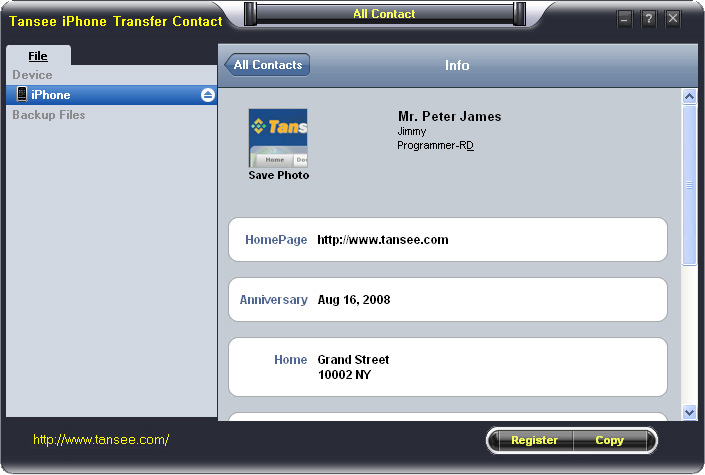
iPhone Transfer Contact can provide you: Tutorial 1: Transfer Contact from iPhone to Computer Tutorial 2: Transfer Contact’s photo from iPhone to Computer Tutorial 3: Restore Contact from CSV file to Outlook Tutorial 4: Restore Contact from CSV file to iPhone Step 2: Connect your iPhone to your computer, mobiletrans and run iPhone Transfer Contact. Then, your contacts on iPhone memory will display as shown in your iPhone screen automatically as fig 1. You can click on single name, all his or her information will display as fig 2 shown.
- Backup iPhone Contact’s Photos.
- Export two types of file format (Antc file, Text file).
- Export full screen of iPhone contact’s Photos.
- View Contacts in Text file format (.txt) or ANTC file format (.antc) on PC.
- Password protection support (ANTC file only).
Tutorial 1: How to transfer contact from iPhone to computer
Step 1: You can download iPhone Transfer Contact free version here, and install the software (skip if done yet).
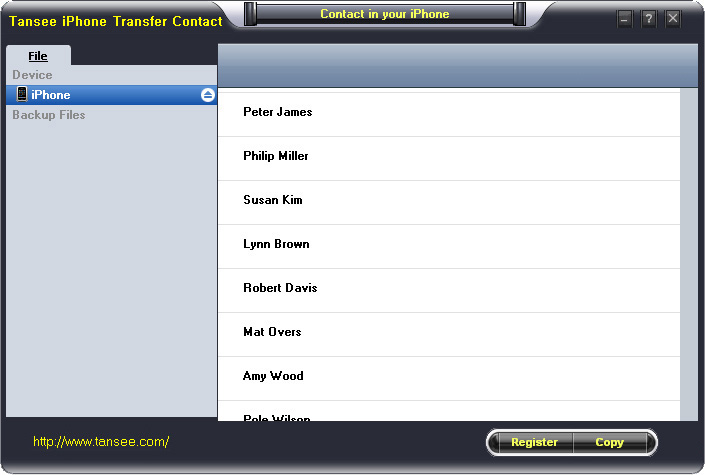
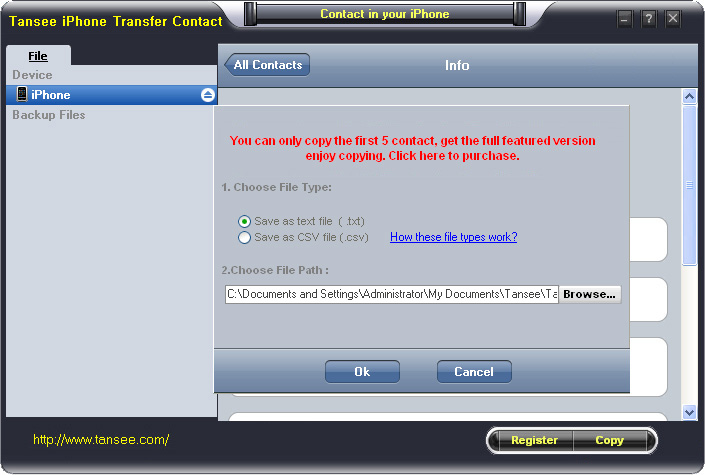
Step 3-a: In fig 1 situation, click button "Copy" to copy all contacts from your iPhone to your computer , then select options:
1: Choose File Type: backup to TXT file, ANTC file or CSV file;
2: Choose File Path: You also can change the backup path if you don’t use default path.
3: Advanced Option: if you choose ANTC format in step 1, you can add a password to protect the file.
Note: You must remember your password, because we don’t know the it except yourself. So please remember it well.
Click "OK" Button to finish the Copy. Please see fig 3.
Note: With trail version, you can only copy the first 5 contacts .

1: Choose File Type: Backup contacts to TXT file, and CSV file in single contact transfer;
2: Choose File Path: You can change the backup path if you do not use default path;
3: Advanced Option: Disabled in single contact transfer.
Click OK Button to finish the Copy. See fig 4.
Note: You can only copy the first 5 contacts in trail version.
Tutorial 2: How to transfer iPhone contact’s photo to computer?
In fig 2 above, you can click the photo of single person to save it to your computer., then you can transfer iPhone contact’s photo to computer. See fig 5.

Tutorial: 3:How to restore contact from CSV file to outlook?
Step 1: Backup all your contacts from iPhone to computer as .csv file format using iPhone Transfer Contact.
Step 2: Click on Start - All Programs - Accessories, click to open Address Book.
In Address Book, click File - Import - Other Address Book..., select "Text File (Comma Separated Values)", click Import, then browser the CSV file, click Next, Map the fields you wish to import, click finish.After all this, you had import the contacts to your Windows Address Book.
Step 3: Open Outlook; Open the File menu; Choose “Import and Export”; In the “Import and Export Wizard” dialog box choose “Import Internet email and address", then choose "OUTLOOK EXPRESS 4.X 5.X 6.X", click "Next".
Tutorial 4: How to restore contact from CSV file to iPhone?
Step 1: Backup all your iPhone contacts computer as .csv file format using iPhone Transfer Contact.
Step 2: Click on Start - All Programs - Accessories, click to open Address Book.
In Address Book, click File - Import - Other Address Book..., select "Text File (Comma Separated Values)", click Import, then browser the CSV file, click Next, Map the fields you wish to import, click finish.After all this,how to use anytrans you had import the contacts to your Windows Address Book.
Step 3: Open iTunes, connect iPhone, click to select the iPhone on iTunes, choose Info tab, in Contact section, check "Sync contacts with Window Address Book", click apply. Back To Homepage.
Is it worth to buy lens kit for mobile phone, ?
Namaste ! everyone
well first of all i tell you all am not a professional photographer ,or want to be.
i just loving to capture light in my phone. i want to do some little experiment. now i think to purchase lens kit for my mobile phone camera. but am bit confused to buy this thing. i have some little query regarding mobile lens kit.

