






















Trending Topics

FLIP Phones in India? is there any upcoming Flip phones in the market?
their are people who want to buy flip phones
is there any flip phone available in india right now?
is there any coming up in 2015?

Which Samsung Flip phones should I upgrade to?
Should I upgrade to Samsung Galaxy Z Flip 8 or Galaxy Z Flip 7?
Will higher prices of upcoming Samsung foldable models be worth the money?
Samsung’s new foldables will be launched tomorrow, and there is chatter about a price hike for the European markets. There are chances that new devices like Samsung Galaxy Z Fold 8, Z Flip 8, and Galaxy Watch 9 could be more expensive than previous models. Don’t you think Samsung should focus on making these phones affordable for buyers?

Samsung will manufacture 2.8 million Galaxy Z Fold 8 units this year.
Leaks suggest that Samsung plans to manufacture 2.8 million Galaxy Z Fold 8 units this year, which will replace the Ultra and Flip models. Does that mean Samsung will be lowering the prices of its foldable phones?
Buying Galaxy Z Flip 7 mainly because regular phones feel boring now
Has anyone found themselves bored with regular phones? Mostly every flagship phone design looks similar, while flip phones shows innovation. This year, I have seen Galaxy Z Flip 7 seems an excellent choice. Should I buy it?

How to Transfer Contacts from HTC to Samsung
Help! I recently purchased a Samsung S3 and want to transfer SIM and phone contacts from HTC Desire to Samsung S3. However, I have to use a new Mini-SIM with the S3 and I can’t put my old SIM in the phone. Is there an easy way to complete this task? Actually, if you want to cope HTC contacts to Samsung, like Samsung S3, you don't have to insert the old SIM card or edit the phone numbers one by one on your Samsung S3. With the help with Phone to Phone Transfer tool, you can transfer all your contacts including the ones in Gmail, How to Transfer Photos from iPhone/iPad/iPod to Computer ChatON and other accouts to the Samsung Galaxy S3 with I click. Download Phone to Phone Transfer tool to copy contacts from HTC to Samsung S3. Note: Phone to Phone Transfer works well with Samsung and HTC phones and tables. Check more supported Samsung and HTC phones and tablets and Android OS here. Download, install and run Phone to Phone Transfer on your computer. The primary window pops up like the screenshot shows below. Connect both of HTC phone and Samsung S3 to the computer via USB cables. Then this program will detect the two devices soon as possible. After that, you can see them in the primary window. On the left is your HTC phone, and on the right is Samsung S3. Between the two devices is "Flip", which lets you change the places of the two devices. It needs you can follow the similar steps to transfer contacts from Samsung S3 to HTC phone. If you decide to remove all contacts on your target Samsung S3 to save the being transferred contacts, you just need to tick off "Clear data before copy". Or just keep "Clear data before copy" unchecked if you don't want to delete the contacts. This Phone to Phone Transfer program empowers you to cope contacts, music, videos, SMS, apps, call logs and photos from HTC to Samsung within 1 click. Therefore,How to Transfer PDF to iPhone from Computer with Ease you can choose the data which you want to transfer. If you only want to cope the contacts, please uncheck the other data except contacts and click "Start Copy". You can check the process in the pop-up transfer window. When the contact transfer process comes to an end, please click "OK" button. That's all! More information about Phone to Phone Transfer tool: Zero quality loss & risk-free: everything you transfer is 100% same as the original and can be only read by yourself. 

How to cope contacts from HTC to Samsung Galaxy S3 in 1 click
Step 1: Run Phone to Phone Transfer tool
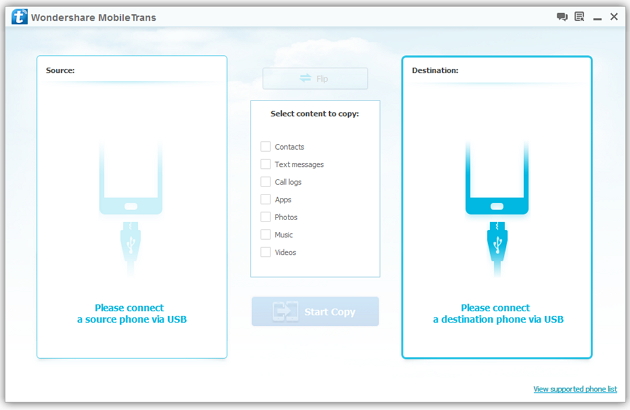
Step 2: Connect your HTC and Samsung S3 to the computer
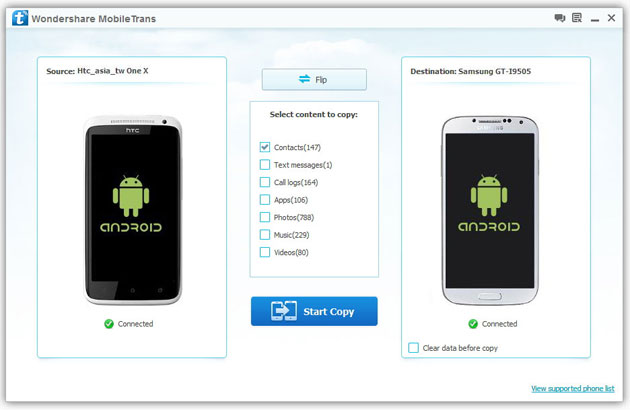
Step 3: Transfer contacts from THC to Samsung Galaxy S3
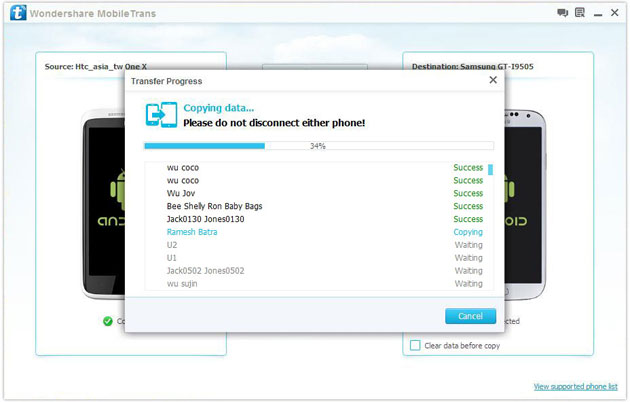
2) Not just contacts, transfer SMS, call logs, photos, music, videos and apps*
3) Comprehensive contact copy, including job title, email addresses, company name, etc.
4) Works with over 2,000 phones including Droid, Symbian (Nokia), and all models of iPhones, including new iPhone 5.
5) Transfers content between phones on different networks. AT&T, Verizon, Sprint, T-Mobile - no problem!

