






















Trending Topics



OUKITEL K6000 Pro Smartphone Parameter Revealed - 6000mAh, Android 6.0, 3GB RAM

Brand: Oukitel
Model: K6000 Pro
Color: Silver/Grey
Dimensions: 10x76.7x154.3 mm
Weight: 213.88g (Build-in Battery)
Operating System: Android 6.0
Fingerprint ID: unlock in 0.3 second
CPU: 64 bit Octa core MT6753
GPU: Mali-T720 GPU
RAM: 3GB LPDDR3
ROM: 32GB, TF card support up to 32GB
Battery: SCUD 6000mAh Lithium Polymer
Talk time: 46 hours
Music: 45 hours
Videos: 10 hours
Charger: MTK Pump Express Flash Charging
5V/7V/9V-2A Intelligent flash charge
Display:
Size: 5.5 inch
Resolution: FHD 1920x1080 pixels
Type: LTPS 2.5D
Material: Dragontrail X
Camera:
Rear camera: 13MP, Front camera: 5MP
Rear camera: 16MP, Front camera:8MP(Interpolated)
F2.0 Aperture, Dual Flash
Video: 1080P
Connection:
Network: GSM: 850/900/1800/1900 (Band5, Band8, Band3, Band2)
WCDMA: 900/2100 (Band8, Band1)
FDD: 800/1800/2100/2600 (Band20 , Band3, Band1, Band7)
SIM: Dual SIM dual standby
Wifi: Support
Bluetooth: Bluetooth 4.0
Positioning: GPS, A-GPS, GLONASS
Sensors: G-sensor, Light sensor, Proximity sensor, Hall Effect sensor
Functions: FM radio, OTG, Hotknot, Miracast, Off-screen gesture, Super power saving mode



How to Transfer Contact from iPhone to Computer - iPhone Contact Transfer
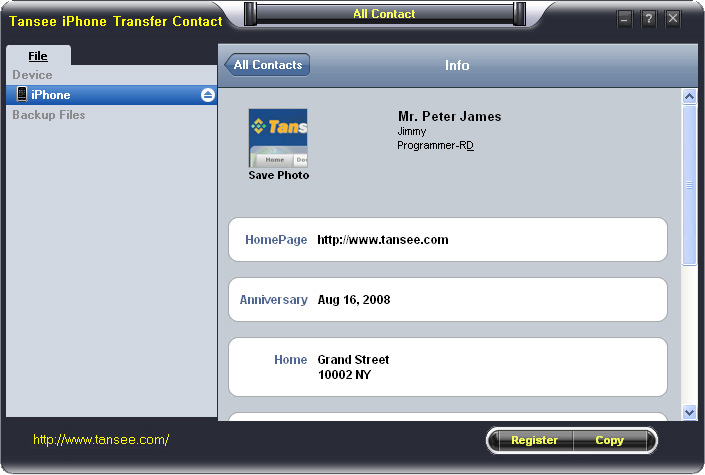
iPhone Transfer Contact can provide you: Tutorial 1: Transfer Contact from iPhone to Computer Tutorial 2: Transfer Contact’s photo from iPhone to Computer Tutorial 3: Restore Contact from CSV file to Outlook Tutorial 4: Restore Contact from CSV file to iPhone Step 2: Connect your iPhone to your computer, mobiletrans and run iPhone Transfer Contact. Then, your contacts on iPhone memory will display as shown in your iPhone screen automatically as fig 1. You can click on single name, all his or her information will display as fig 2 shown.
- Backup iPhone Contact’s Photos.
- Export two types of file format (Antc file, Text file).
- Export full screen of iPhone contact’s Photos.
- View Contacts in Text file format (.txt) or ANTC file format (.antc) on PC.
- Password protection support (ANTC file only).
Tutorial 1: How to transfer contact from iPhone to computer
Step 1: You can download iPhone Transfer Contact free version here, and install the software (skip if done yet). 

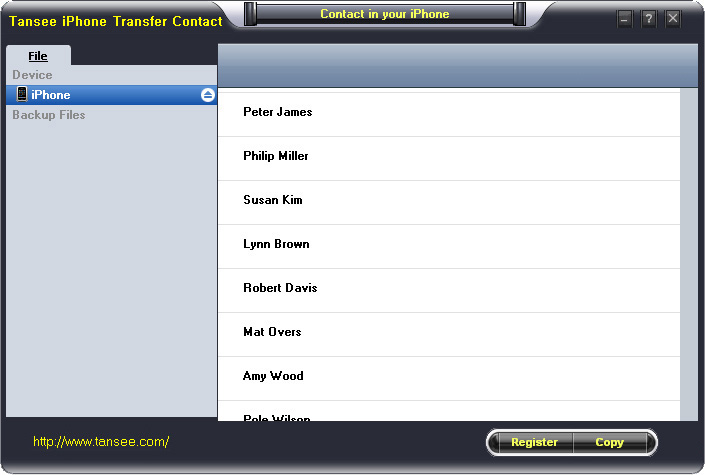
Step 3-a: In fig 1 situation, click button "Copy" to copy all contacts from your iPhone to your computer , then select options:
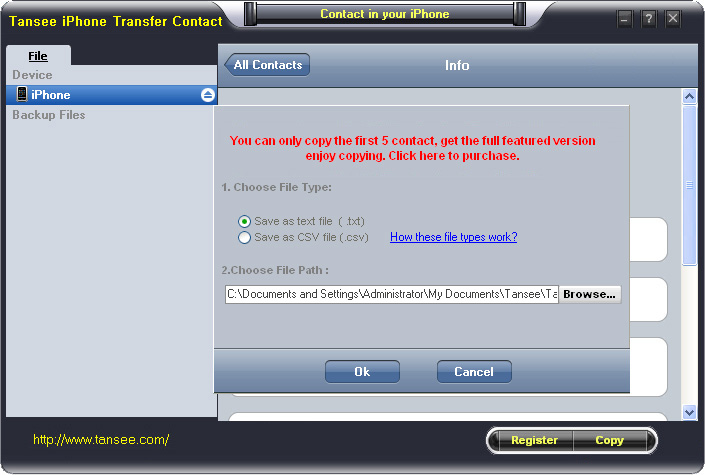
1: Choose File Type: backup to TXT file, ANTC file or CSV file;
2: Choose File Path: You also can change the backup path if you don’t use default path.
3: Advanced Option: if you choose ANTC format in step 1, you can add a password to protect the file.
Note: You must remember your password, because we don’t know the it except yourself. So please remember it well.
Click "OK" Button to finish the Copy. Please see fig 3.
Note: With trail version, you can only copy the first 5 contacts .

1: Choose File Type: Backup contacts to TXT file, and CSV file in single contact transfer;
2: Choose File Path: You can change the backup path if you do not use default path;
3: Advanced Option: Disabled in single contact transfer.
Click OK Button to finish the Copy. See fig 4.
Note: You can only copy the first 5 contacts in trail version.
Tutorial 2: How to transfer iPhone contact’s photo to computer?
In fig 2 above, you can click the photo of single person to save it to your computer., then you can transfer iPhone contact’s photo to computer. See fig 5.

Tutorial: 3:How to restore contact from CSV file to outlook?
Step 1: Backup all your contacts from iPhone to computer as .csv file format using iPhone Transfer Contact.
Step 2: Click on Start - All Programs - Accessories, click to open Address Book.
In Address Book, click File - Import - Other Address Book..., select "Text File (Comma Separated Values)", click Import, then browser the CSV file, click Next, Map the fields you wish to import, click finish.After all this, you had import the contacts to your Windows Address Book.
Step 3: Open Outlook; Open the File menu; Choose “Import and Export”; In the “Import and Export Wizard” dialog box choose “Import Internet email and address", then choose "OUTLOOK EXPRESS 4.X 5.X 6.X", click "Next".
Tutorial 4: How to restore contact from CSV file to iPhone?
Step 1: Backup all your iPhone contacts computer as .csv file format using iPhone Transfer Contact.
Step 2: Click on Start - All Programs - Accessories, click to open Address Book.
In Address Book, click File - Import - Other Address Book..., select "Text File (Comma Separated Values)", click Import, then browser the CSV file, click Next, Map the fields you wish to import, click finish.After all this,how to use anytrans you had import the contacts to your Windows Address Book.
Step 3: Open iTunes, connect iPhone, click to select the iPhone on iTunes, choose Info tab, in Contact section, check "Sync contacts with Window Address Book", click apply. Back To Homepage.

Did you seen this latest Gadget
Hi All I seen a new gadget or some fashion wear like woolen warm up coat. But it's too funny to see and watch that these people using in Public. It's for privacy while we working. In order to not get disturbed by others we can use this. But I'm crazy after seeing this what do you say guys express some of your thoughts on it.
see that gadget Here

(Full Rig, Not Only The Cabinet) $6100 Gaming PC - Totally As Crazy As Hell
Today I present a $6100 Gaming PC which I know is totally insane. So, here is the full rig: CPU: Intel Core i7-5820K 3.3GHz 6-Core Processor CPU Cooler: Corsair H100i GTX 70.7 CFM Liquid CPU Cooler Motherboard: MSI X99S Gaming 7 ATX LGA2011-3 Motherboard RAM: Corsair Dominator Platinum 64GB (8 x 8GB) DDR4-2666 Memory Storage: Samsung 850 Pro Series 1TB 2.5" Solid State Drive & Western Digital BLACK SERIES 4TB 3.5" 7200RPM Internal Hard Drive Video Card: Asus GeForce GTX Titan X 12GB Video Card Cabinet: Cooler Master Cosmos II (Black) ATX Full Tower Case Power Supply: EVGA 750W 80+ Gold Certified Fully-Modular ATX Power Supply Optical Drive: Asus DRW-24B1ST/BLK/B/AS DVD/CD Writer Operating System: Microsoft Windows 8.1 Pro - 64-bit (OEM) (64-bit) Wired Network Adapter: Intel E1G44ET2 10/100/1000 Mbps PCI-Express x4 Network Adapter Wireless Network Adapter: Asus PCE-AC68 802.11a/b/g/n/ac PCI-Express x1 Wi-Fi Adapter Monitor: Asus ROG SWIFT PG278Q 144Hz 27.0" Monitor Keyboard: Razer BlackWidow Chroma Wired Gaming Keyboard Mouse: Razer DeathAdder Chroma Wired Optical Mouse Headphones: Razer KRAKEN 7.1 CHROMA 7.1 Channel Headset Speakers: Logitech Z906 500W 5.1ch Speakers Grand Total: $6124.86 (Rs. 388894.62 at the time of posting this) To see the Rig and to buy it go over here: http://pcpartpicker.com/p/WyBbzy Conclusion: This will run your games at least for the next 10 years :troll_face: Note: Only buy this rig if you are as crazy as all hell but some bloody rich people will surely like to buy it.
(Cabinet Only) $1000 Gaming Rig
So, here's a $1000 gaming rig for extreme gaming: CPU: Intel Core i5-4460 3.2GHz Quad-Core Processor CPU Cooler: Cooler Master Hyper 212 EVO 82.9 CFM Sleeve Bearing CPU Cooler Motherboard: MSI Z97S SLI Krait Edition ATX LGA1150 Motherboard RAM: Corsair Vengeance 16GB (2 x 8GB) DDR3-1600 Memory Storage: Seagate Barracuda 1TB 3.5" 7200RPM Internal Hard Drive Video Card: MSI GeForce GTX 960 2GB Video Card Case: Corsair 200R ATX Mid Tower Case Power Supply: Corsair CX 600W 80+ Bronze Certified Semi-Modular ATX Power Supply Wired Network Adapter: TP-Link TG-3468 10/100/1000 Mbps PCI-Express x1 Network Adapter Wireless Network Adapter: Gigabyte GC-WB867D-I 802.11a/b/g/n/ac PCI-Express x1 Wi-Fi Adapter To see the rig and to buy it go to: http://pcpartpicker.com/p/m93VXL Grand total of the rig: $932.49 (Rs. 59343.66) in which you don't even get a proper laptop. Note: The merchant is Amazon.com and it ships to India.
(Complete Build, Not Just The Cabinet) < $1500 Rig That Will Make Your Games Run Like Hell
Yo guys, I have a rig for those looking for a massive gaming PC under 100K, you can overlock it and can run most games under 'Ultra' settings or if not then definitely under 'High' settings and it might perform better than your 150K Alienware, so here go: CPU: Intel Core i5-4690K 3.5GHz Quad-Core Processor CPU Cooler: Corsair H55 57.0 CFM Liquid CPU Cooler Motherboard: MSI Z97S SLI Krait Edition ATX LGA1150 Motherboard RAM: Corsair Vengeance 8GB (2 x 4GB) DDR3-1600 Memory Storage: Western Digital Caviar Blue 1TB 3.5" 7200RPM Internal Hard Drive Video Card: Asus GeForce GTX 960 2GB Video Card Cabinet: NZXT Source 530 ATX Full Tower Case Power Supply: Corsair CX 430W 80+ Bronze Certified Semi-Modular ATX Power Supply Optical Drive: Asus DRW-24B1ST/BLK/B/AS DVD/CD Writer OS: Microsoft Windows 8.1 Pro - 64-bit (OEM) (64-bit) Wired Network Adapter: TP-Link TG-3468 10/100/1000 Mbps PCI-Express x1 Network Adapter Wireless Network Adapter: Gigabyte GC-WB867D-I 802.11a/b/g/n/ac PCI-Express x1 Wi-Fi Adapter Case Fan: Corsair Air Series AF140 Quiet Edition 67.8 CFM 140mm Fan Monitor: LG 22MP55HQ-P 60Hz 22.0" Monitor Keyboard & Keyboard Bundle: Cooler Master CM Storm Devastator Gaming Bundle Wired Gaming Keyboard w/Optical Mouse Headphones: Logitech G430 7.1 Channel Headset Speakers: Logitech Z313 25W 2.1ch Speakers Grand total: $1380.23 (Rs. 87875.72 at the time of poating this thread) And what's the good thing? The good thing is that now you don't need anything else to complete the build and you can play games on it as soon as you build it, this contains everything and the build is very flexible too! See the build price and buy it if you like: http://pcpartpicker.com/p/XXF7Bm And the same build with Intel Core i7-4790K 4.0GHz Quad-Core Processor ($1493.79 or Rs. 95199.16 at the time of posting this): http://pcpartpicker.com/p/qPhCcf Note: You have to buy the build from Amazon.com (Well, it ships to India) because some parts weren't available in Indian online stores so, yeah, that's it, enjoy and show off in front of your friends with such an affordable price (Well, only for some hardcore and rich gaming fans) 

