






















Trending Topics

Does Photo Assist feel more useful on the Samsung Galaxy Z Flip8 because you can edit photos directly after shooting?
Photo Assist lets you describe the edit you want and uses Galaxy AI to make changes. I’m curious if Samsung Galaxy Z Flip8 users are actually using prompt-based editing instead of traditional editing tools.

Generative Edit on the Samsung Galaxy S26 Ultra sounds useful
I have switched to Samsung Galaxy S26 Ultra and am using its Generative Edit. I was stunned by the enhancement recommendations. Apart from features such as blur removal and brightness adjustments, you can use the Galaxy Enhance-X app, which allows you to get further editing recommendations. I am trying this with my older college photos, and the live effect is one of my favorites.
What are the best features of the Edits app? Convince me why I should use the app to edit my Reels?
I have recently got a project to edit an influencer’s page on instagram. He has more than 10k followers. I need to do some light editing work. What are the other trendy features to improve the audio editing.
How to edit status bar in redmi note 9 pro max? I can not edit.
I can not edit status bar in redmi note 9 pro max. How to edit?
Would you buy a laptop with a great OLED screen if it meant accepting shorter battery life?
One model I'm considering has a noticeably better display, but battery reviews seem mixed. I edit images occasionally and watch a lot of videos, though I also need to work away from a socket.
Does Galaxy AI feel more useful when you use it on the Samsung Galaxy Z Fold 8’s bigger display?
I’ve used AI features on normal smartphones, but sometimes the screen feels too small when you’re trying to read, edit and compare things at the same time. The Samsung Galaxy Z Fold 8 gives Galaxy AI more screen space to work with, so I’m curious if that changes the overall experience.
I’m really into photography, so is Photo Assist alone a good reason to consider the Samsung Galaxy Z Fold8?
I spend a lot of time taking and editing photos, and while scrolling through Samsung Galaxy Z Fold8 features I came across Photo Assist. Being able to describe the edit I want and then compare the original and edited image on the big screen sounds interesting. For someone who keeps photography as a top priority, is this actually useful?
Is 128GB enough for a tablet?
It will mostly have PDFs, notes and Netflix downloads. I do not plan to edit videos on it.
The new MacBook Pro looks incredible, but I am starting to think the MacBook Air is actually more sensible for me
My work is mostly writing, browser tabs and Canva. I do not edit heavy videos or do any serious rendering, so I am questioning why I was even looking at the Pro.

Will the new enhanced AI tools on the Samsung Galaxy Z Fold8 Ultra make editing faster?
The AI features like Photo Assist and My Fancam help users edit pictures and videos and save time. Would you use these features while editing your own photos and videos?
Photo editing no longer takes hours now with the Photo Assist feature in Samsung Galaxy Z Flip8.
If you are someone who wants your photo to be edited quickly, then the Photo Assist feature in Samsung Galaxy Z Flip8 is very useful. It also saves the efforts and time of the users. Users just need to enter a prompt, and Galaxy AI will edit the photo for them.
Google has updated the Gemini app for macOS
Google has updated the Gemini app for macOS, letting users give voice commands in a more natural way. Instead of speaking like a robot, you can simply talk normally to write, edit, or summarize text. Do you think this will make AI easier to use every day?
I bought galaxy S26, please suggest me how to enable some cool features.
I just bought a Samsung Galaxy S26. Anyone here who can suggest to me how I can enable Creative Studio to edit my photos?
Samsung Galaxy S26 RAW Photography Users, What Are You Editing With?
Since the phone supports Expert RAW, I wanted to know how people edit their photos. Do you edit on the phone itself or move files to a PC for software like Lightroom?
S26 Ultra S Pen Became My Default Photo Editing Tool
S-Pen in Ultra! I did not know about this. Recently, I bought an S26 Ultra and used an S Pen. I am really enjoying my work now. I could not have expected this much precision before. Now I can easily remove unwanted objects and edit with desired colours with this tool.
I Can Actually See Myself Using LOG Video on the Samsung Galaxy S26 Ultra
Truly amazing feature! I have been using LOG Video on my Samsung Galaxy S26 Ultra phone. I can say shadows and highlights are also clear, no blurry photos. I can edit my travel reels and food videos. Initially, I was finding it challenging with editing options. But as soon as I get my hands on it, I am enjoying shooting my vlogs.
Samsung Galaxy S26 Ultra's LOG Video Presets
The LOG video presets like Blockbuster and Thriller sound interesting, especially for quick cinematic shots. Not everyone wants to edit footage later, so presets might help. But do people actually use these regularly or just try them once?

How to Transfer Contacts from HTC to Samsung
Help! I recently purchased a Samsung S3 and want to transfer SIM and phone contacts from HTC Desire to Samsung S3. However, I have to use a new Mini-SIM with the S3 and I can’t put my old SIM in the phone. Is there an easy way to complete this task? Actually, if you want to cope HTC contacts to Samsung, like Samsung S3, you don't have to insert the old SIM card or edit the phone numbers one by one on your Samsung S3. With the help with Phone to Phone Transfer tool, you can transfer all your contacts including the ones in Gmail, How to Transfer Photos from iPhone/iPad/iPod to Computer ChatON and other accouts to the Samsung Galaxy S3 with I click. Download Phone to Phone Transfer tool to copy contacts from HTC to Samsung S3. Note: Phone to Phone Transfer works well with Samsung and HTC phones and tables. Check more supported Samsung and HTC phones and tablets and Android OS here. Download, install and run Phone to Phone Transfer on your computer. The primary window pops up like the screenshot shows below. Connect both of HTC phone and Samsung S3 to the computer via USB cables. Then this program will detect the two devices soon as possible. After that, you can see them in the primary window. On the left is your HTC phone, and on the right is Samsung S3. Between the two devices is "Flip", which lets you change the places of the two devices. It needs you can follow the similar steps to transfer contacts from Samsung S3 to HTC phone. If you decide to remove all contacts on your target Samsung S3 to save the being transferred contacts, you just need to tick off "Clear data before copy". Or just keep "Clear data before copy" unchecked if you don't want to delete the contacts. This Phone to Phone Transfer program empowers you to cope contacts, music, videos, SMS, apps, call logs and photos from HTC to Samsung within 1 click. Therefore,How to Transfer PDF to iPhone from Computer with Ease you can choose the data which you want to transfer. If you only want to cope the contacts, please uncheck the other data except contacts and click "Start Copy". You can check the process in the pop-up transfer window. When the contact transfer process comes to an end, please click "OK" button. That's all! More information about Phone to Phone Transfer tool: Zero quality loss & risk-free: everything you transfer is 100% same as the original and can be only read by yourself. 

How to cope contacts from HTC to Samsung Galaxy S3 in 1 click
Step 1: Run Phone to Phone Transfer tool
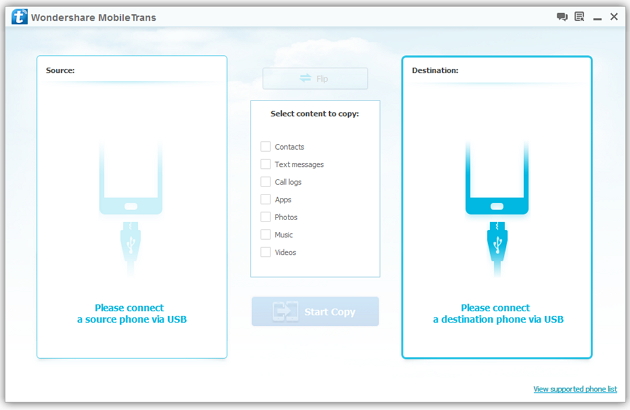
Step 2: Connect your HTC and Samsung S3 to the computer
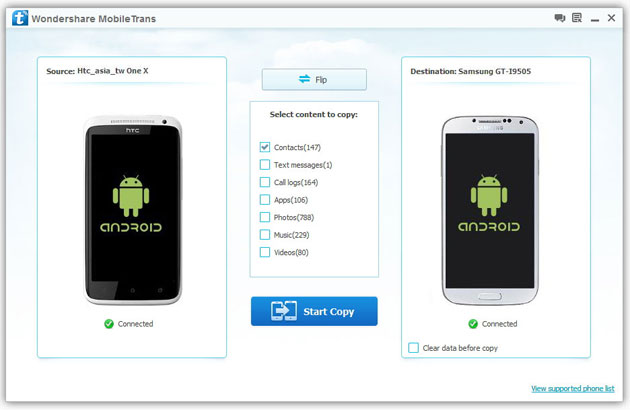
Step 3: Transfer contacts from THC to Samsung Galaxy S3
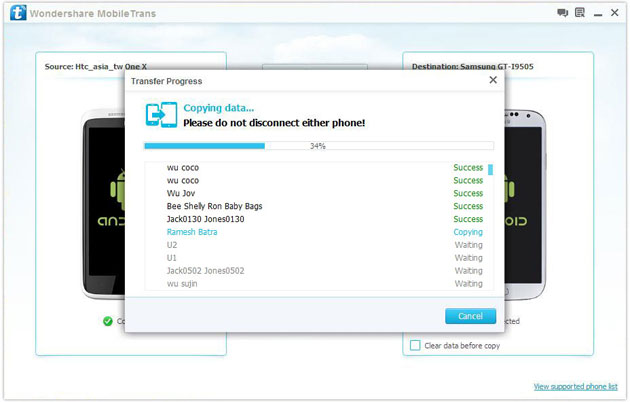
2) Not just contacts, transfer SMS, call logs, photos, music, videos and apps*
3) Comprehensive contact copy, including job title, email addresses, company name, etc.
4) Works with over 2,000 phones including Droid, Symbian (Nokia), and all models of iPhones, including new iPhone 5.
5) Transfers content between phones on different networks. AT&T, Verizon, Sprint, T-Mobile - no problem!

Anyone hear listen to podcasts in the shower? What speaker do you use?
I've bought the JBL Clip 4 and it's awful for podcasts, bass is super strong and you can't understand what the speakers are saying unless you increase volume to max and even then it's pretty bad, it's very loud but you still can't understand. Anyone uses a speaker that is decent for podcasts and not music? Edit: here* in the title, not hear :)

